EasyManua.ls Logo

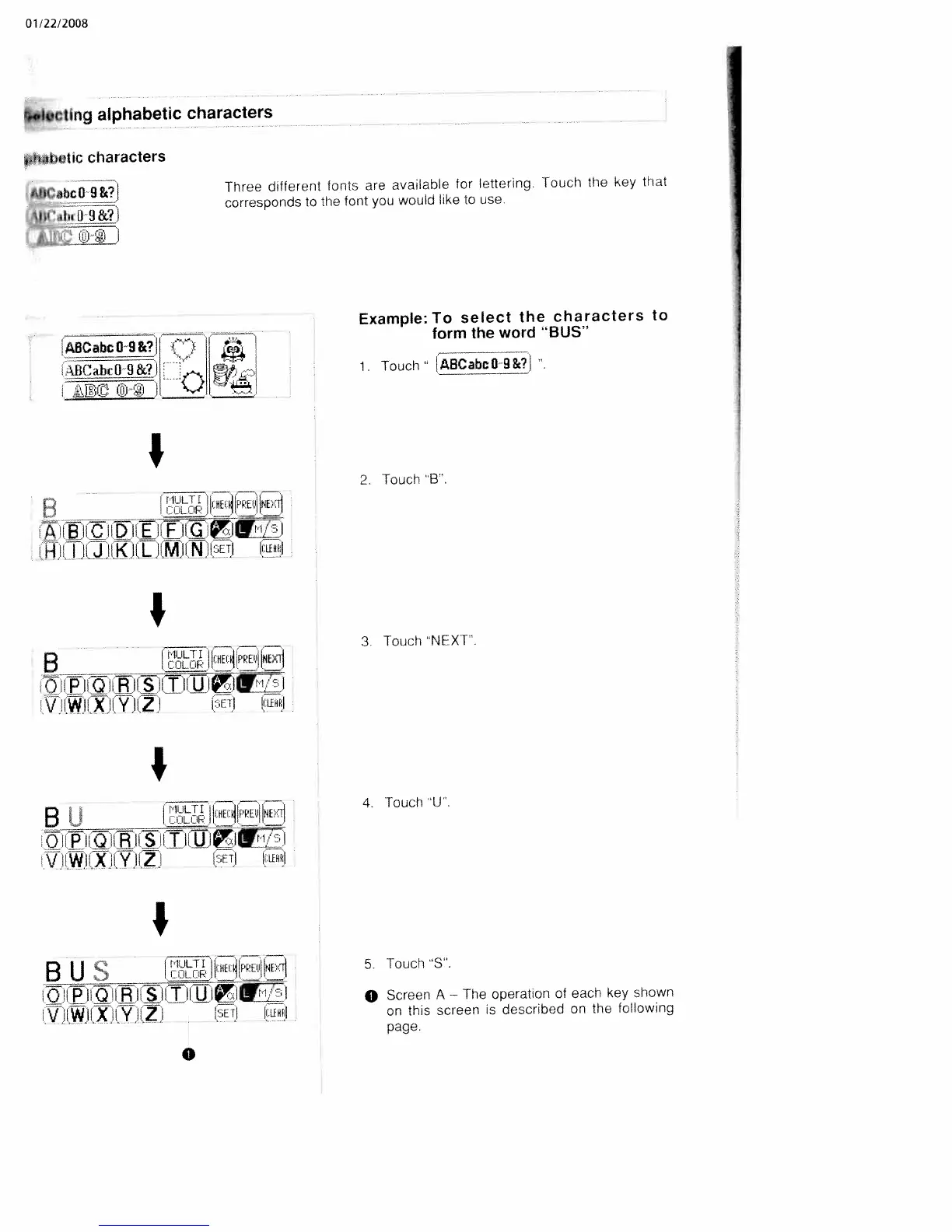
White W3300 - Selecting Alphabetic Characters; Example: Select Characters for BUS

Default Icon
73 pages
Print Icon
To Next Page IconTo Next Page
To Previous Page IconTo Previous Page
Loading...
01/22/2008
becUng
alphabetic
characters
tkat2etIc
characters
4JtCabcO
9&?I
Three
different
fonts
are
available
for
lettering.
Touch
the
key
that
corresponds
to
the
font
you
would
kke
to
use.
%‘
iwL1__i
i
____
Example:
To
select
the
characters
to
ABCahcOi&?1
form
the
word
“BUS”
______
i.
Touch
ABCabcO9&?J
I
2.
Touch
B.
H
_________
HE
4!l
I__
____
-_
3.
Touch
NEXT.
B
[
1
-Si
\!
iW.Il
X
II,
‘y’ji
Z’
:I
lid
I___
B
Ii
[roLup
HEINE7l
4.
Touch
U
I1WIIX
p’’
:‘I
Ice!
I
B
U
S
1JEuII
5
Touch
S’.
QEhIIfi!LMI!IllI!JZI
0
Screen
A
The
operauon
of
each
kej
shown
V
IWJIXIIY
JIZ
I
ISETj
lice!
on
this
screen
is
described
on
the
following
page.
0

Table of Contents

Related product manuals