EasyManua.ls Logo

White W3300 - Memory Management; Saving a Pattern Combination in Memory

Default Icon
73 pages
Print Icon
To Next Page IconTo Next Page
To Previous Page IconTo Previous Page
Loading...
VI
/
LU
LUIJO
$EMORY
Up
to
5
different
pattern
combinations
can
be
saved
and
retrieved
from
memory.
-z
_i
Ir,
BONE/IN
IHH4,INONEEDLb
‘EETTJNi
Bi:.BEIN
[Z
fir
o
“BASIC
OPERATION
key
Saving
a
pattern
combination
in
memory
G
r
1,
II
I
II
j
H
k
II
I
lirrilin
I:ETI
O,fHj
LZ
EIEI
o
rn
i
IT
H
LN
T
ION
F-F
IN
I
P
it
1MEMiJP’jlIOHTr’JE”:’
‘I
UT1’HEqI
‘IIiIj
IWf’LH’l
z
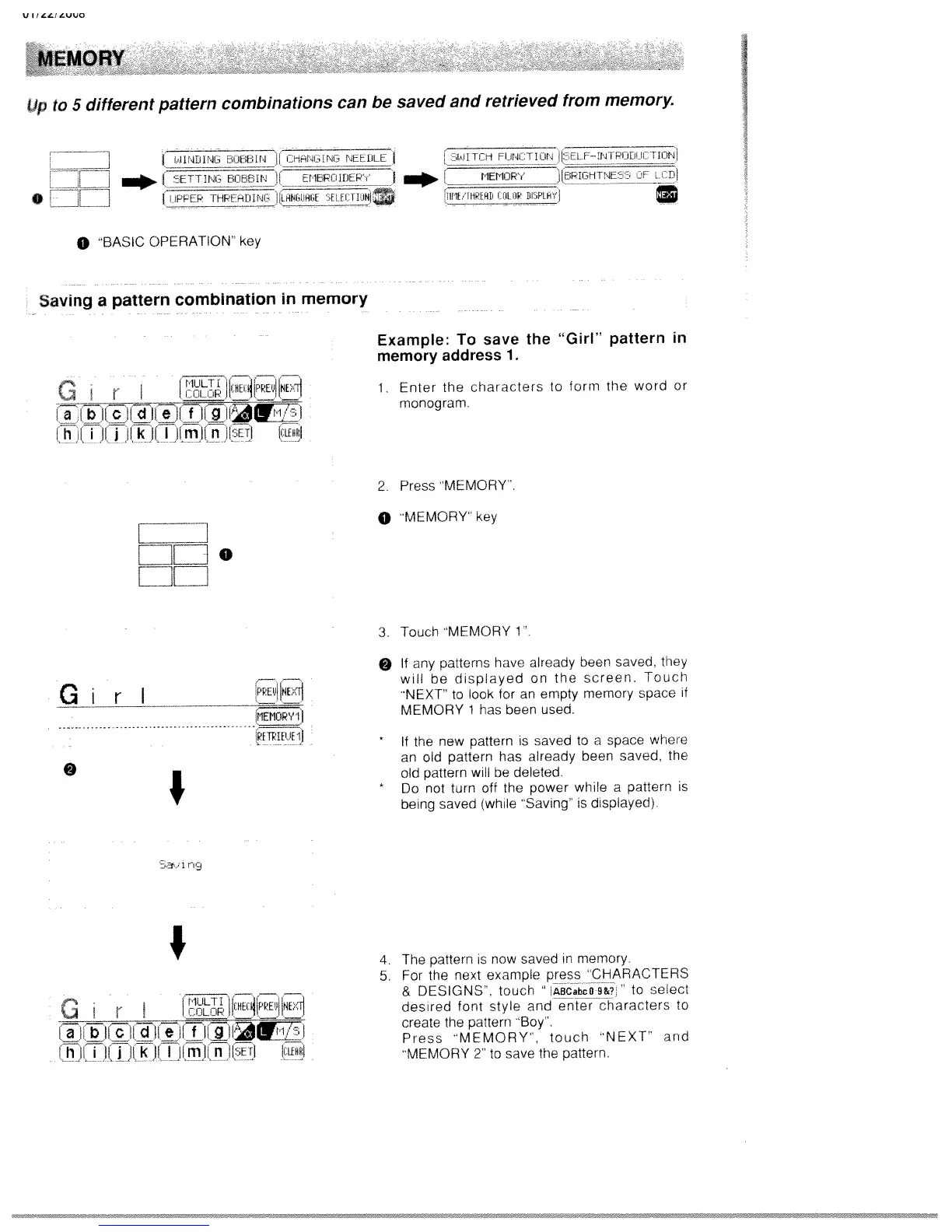
Example:
To
save
the
“Girl”
pattern
in
memory
address
1.
1.
Enter
the
characters
to
form
the
word
or
monogram.
2
Press
MEMORY.
0
MEMORY
Key
3.
Touch
MEMORY
1
Girl
0
fr1EII0Rv1
ETrIET’F
if
I
I
fl9
O
If
any
patterns
have
already
been
saved,
they
will
be
displayed
on
the
screen.
Touch
NEXT’
to
look
for
an
empty
memory
space
if
MEMORY
1
has
been
used.
*
If
the
new
pattern
is
saved
to
a
space
where
an
old
pattern
has
already
been
saved,
the
old
pattern
will
be
deleted.
*
Do
not
turn
off
the
power
while
a
pattern
is
being
saved
(while
“Saving”
is
displayed)
I
0
r
_____
1
I
Ii_
iii
k
Ii
I
lulijin
ISETI
11tH
4.
The
pattern
is
now
savee
in
memory.
5.
For
the
next
example
press
“CHARACTERS
&
DESIGNS”,
touch
ABCabCD
9&?
to
select
desired
font
style
and
enter
characters
to
create
the
pattern
‘Boy”.
Press
“MEMORY”,
touch
“NEXT”
and
‘MEMORY
2”
to
save
the
pattern.

Table of Contents

Related product manuals