EasyManua.ls Logo

White W3300 - Sewing a Basic Embroidery Pattern; Embroidering Multi-Color Patterns; Embroidering Single Color Patterns

Default Icon
73 pages
Print Icon
To Next Page IconTo Next Page
To Previous Page IconTo Previous Page
Loading...
01122/20013
$E(JN*
A$IC
qrsjs
Embroidering
multi-color
patterns
[*J[][c]
1/
3
COLOR
j
(1) (2)
(3)
Jr
HLLP
(2)
(3)
Jr
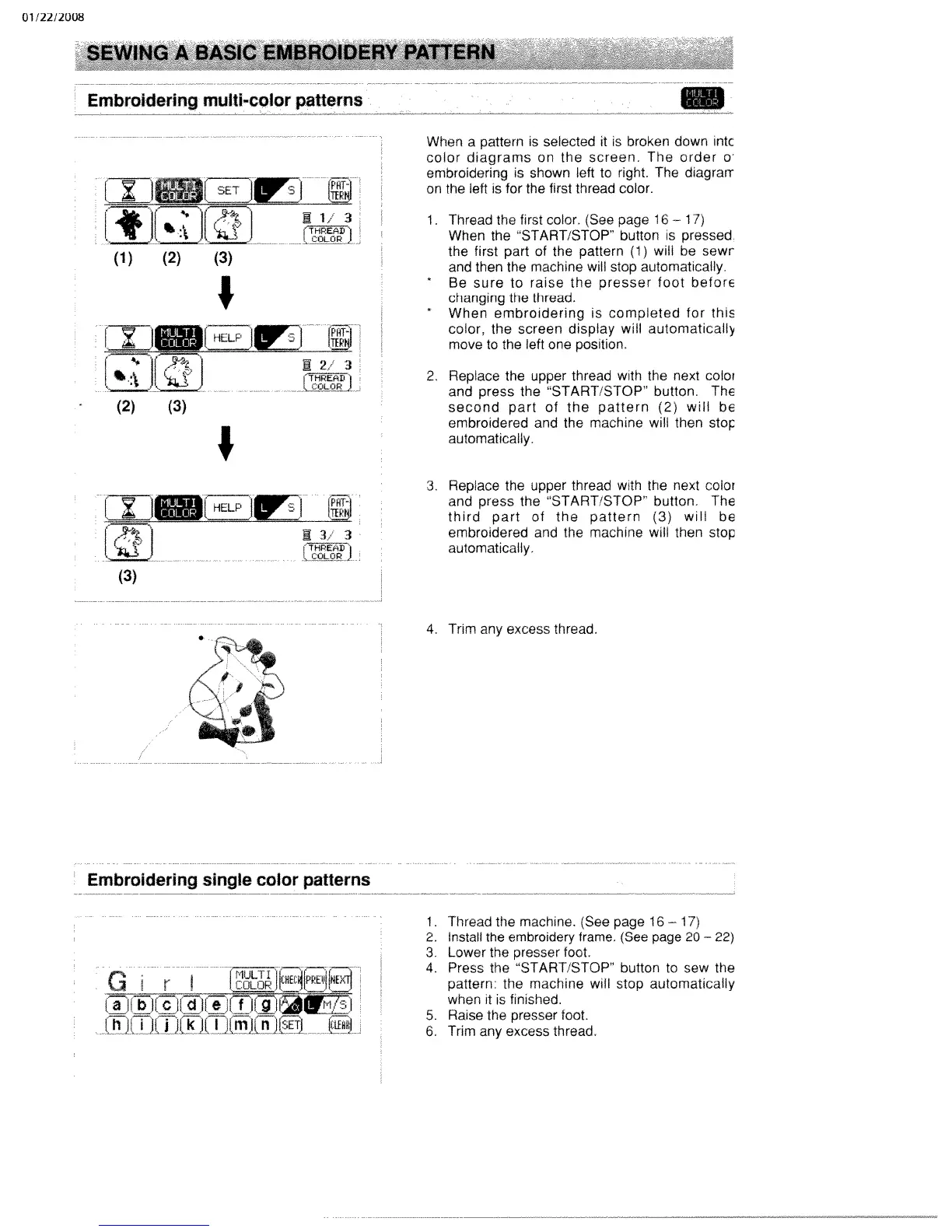
When
a
pattern
is
selected
it
is
broken
down
ntc
color
diagrams
on
the
screen.
The
order
o’
embroidering
is
shown
left
to
right.
The
diagrarr
on
the
left
is
for
the
first
thread
color.
1
Thread
the
first
color.
(See
page
16
1
7)
When
the
START/STOP”
button
is
pressed
the
first
part
of
the
pattern
(1)
will
be
sewr
and
then
the machine
will
stop
automatically.
*
Be
sure
to
raise
the
presser
foot
beforE
changing
the thread.
*
When
embroidering
is
completed
for
this
color,
the
screen
display
will
automatically
move
to
the
left
one
position.
2.
Replace
the
upper
thread
with
the
next
color
and
press
the
“START/STOP’
button,
The
second
part
of
the
pattern
(2)
will
be
embroidered
and the machine
will
then
stoç
automatically.
L:ii
HELP
[!]
(3)
Pfff
TER
-
3
3
1
(MLOR
3.
Replace
the
upper
thread
with
the
next
color
and
press
the
“START/STOP”
button
The
third
part
of
the
pattern
(3)
will
be
embroidered
and the
machine
will
then
stop
automatically.
Embroidering
single
color
patterns
Gir
Chu111uJ[kWniET
4.
Trim
any
excess
thread.
1.
Thread the
machine.
(See
page
16
17)
2.
Install
the
embroidery
frame.
(See
page
20
22)
3.
Lower
the
presser
foot.
4.
Press
the
“START/STOP”
button
to
sew
the
pattern’
the machine
will
stop
automatically
when
it
is
finished.
5.
Raise
the
presser
foot.
6.
Trim
any
excess
thread.

Table of Contents

Related product manuals