EasyManua.ls Logo

White W3300 - Cleaning; Remove Needle Plate and Hook; Clean Lint and Dust

Default Icon
73 pages
Print Icon
To Next Page IconTo Next Page
To Previous Page IconTo Previous Page
Loading...
UII
CL)
LUUO
LAMNG
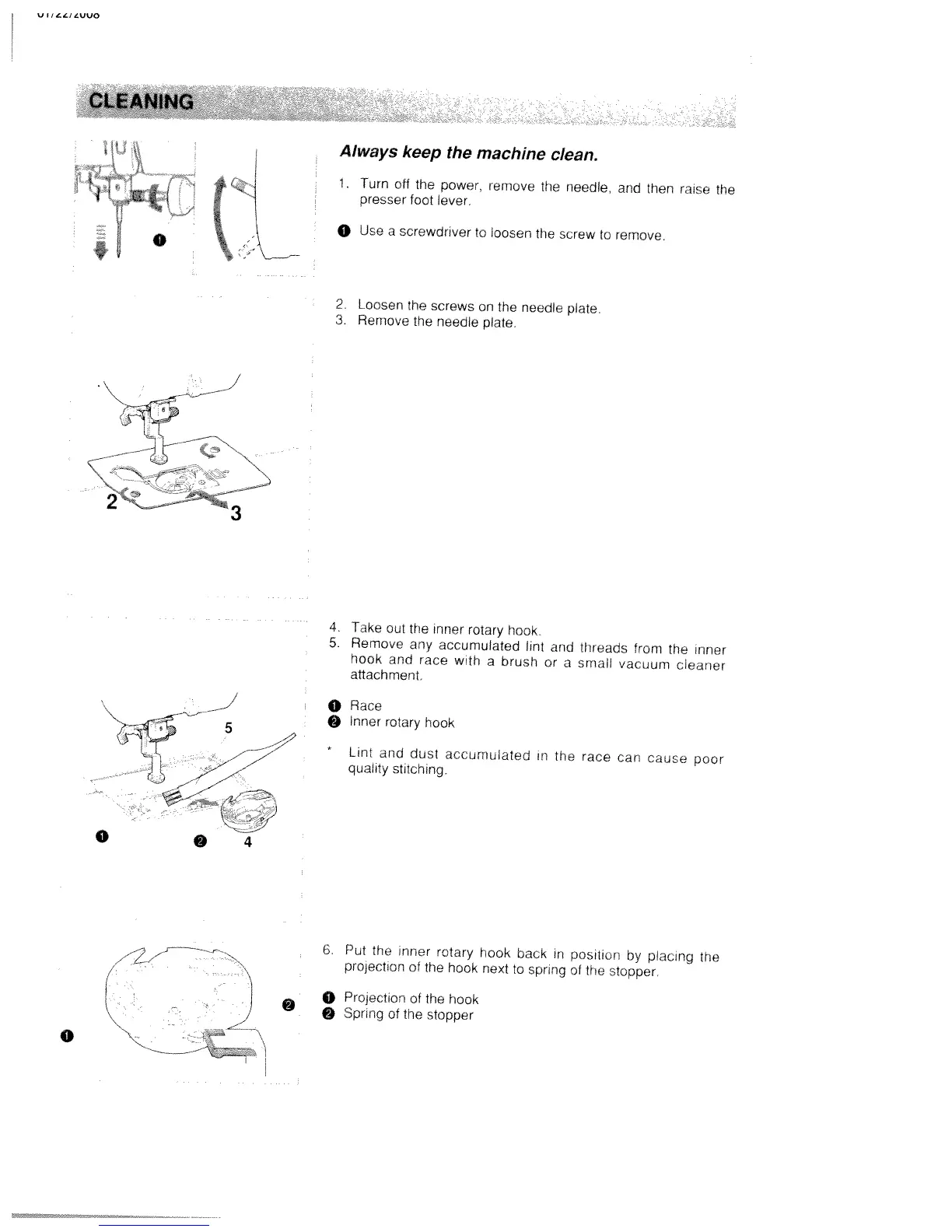
Always
keep
the
machine
clean.
J
1,
Turn
off
the
power,
remove
the
needle,
and
then
raise
the
I
iJg(
f
“j
presser
foot
lever.
j
0
Use
a
screwdnver
to
loosen
the
screw
to
remove.
2.
Loosen
the
screws
on
the
needle
plate
3.
Remove
the
needle
plate.
-
%_
4
Take
out
the
inner
rotary
hook
5.
Remove
any
accumulated
lint
and
threads
from
the
inner
hook
and
race
with
a
brush
or
a
small
vacuum
cleaner
attachment.
j
0
Race
5
0
Inner
rotary
hook
*
Lint
and
dust
accumulated
in
the
race
can
cause
poor
qua’ity
stitching.
0
4
6.
Put
the
inner
rotary
hook
back
in
position
by
placing
the
prolection
of
the
hook
next
to
spring
of
the
stopper.
o
Projection
of
the
hook
Spring
of
the
stopper
0
-

Table of Contents

Related product manuals