EasyManua.ls Logo

White W3300 - Selecting Patterns from a Memory Card; Insert Memory Card; Important Card Handling Warnings

Default Icon
73 pages
Print Icon
To Next Page IconTo Next Page
To Previous Page IconTo Previous Page
Loading...
Selecting
patterns
from
a
memory
card
Be
sure
to
turn
off
the
power
switch
before
inserting
or
removing
the
memory
cards.
0
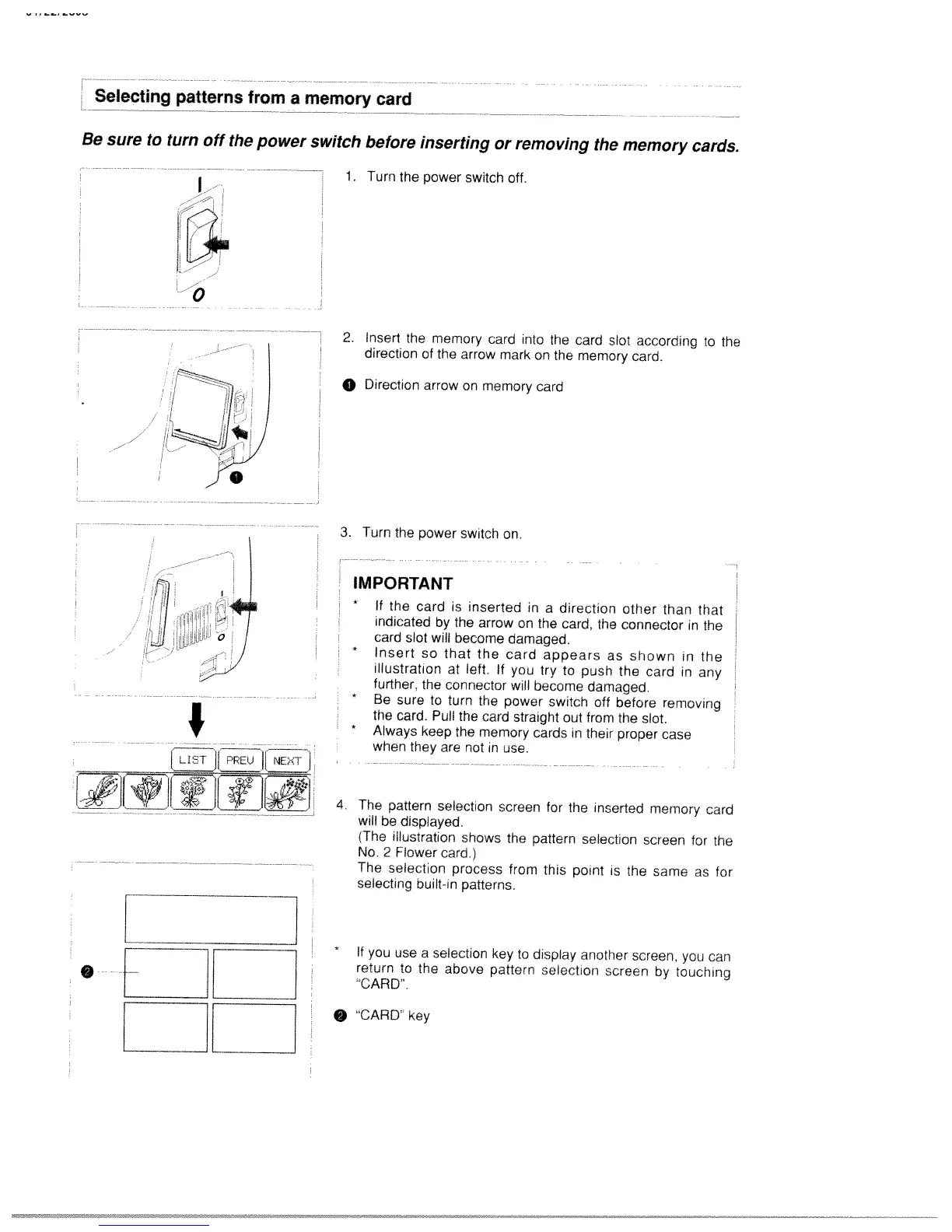
1.
Turn
the
power
switch
off.
2.
Insert
the
memory
card
into
the
card
slot
according
to
the
direction
of
the
arrow
mark
on
the
memory
card.
0
Direction
arrow
on
memory
card
2
IJT11P1J
L!][$[
1!L14i
EZEZ
3.
Turn
the
power
switch
on.
IMPORTANT
*
If
the
card
is
inserted
in
a
direction
other
than
that
indicated
by
the
arrow
on
the
card,
the
connector
in
the
card
slot
will
become
damaged.
*
Insert
so
that
the
card
appears
as
shown
in
the
illustration
at
left.
If
you
try
to
push
the
card
in
any
further,
the
connector
will
become
damaged.
*
Be
sure
to
turn
the
power
switch
off
before
removing
the
card.
Pull
the
card
straight
out
from
the
slot.
*
Always
keep
the
memory
cards
in
their
proper
case
when
they
are
not
in
use.
4.
The
pattern
selection
screen
for
the
inserted
memory
card
will
be
displayed.
(The
illustration
shows
the
pattern
selection
screen
for
the
No.
2
Flower
card.)
The
selection
process
from
this
point
is
the
same
as
for
selecting
ouilt-in
patterns.
If
you
use
a
seleciion
key
to
display
another
screen.
you
can
return
to
the
above
pattern
selection
screen
by
touching
“CARD’.
“CARD’
key

Table of Contents

Related product manuals