EasyManua.ls Logo

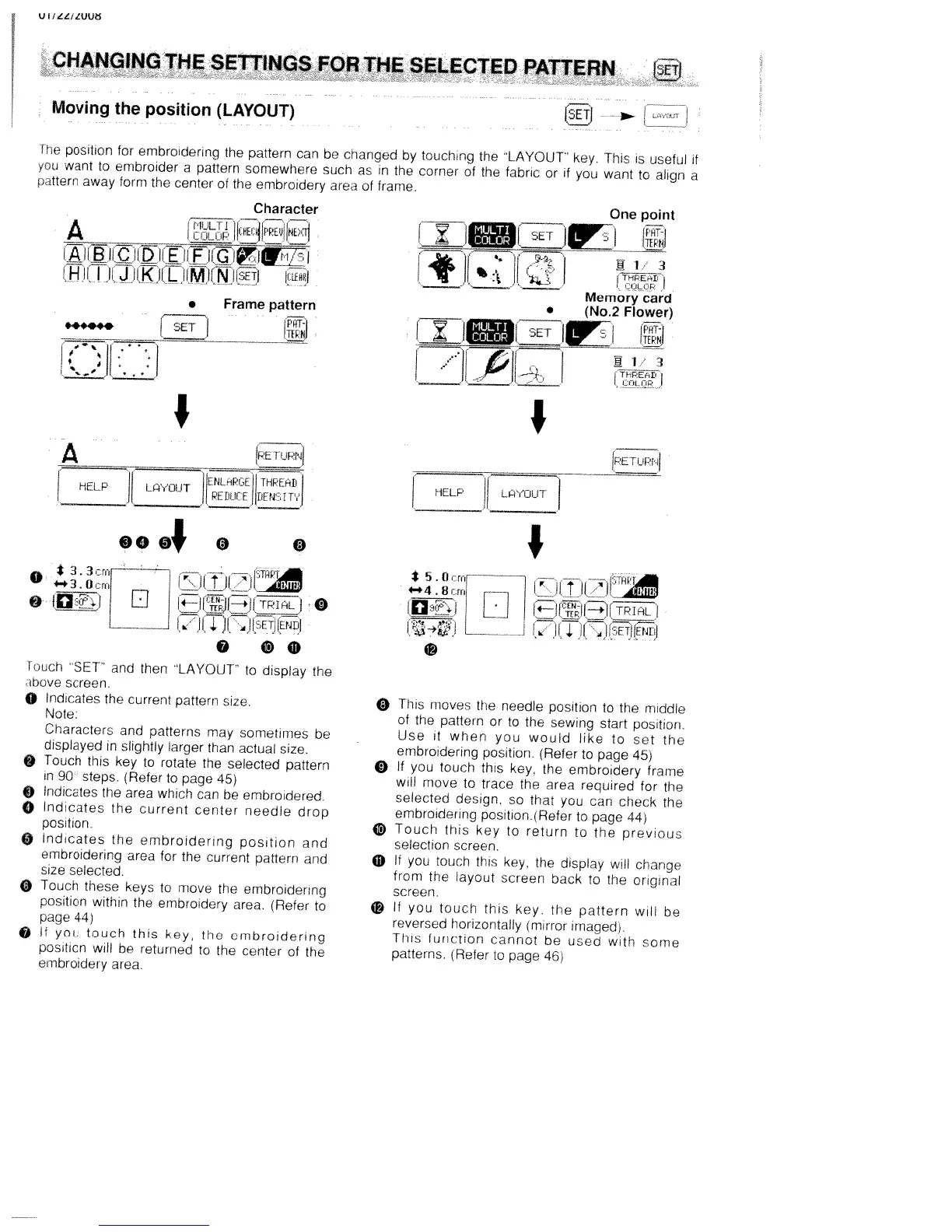
White W3300 - Changing the Settings for the Selected Pattern; Moving the Position (Layout)

Default Icon
73 pages
Print Icon
To Next Page IconTo Next Page
To Previous Page IconTo Previous Page
Loading...
U
I
/
LL,
LUUö
Moving
the
position
(LAYOUT>
Character
A
MULTI
j..I
*
3
.
3
crnf
fl
-
TiW1
_____
L_J1.IM_1
4Wi
@
fl±i
El
(4HJH*I!TPtnLI
0
L
(1
ii.
4
JETfrNDI
0
Q
much
SET’
and
then
LAYOUT
to
display
the
hove
screen.
O
indicates
the
current
pattern
size.
Note.
Characters
and
patterns
may
sometimes
be
displayed
in
slightly
larger
than
actual
size.
Touch
this
key
to
rotate
the
selected
pattern
n
90
steps.
(Refer
to
page
45)
)
Indicates
the
area
which
can
be
embroidered
o
lndicates
the
current
center
needle
drop
position.
0
Indicates
the
embroidering
position
and
embroidering
area
for
the
current
pattern
and
size
selected.
O
Touch
these
keys
to
move
the
embroidering
position
within
the
embroidery
area.
lRefer
to
page
44
O
It
you
touch
this
key,
the
embroidering
position
will
be
returned
to
the
center
of
the
embroidery
area.
One
point
PHT
-
imi
13
-y
.___
Memory
card
(No.2
Flower)
z
5ETl
Ti-PEt’
________
________
________
.JJL
..1
‘I
IPE.
T
iPij
HELP
L
OUT
I
*
5.
0
cml
1
i
.TtIP
8ml
_____
___
[
___
I
L_
J
4
JHETJIENEII
o
This
moves
the
needle
position
to
the
middle
of
the
pattern
or
to
the
sewing
start
position
Use
it
when
you
would
like
to
set
the
embioidering
position.
(Refer
to
page
45)
o
it
you
touch
this
key.
the
embroidery
frame
will
move
to
trace
the
area
required
for
the
selected
design.
so
that
you
can
check
the
embroidering
position(Refer
to
page
44)
J
Touch
this
key
to
return
to
the
previous
selection
screen.
If
you
touch
this
key.
the
display
lI
charge
from
tne
layout
screen
back
to
the
original
screen.
It
you
touch
this
key
the
pattern
will
be
reversed
horizontally
)mirror
imaged)
This
function
cannot
be
used
with
some
patterns.
(Refei
to
page
46)
CHANGING
THE
SETTINGS
FOR
THE
SELECTED
PATTERN
ISETJ
‘me
position
for
embroidering
the
pattern
can
be
changed
by
tcuchng
the
LAYOUT
key.
This
is
useful
if
ju
want
to
embroider
a
pattern
somewhere
such
as
in
the
corner
of
the
fabric
or
if
you
want
to
align
a
n
itterri
away
form
the
center
of
the
embroidery
area
of
frame
.
Frame
pattern
SET
*,
,.
,‘
____
I
___
A
_______
__
HE.LP
LCNOUT
0004
0
0

Table of Contents

Related product manuals