EasyManua.ls Logo

White W3300 - Changing the Size of Characters and Frame Patterns; Enlarge;Reduce Pattern Size; Changing Thread Density of the Stitch

Default Icon
73 pages
Print Icon
To Next Page IconTo Next Page
To Previous Page IconTo Previous Page
Loading...
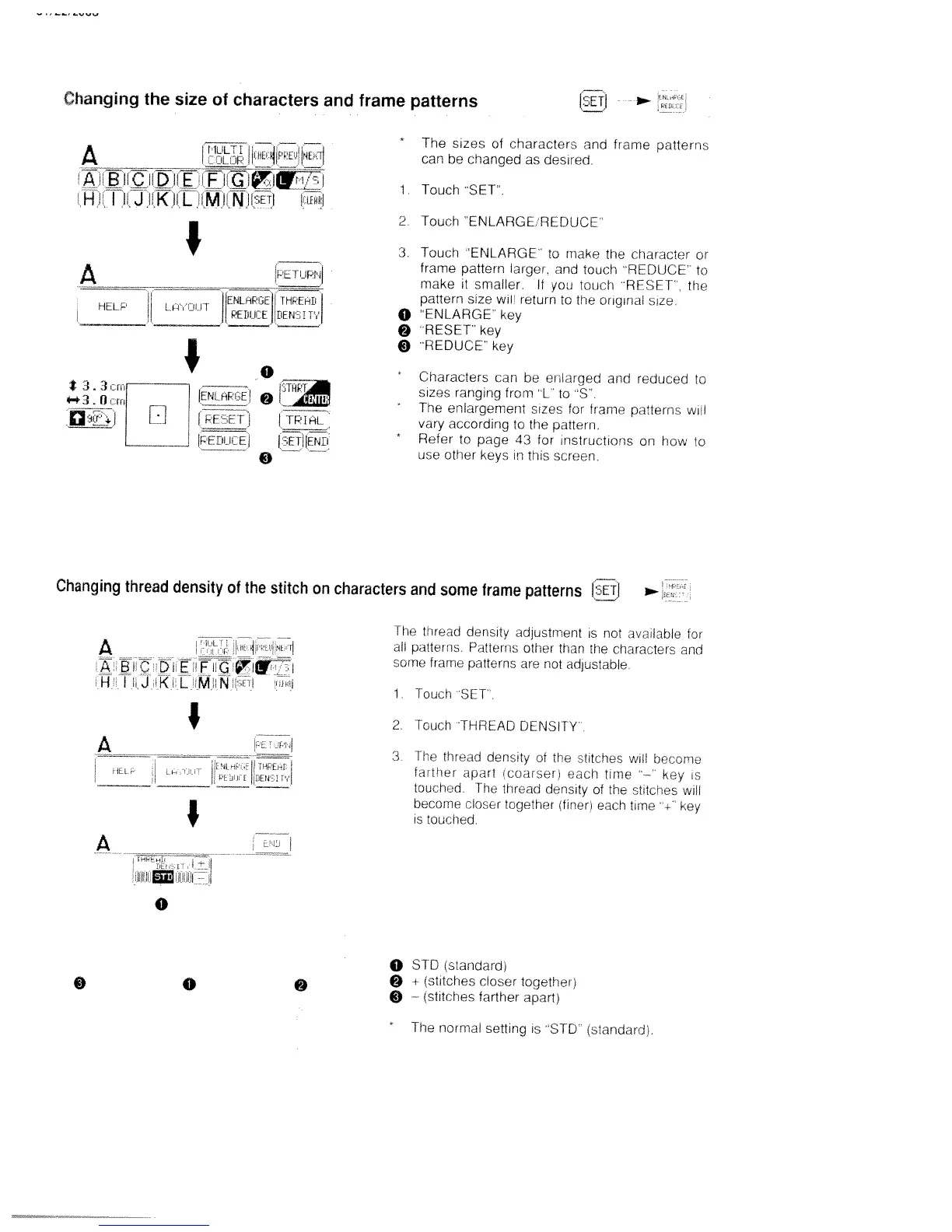
Changing
the
size
of
characters
and
frame
patterns
(ETJ
*
The
sizes
of
characters
and
frame
patterns
can
be
changed
as
desired.
1.
Touch
SET’
2.
Touch
ENLARGE
REDUCE
3
Touch
ENLARGE
to
make
the
rharicter
or
frame
pattern
larger.
and
touch
“REDUCE
to
_______
______
make
it
smaller
If
you
touch
RESET’
the
pattern
size
wifl
return
to
the
original
size
o
ENLARGE’
key
“RESET
key
9
‘REDUCE
key
*
Characters
can
be
en
arged
and
reduced
to
sizes
ranging
from
‘L
to
“S
*
The
enlargement
sizes
for
trame
pdtters
wii
vary
according
to
the
pattern.
*
Refer
to
page
43
for
instructions
on
how
to
use
other
keys
in
this
screen.
Changing
thread
density
of
the
stitch
on
characters
and
some
frame
patterns
[2ET,I
The
tr’’ead
density
adlustment
is
not
ava’Iabie
for
all
patterns
Patterns
other
than
the
chdracter
and
some
frame
patterns
are
not
adjustable
1
‘tOrh
SEP.
2.
fcch
‘THREAD
DENSITY
3
The
thread
density
of
the
htchcs
will
beccrne
farther
apart
coarser;
each
time
“—
key
is
four
hod
‘the
thrao
dens:ty
of
th
shtches
wifl
become
riosor
together
firer;
cacti
t
me
‘.-‘
key
is
toucned
o
STD
(standardi
9
±
strtches
closer
together.
9
(stitches
farther
apart;
A.
ri,z
P
me
‘i
mirE
H
I
II
Kt
L
,
(,M
L’iJ
jiEi
iiej
I
__
ENLFiPr,E
THPEHL
HOP
l
L
iii
PEOii[E
riEn
I
t33
ri
4-e3Q
ni’I
H
ENLPi
cC
IPEEFT,
PC
[iii
C’
C
0
___
EIClT
o
__
I
TP1tL
I
TI
jE
N
Li
9
A
A
BIC
H
Ti
J
i
L
FZ
rn
KiL
MN
i
I
A
rr;
iL
.___._i,:.___,L,
I
A
0
0
0
9
*
The
normal
setting
is
“SIC
(standard),

Table of Contents

Related product manuals