EasyManua.ls Logo

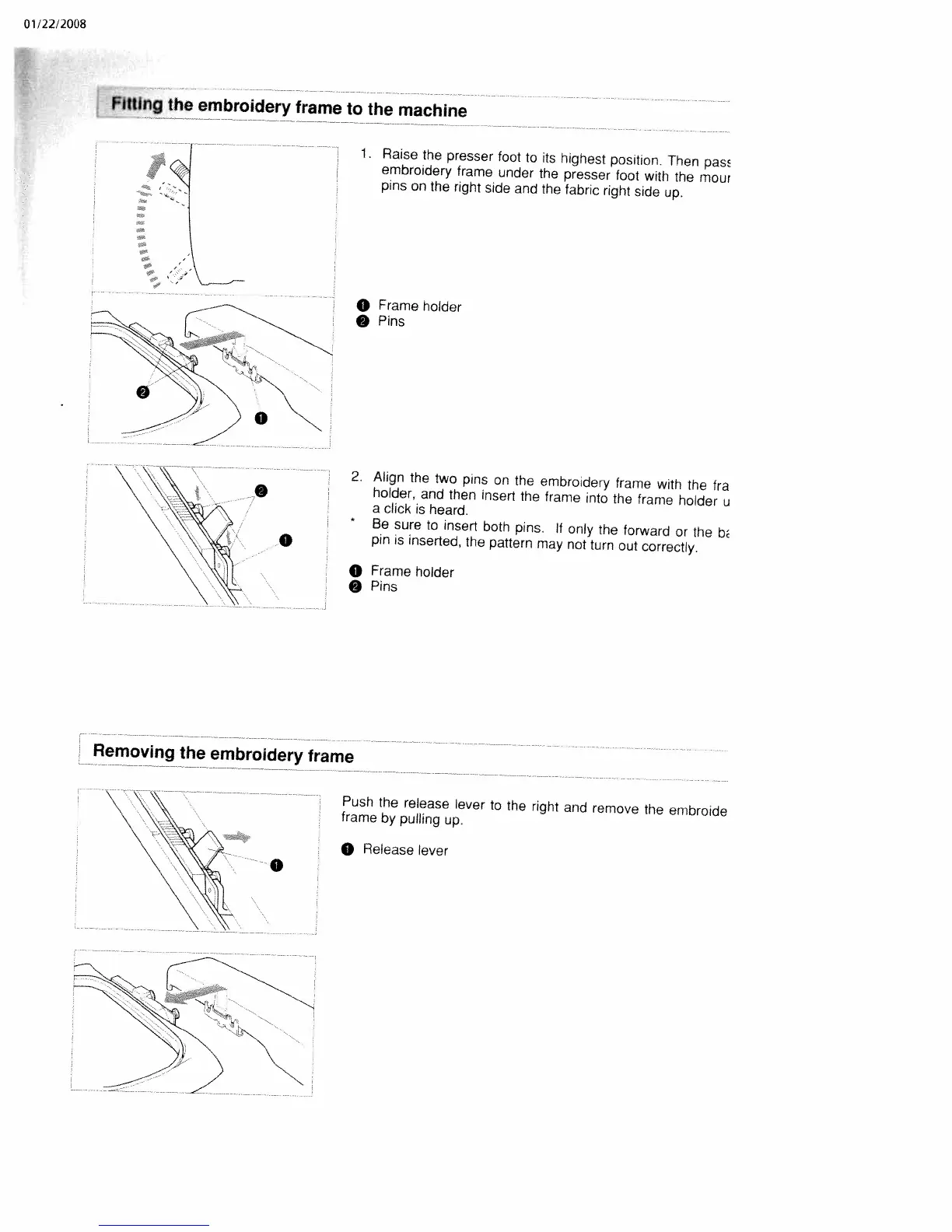
White W3300 - Fitting the Embroidery Frame to the Machine; Align Frame Holder and Pins; Removing the Embroidery Frame

Default Icon
73 pages
Print Icon
To Next Page IconTo Next Page
To Previous Page IconTo Previous Page
Loading...
01/22/2008
Fitting
the
embroidery
frame
to
the
machine
1
Raise
the
presser
foot
to
its
highest
position.
Then
pass
embroidery
frame
under
the
presser
foot
with
the
mour
pins
on
the
right
side
and
the
fabric
right
side
up.
O
Frame
holder
Pins
0
2.
Align
the
two
pins
on
the
embroidery
frame
with
the
fra
holder,
and
then
insert
the
frame
into
the
frame
holder
u
a
click
is
heard.
*
Be
sure
to
insert
both
pins,
If
only
the
forward
or
the
b/
pin
is
inserted,
the
pattern
may
not
turn
out
correctly.
O
Frame
holder
O
Pins
Removing
the
embroidery
frame
0
Push
the
release
lever
to
the
right
and
remove
the
embroide
frame
by
pulling
up
0
Release
lever
0

Table of Contents

Related product manuals