EasyManua.ls Logo

White W3300 - Page 40

Default Icon
73 pages
Print Icon
To Next Page IconTo Next Page
To Previous Page IconTo Previous Page
Loading...
01/22/2008
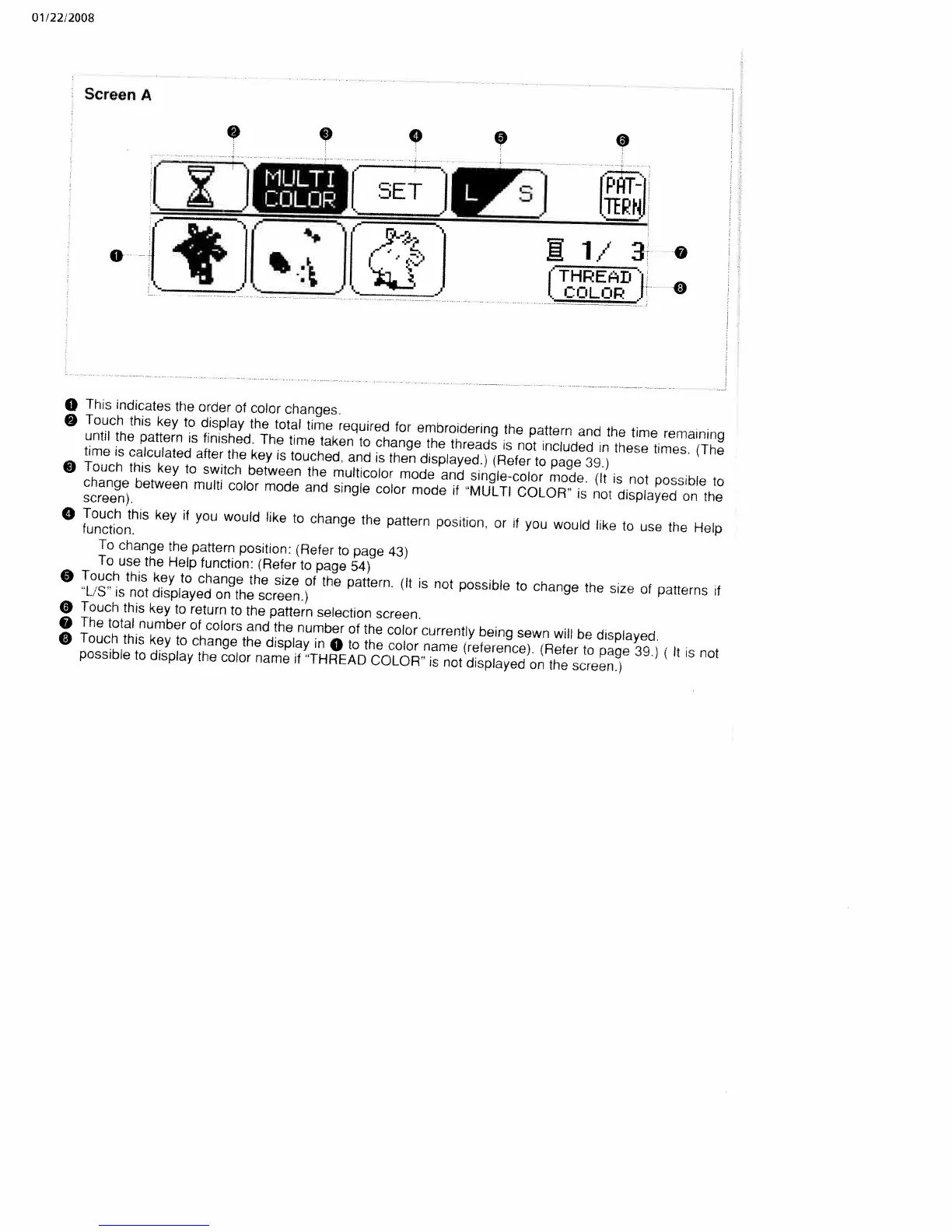
Screen
A
1/3’
0
(THREAD’
*
I
COLOR
0
O
This
indicates
the
order
of
color
changes.
Touch
this
key
to
display
the
total
time
required
for
embroidering
the
pattern
and
the
time
remaining
until
the
pattern
is
finished.
The
time
taken
to
change
the
threads
is
not
included
in
these
times.
(The
time
is
calculated
after
the
key
is
touched,
and
is
then
displayed.)
(Refer
to
page
39.)
O
Touch
this
key
to
switch
between
the
multicolor
mode
and
single-color
mode.
(It
is
not
possible
to
change
between
multi
color
mode
and
single
color
mode
if
“MULTI
COLOR
is
not
displayed
on
the
screen),
O
Touch
this
key
if
you
would
like
to
change
the
pattern
position,
or
if
you
would
like
to
use
the
Help
function.
To
change
the
pattern
position:
iRefer
to
page
43)
To
use
the
Help
function:
(Refer
to
page
54)
O
Touch
this
key
to
change
the
size
of
the
pattern.
(It
is
not
possible
to
change
the
size
of
patterns
if
‘L’S’
is
not
displayed
on
the
screen.)
O
Touch
this
key
to
return
to
the
pattern
selection
screen.
The
total
number
of
colors
and
the
number
of
the
color
currently
being
sewn
will
be
displayed.
o
Touch
this
key
to
change
the
display
in
0
to
the
color
name
(relerence).
(Refer
to
page
39.)
(It
is
not
possible
to
display
the
color
name
if
‘THREAD
COLOR”
is
not
displayed
on
the
screen.)
0
0
0
9
MULTI
COLOR

Table of Contents

Related product manuals