EasyManua.ls Logo

White W3300 - If Thread Breaks During or After Embroidery; While Embroidering

Default Icon
73 pages
Print Icon
To Next Page IconTo Next Page
To Previous Page IconTo Previous Page
Loading...
,JI
tLL/LVOO
rw
E
T
ik1L
SET
j
1
j
-
_____J
-_2
“—‘
I
Z
iI
HELP
;i
‘-‘k
1/
3
-‘V
II
%
‘L
I
V
S
iS
_J
•4-
_çOLQP
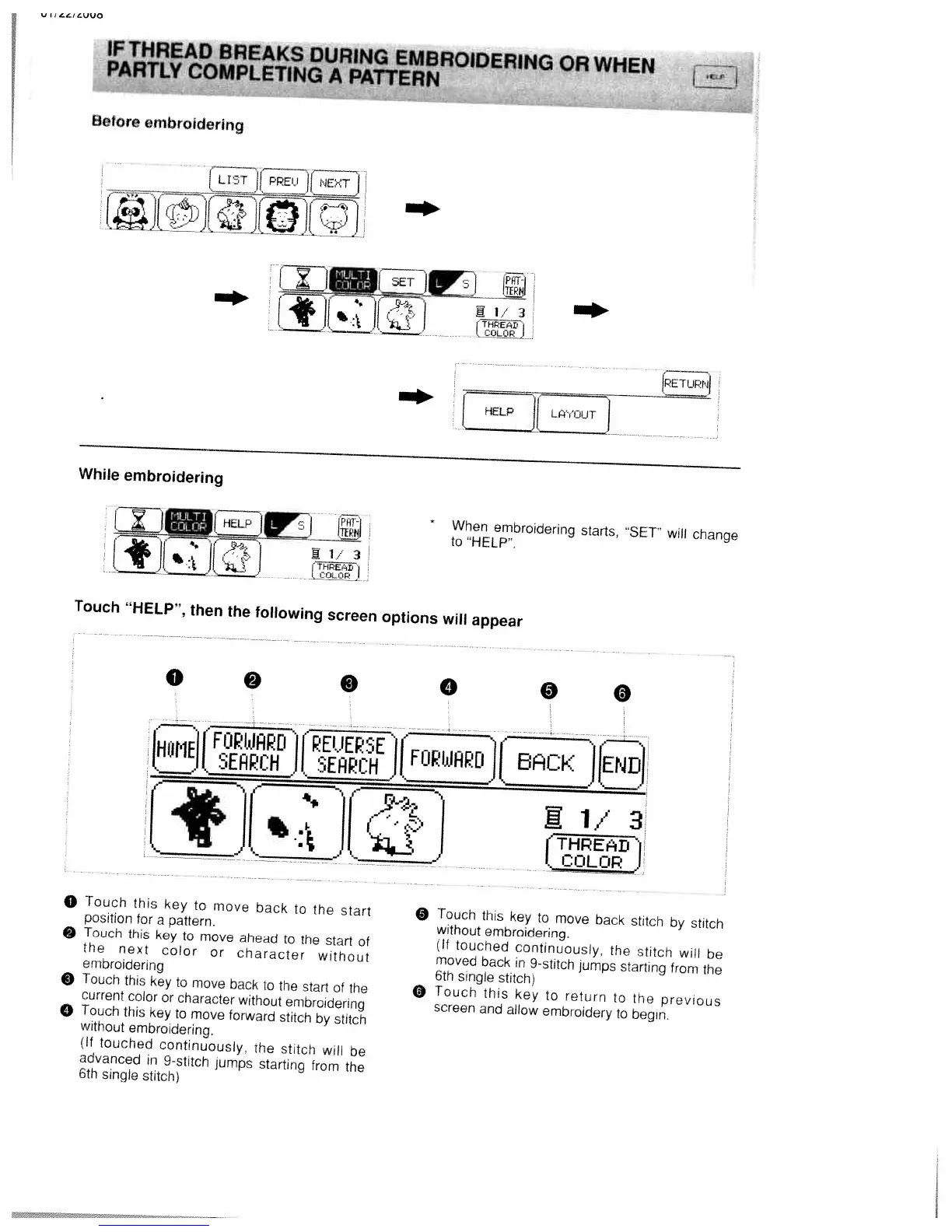
When
embroidering
starts,
SET”
will
change
to
HELP’.
Touch
“HELP”,
then
the
following
screen
options
will
appear
o
Touch
this
key
to
move
back
to
the
start
position
for
a
pattern.
Touch
this
key
to
move
ahead
to
the
start
of
the
next
color
or
coaracter
without
embroidering
O
Touch
this
key
to
move
back
to
the
start
of
the
current
color
or
character
without
embroidering
o
Touch
this
key
to
move
forward
stitch
by
stitch
without
embroidering.
lf
touched
continuously
the
stitch
will
be
advanced
in
9-stitch
jumps
starting
from
the
6th
single
stitch)
O
Touch
this
key
to
move
back
stitch
by
stitch
without
embroidering.
lf
touched
continuously,
the
stitch
will
be
moved
back
in
9-stitch
jumps
starting
from
the
6th
single
stitch)
O
Touch
this
key
to
return
to
the
previous
screen
and
allow
embroidery
to
begin.
IFTHREAD
BREAKS
DURING
EMBROIDERING
OR
WHEN
PARTLY
COMPLETIN(
A
PATtERN
Before
embroidering
LtTT
[JLJ
While
embroidering
IPETUPNI
HELP
L’OUT
0
0
0
0
0
0
OMEJ[jf’
]EPsE
[FUPI4APD
r
1/3
(D
I
COLOR

Table of Contents

Related product manuals