18
2. For the Installer
2.4.12 Installing the thermocontrol sensor
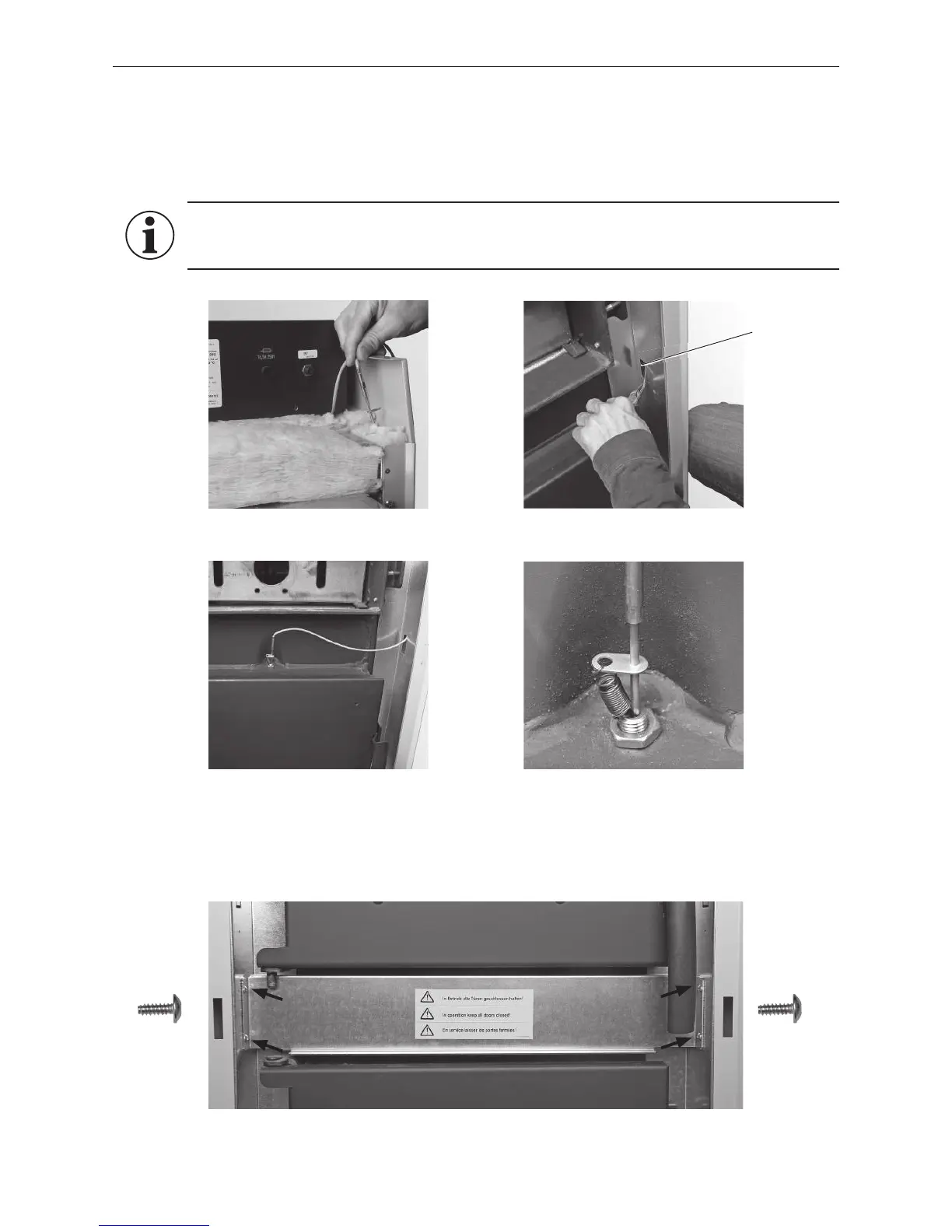
– Route the thermocontrol sensor (green cable) at the front of the right side panel down and feed through –
Fig.28, 29. But first bend the cut-out (feed-through) at the bottom of the side panel out of the way.
– Insert the sensor over the ash door in the front and into the protective tube; hook the spring in place – Fig.30,31.
Fig. 28 Inserting the thermocontrol sensor at the top
Fig. 29 Threading through thermocontrol
sensor
Fig. 30 Securing the thermocontrol sensor with
spring, pulling cable back
Fig. 31 Thermocontrol sensor with spring
2.4.13 Installing the thermocontrol sensor cover
– Attach the thermocontrol sensor with 4 self-tapping screws – Fig. 32.
Fig. 32 Attaching the cover over the thermocontrol sensor with 4 screws
2 each of 2 each of
Cut-out feed-
through
Information!
Pull the protruding cable from the thermocontrol sensor back into the side panel or control panel.
The cable may not hang out in order to keep it from becoming caught in the ash door.



 To Next Page