Rugged Windows Tablet M101B/ M101BL User Guide
2.4.1 Installing SIM Card (For 3G/LTE Equipped Devices)
The Tablet Computer supports 3G/LTE data connection and fits a Micro-SIM card.
To install the SIM card:
Service Windows
Screw: M2x5, 4 pc
Screwdriver: Philips Type , Size #0 , for
M2 screws, torque: 2.0 ± 0.5 kgf.cm
3G/ LTE Module
Screw: M2x3.5, 1 pc
Screwdriver: Philips Type , Size #0 , for
M2 screws, torque: 2.0 ± 0.5 kgf.cm
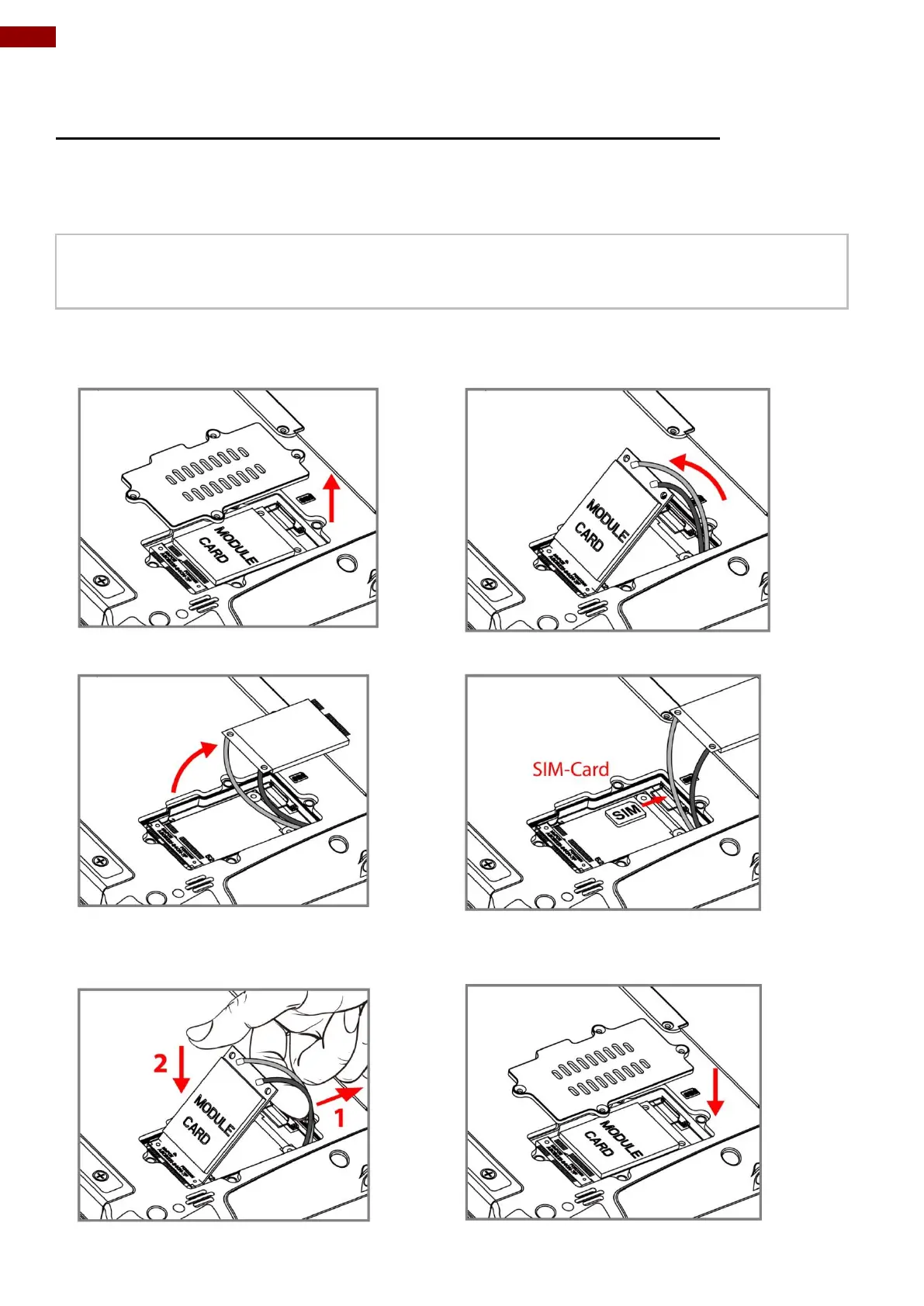
❶ Remove four screws and remove the service
window.
❷ Remove the one screw that secures the 3G/ LTE
module. Carefully lift the module up. Do not to damage
the connected cables!
❸ Carefully flip and move the 3G/ LTE module and
to the right. Do not disconnect cables!
❹ Insert SIM-Card all the way in. Chip/ contact facing
down.
❺ Use your hand to carefully pull the cable outside
the module card. Re-insert the 3G/LTE module and
fasten one screw. Accurately route the cables. Do
not bend cables! Do not pinch/ squeeze the cable!
❻Re-insert the service window and fasten with the four
screws.



 To Next Page