CAMERA SYSTEM (LooksCAM2) 29 www.xenosys.co.kr
4. Detail Options / Configurations
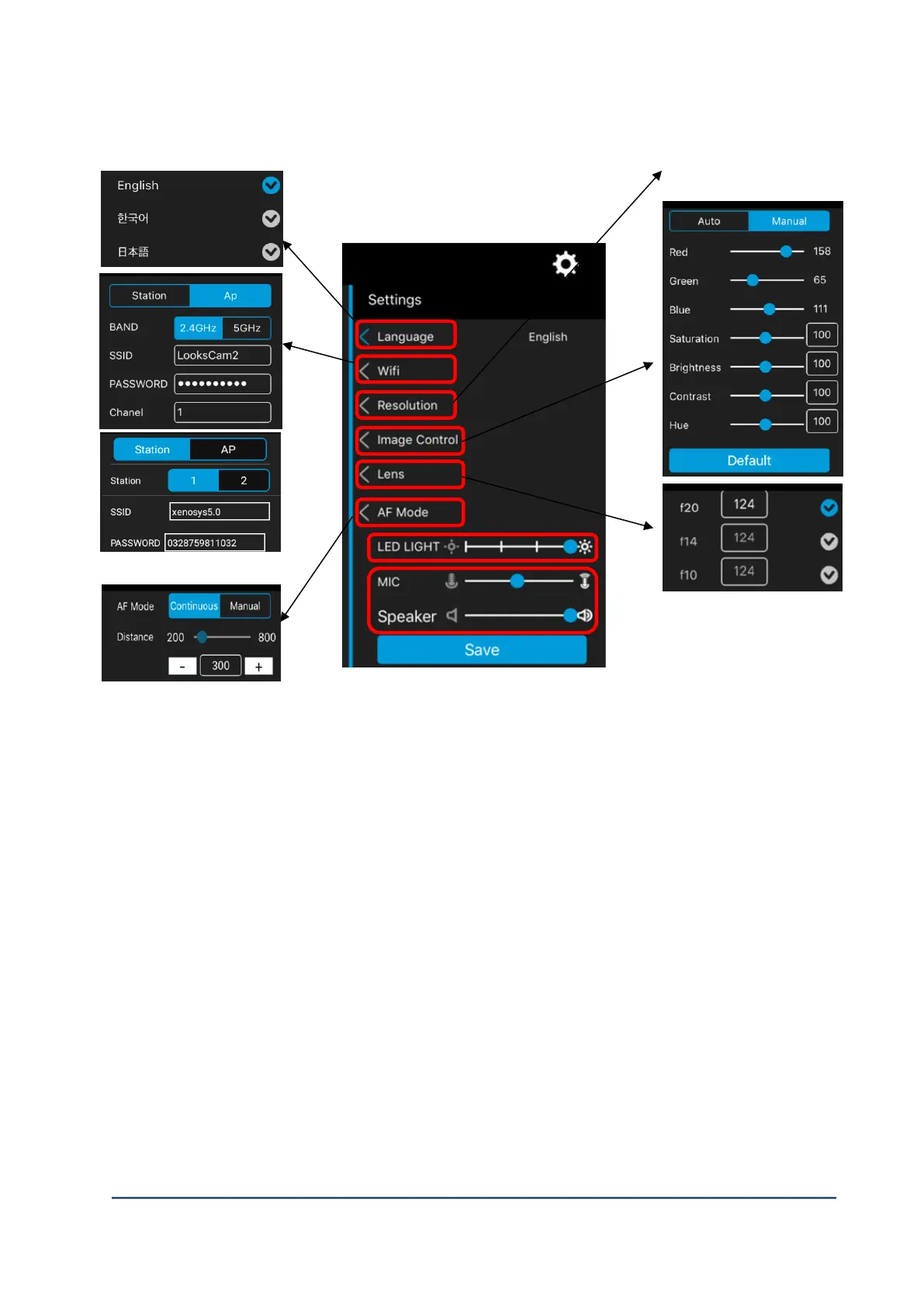
(1) Language Setting: Choose which language will be used for control unit notices..
(2) WiFi : There are two modes Ap and Station.
A. Ap Mode: Direct connected mode between LC2-CU and tablet PC.
1) BAND: Choose between 2.4GHz and 5GHz.
2) Default Value: SSID(LooksCam2), PASSWORD(1234567890)
3) SSID & password can be discriminated number, capital letter, and small letter. Below rules
should be followed to meet SSID & password.
Channel can be chosen from 0 to 11.
B. Station Mode: Connected to wireless router with LC2-CU & tablet PC.
1) Using the mirroring function of tablet PC, you can transfer the video to TV or monitor wirelessly.
For this function, Chromecast for Android, and Apple TV for iOS.
Connection between LC2-CU and normal PC by using “reflector3” – paid commerical program
to do mirroring.
2) Default Value: SSID (LooksCam2), PASSWORD (1234567890). SSOD and password can be
changed according to wireless router status.



 To Next Page