Software Setting
o Keyboard and Screen
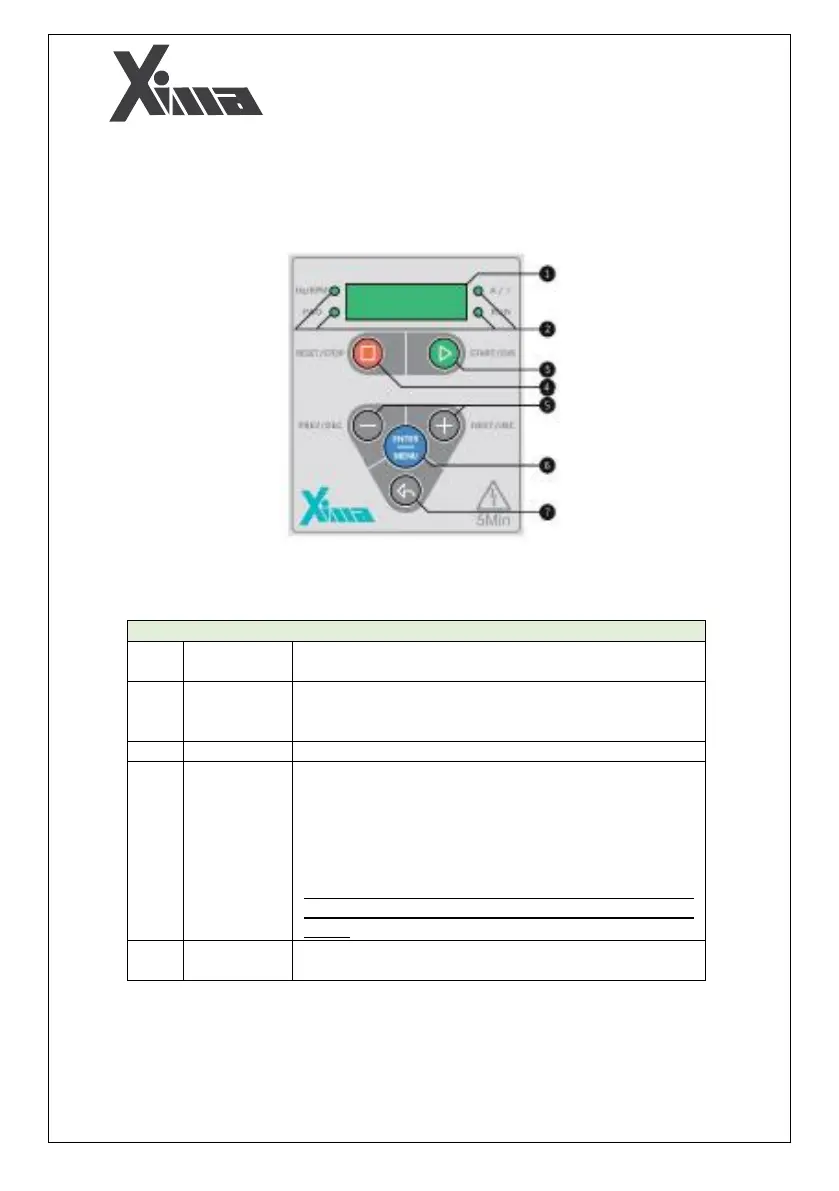
The XIMA device has a 4-digit screen and 4 LED lights for displaying values and parameters, and
a 6-key keyboard for setting parameters, resetting faults, and starting or stopping the motor.
Fig. 14: Main keyboard of the device
4-digit screen for displaying frequency, speed, current, load
value, and viewing and setting parameters.
4 LEDs for displaying the rotation direction of the motor, the
current or load percentage, the frequency or motor speed,
and the device state of being started or stopped.
Start and Direction change key (START/DIR)
Stop and Reset key (RESET/STOP).
Pressing this key for 2 seconds will reset the fault (short
circuit fault or is not reset by this key and the device must
be restarted)
Note that if a fault occurs repeatedly, avoid resetting it and
contact the company to prevent the complete failure of the
device.
Next/Increment key (NEXT / INC) and Previous/Decrease key
(PREV/DEC). They are used to set parameters and to move


 To Next Page