on different parameters or to change the value of a
parameter (when the parameter is selected). Further details
will be presented in this manual.
Enter is used to go to the parameters page, to select and save
a parameter, or to run commands such as parameters auto-
setup and return. Further details will be presented in this
manual.
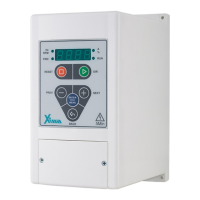
Table 8: Introduction of keyboard and screen of the Xima device
o Screen
When the device is turned on, firstly all LEDs and screen segments are turned on for 0.5 second,
then the word or appears on the screen. We need the Enable input to be enabled
for the startup of the device. If the Enable input is disabled, the word (Inhibited) will be
displayed, and if Enable input is enabled or it has not been defined, the word (Ready) will
be appeared and the device will be waiting for the start command.
If the device starts up, the desired quantity will be displayed on the screen and the
corresponding LED will be turned on.
o Parameter Settings
Note: Some of the parameters have immediate effects on the motor's performance, and one of
these effects is to change the motor direction of rotation. Note that, the settings should be
applied by experts. Any mistakes will increase the possibility of the device failure and will also
reduce the lifetime of the entire system and its efficiency, and can even result in severe personal
injuries.
Some parameters can be changed only when the inverter is in the stop state, and some other
settings are made when saving parameters or exiting from the settings page.


 To Next Page