EasyManua.ls Logo

Xima L100 - Inputs and Outputs Parameters

Xima L100
59 pages
Print Icon
To Next Page IconTo Next Page
To Previous Page IconTo Previous Page
Loading...
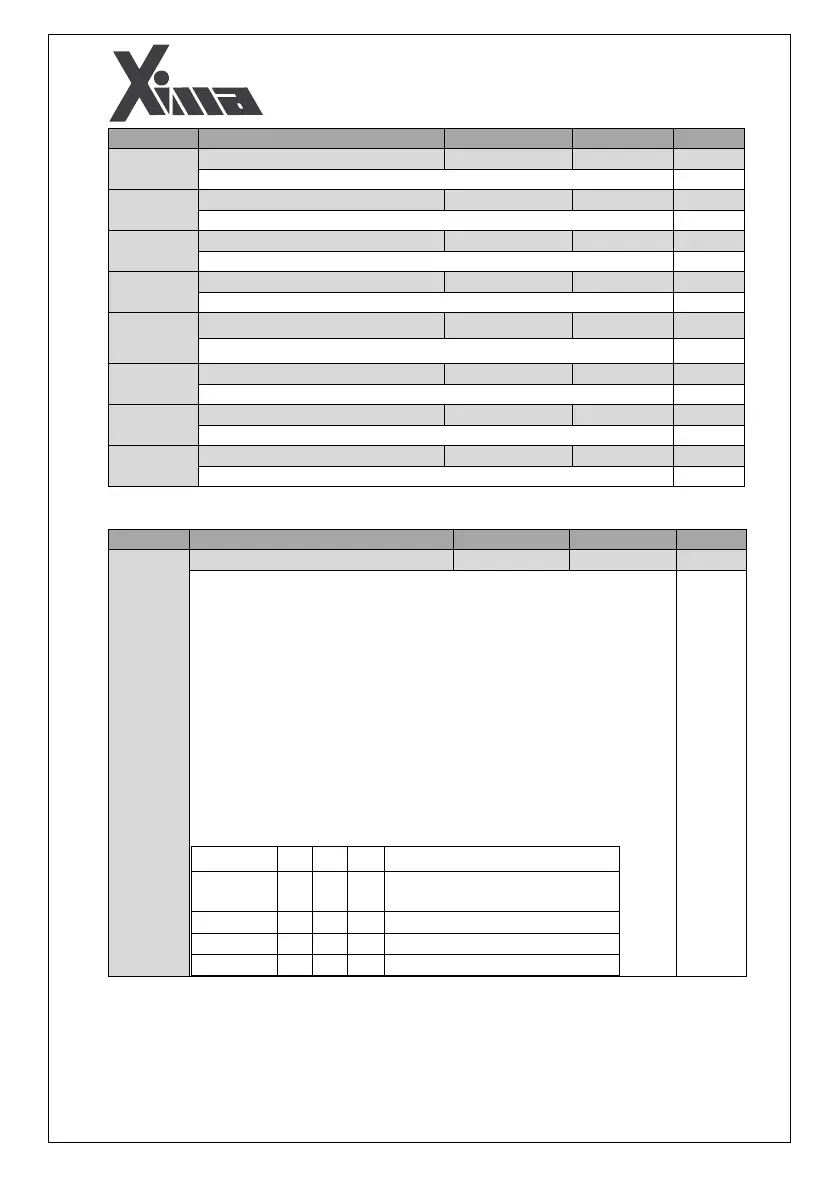
34
Parameter
Name
Setting range
Default value
Type

Motor Rated Frequency
5.0-500.0 Hz
50.0
R/W
Motor Rated Frequency

Rated (Nominal) Speed
0.00-2.50 m/s
1.00
R/W
Rated Speed

Default Motor Direction
0-1
1
R/W
Default Motor Direction

Low-speed Gain
0.50-1.20
1.00
R/W
Low-speed Gain

Motor Power
1.0-7.5 kW
7.5
R/W
Motor Power

Motor Poles pair
1-50
2
R/W
Motor Poles pair

Motor RPM
30-9999 rpm
1460
R/W
Motor rated RPM

Motor Power Factor
0.20-0.90
0.50
R/W
Motor Power Factor (Cos Ф)
o Inputs and Outputs
Parameter
Name
Setting range
Default value
Type
Speed Input Method
0-4
0
R/W
Speed Input Method setting:
0 - Speed priority method
In this method, each digital input represents a speed that applies to the
inverter output. The speeds in this mode are leveling, intermediate,
normal, and inspection types which are set by the PA01 to PA04
parameters.
1 - Binary method
In this method, the three I3, I4, and I6 inputs generate 8 cases based on
the Enable or Disable state, in which a specific speed is applied to the
output according to the table below, except the situation where three
inputs are disabled. There is no longer an inspection mode here, and the
panel determines the type of the speed to be assigned to inspection. In
this case, changing the  stop method do not affect the mode, and
the elevator only moves using the deceleration mode.

Explanations
I6
I4
I3
Motor stop and removing
contactors command
0
0
0
-
Multi speed 1
0
0
1

Multi speed 2
0
1
0

Multi speed 3
0
1
1
