1 - 12 Keyboard Backlight LED
Quick Start Guide
1
Keyboard Backlight LED
(For Illuminated Colored Keyboards Only)
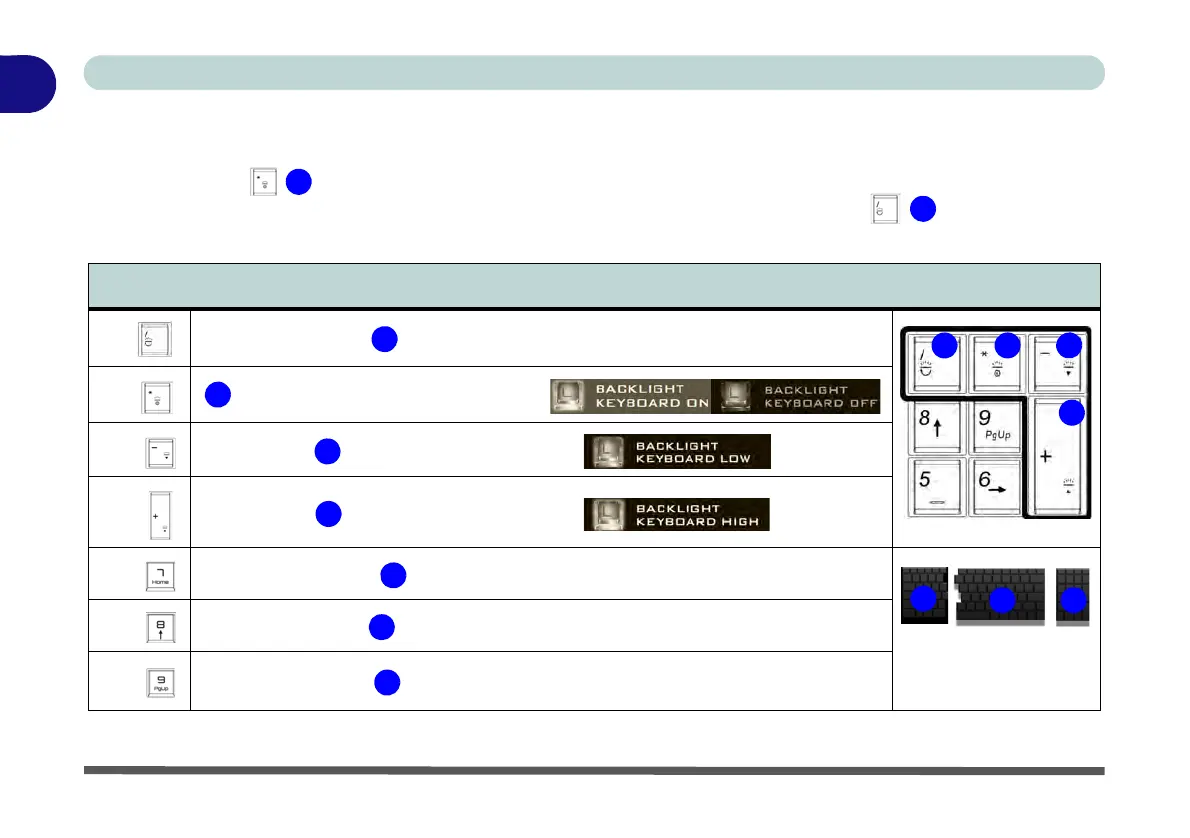
Press Fn plus the key to toggle the keyboard LED on/off. The keyboard LED may be configured using
the Fn + key combination outlined in the table below. In addition press Fn plus the
key to launch the
keyboard backlight application to configure the settings (see overleaf).
Table 1 - 3 - Main Keyboard LEDs
Main Keyboard Colored LED Function key Combinations
Fn +
Launch Keyboard Backlight Application
Fn +
Toggle Keyboard Backlight LED On/Off
Fn +
Keyboard Backlight LED Low
Fn +
Keyboard Backlight LED High
Fn +
Toggle the Left keyboard LED On/Off
Fn +
Toggle the Middle keyboard LED On/Off
Fn +
Toggle the Right keyboard LED On/Off



 To Next Page