1 - 20 Flexikey® Application
Quick Start Guide
1
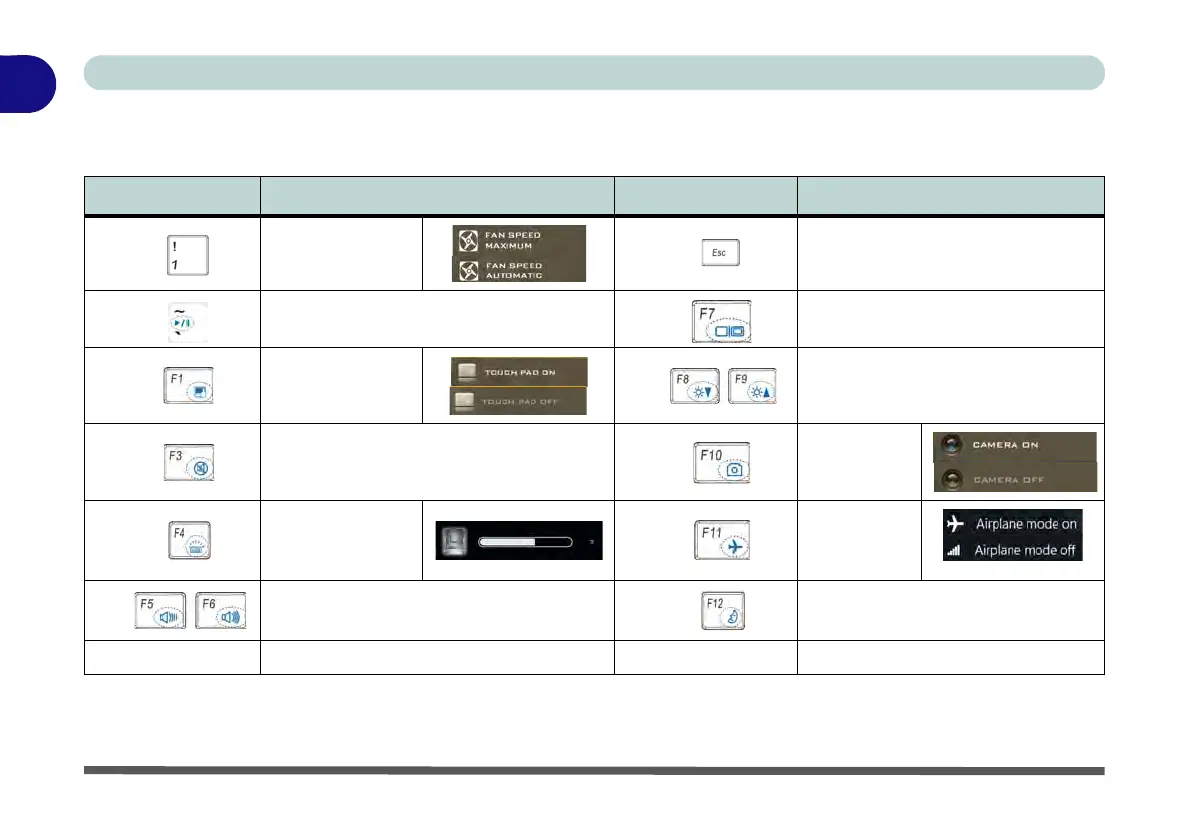
Function Keys & Visual Indicators
The function keys (F1 - F12 etc.) will act as hot keys when pressed while the Fn key is held down.
Table 1 - 5 - Function Keys & Visual Indicators
*Note: It is recommended that you use Maximum fan speed when playing games (use Fn + 1).
Keys Function/Visual Indicators Keys Function/Visual Indicators
Fn +
*
Fan Control Toggle
Automatic / Full
Power
Fn +
Control Center Toggle (see over)
Fn +
Play/Pause (in Audio/Video Programs)
Fn +
Display Toggle
Fn +
Touchpad Toggle
Fn +
Brightness Decrease/Increase
Fn +
Mute Toggle
Fn +
PC Camera
Power Toggle
Fn +
Backlight Keyboard
Toggle Off/High/Low
(White Illuminated
Keyboards Designs
Fn +
Airplane
Mode Toggle
Fn +
Volume Decrease/Increase
Fn +
Sleep Toggle
Fn + Power Button Powered USB 3.0 Port Power Toggle Fn + Backspace Flexikey® Enable/Disable



 To Next Page