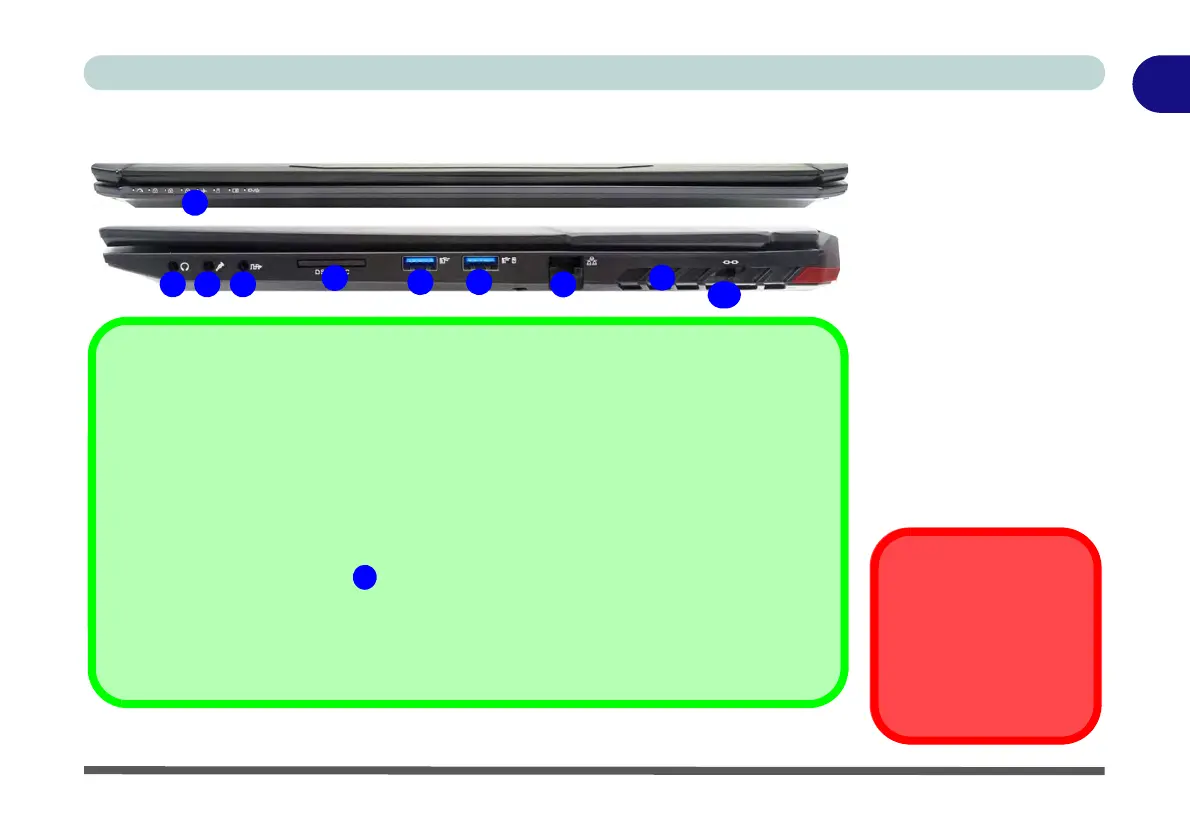
Figure 1 - 12
Front & Right Views
1. LED Power Indicators
2. Headphone Jack
3. Microphone Jack
4. 2-In-Audio Jack
(Line-Out /
S/PDIF-Out Jack)
5. Multi-in-1 Card
Reader
6. USB 3.0 Port (USB
3.1 Gen 1 - Type A)
7. 1 * Powered USB 3.0
Port (USB 3.1 Gen 1)
8. RJ-45 LAN Jack
9. Vent/Fan Intake
10. Security Lock Slot
L
Overheating
To prevent your computer
from overheating make sure
nothing blocks the vent(s)/
fan intake(s) while the com-
puter is in use.
1
5
2
9
3 4 8
6 7
10
Multi-in-1 Card Reader
The card reader allows you to use the most popular digital storage card formats:
MMC (MultiMedia Card) / RSMMC
SD (Secure Digital) / Mini SD / SDHC / SDXC up to UHS-II
Powered USB 3.0 Port
Note that the USB 3.0 port is not operational under DOS and does not support wake on
USB. The powered USB 3.0 ( in Figure 1 - 12 on page 1 - 21) port can supply power
(for charging devices only, not for operating devices) when the system is off but still
powered by the AC/DC adapter plugged into a working outlet, or powered by the battery with
a capacity level above 20% (this may not work with certain devices - see page 7 - 11). Tog-
gle power to this port by using Fn + power button.



 To Next Page