EasyManua.ls Logo

Yamaha V50 - Page 50

Yamaha V50
81 pages
Print Icon
To Next Page IconTo Next Page
To Previous Page IconTo Previous Page
Loading...
These
envelope
generator
settings
are
made
separately
for
each
operator
1—4.
The
number
of
the
operator
currently
being
set
is
shown
in
the
lower
left
of
the
display.
Repeatedly
press
|_©
|
to
step
through
operators
1+2343-4,
and
make
settings
for
each.
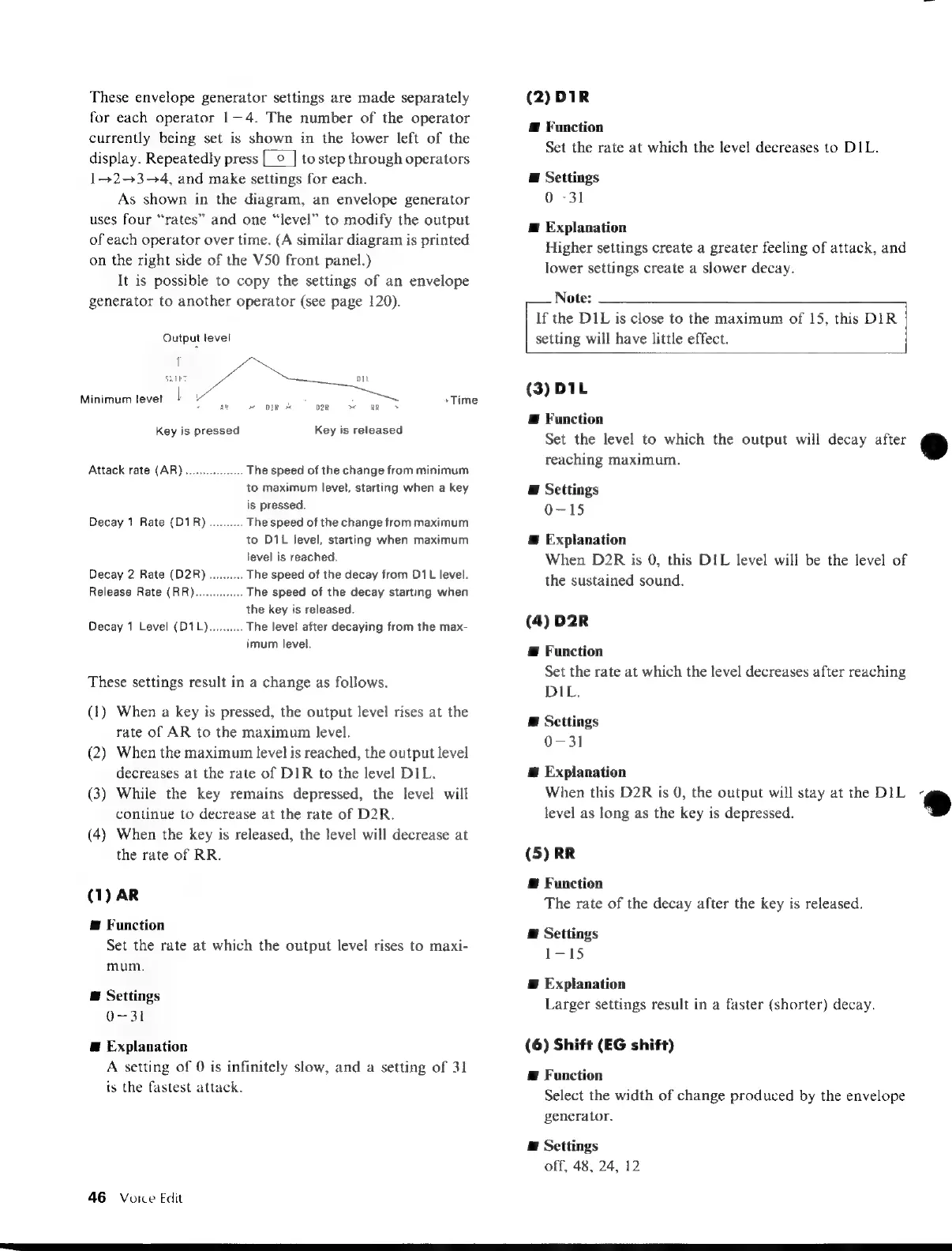
As
shown
in
the
diagram,
an
envelope
generator
uses
four
“rates”
and
one
“level”
to
modify
the
output
of
each
operator
over
time.
(A
similar
diagram
is
printed
on
the
right
side
of
the
V50
front
panel.)
It
is
possible
to
copy
the
settings
of
an
envelope
generator
to
another
operator
(see
page
120).
Output
level
pol
SITET
DI
Minimum
levet
|
:
:
Time
Key
is
pressed
Key
is
released
Attack
rate
(AR)
neis
The
speed
of
the
change
from
minimum
to
maximum
level,
starting
when
a
key
is
pressed.
Decay
1
Rate
(D1R)..........
The
speed
of
the
change
from
maximum
to
D1L
level,
starting
when
maximum
level
is
reached.
Decay
2
Rate
(D2R)
..........
The
speed
of
the
decay
from
D1L
level.
Release
Rate
(RR).
The
speed
of
the
decay
starting
when
the
key
is
released.
Decay
1
Level
(D1L)..........
The
level after
decaying
from
the
max-
imum
level.
These
settings
result
in
a
change
as
follows.
(1)
When
a
key
is
pressed,
the
output
level
rises
at
the
rate
of
AR
to
the
maximum
level.
(2)
When
the
maximum
level
is
reached,
the
output
level
decreases
at
the
rate
of
DIR
to
the
level
DIL.
(3)
While
the
key
remains
depressed,
the
level
will
continue
to
decrease
at
the
rate
of
D2R.
(4)
When
the
key
is
released,
the
level
will
decrease
at
the
rate
of
RR.
(1)
AR
@
Function
Set
the
rate
at
which
the
output
level
rises
to
maxi-
mum.
E
Settings
0-31
E
Explanation
A
setting
of
0
is
infinitely
slow,
and
a
setting
of
31
is
the
fastest
attack.
46
Voice
Edit
(2)
DIR
Æ
Function
Set
the
rate
at
which
the
level
decreases
to
DIL.
E
Settings
0-31
Æ
Explanation
Higher
settings
create
a
greater
feeling
of
attack,
and
lower
settings
create
a
slower
decay.
Note:
If
the
DIL
is
close
to
the
maximum
of
15,
this
DIR
setting
will
have
little
effect.
(3)
DIL
@
Function
Set
the
level
to
which
the
output
will
decay
after
@
reaching
maximum.
E
Settings
0-15
Æ
Explanation
When
D2R
is
0,
this
DIL
level
will
be
the
level
of
the
sustained
sound.
(4)
D2R
Æ
Function
Set
the
rate
at
which
the
level
decreases
after
reaching
DIL.
@
Settings
0-31
@
Explanation
When
this
D2R
is
0,
the
output
will
stay
at
the
DIL
®
level
as
long
as
the
key
is
depressed.
;
(5)
RR
Æ
Function
The
rate
of
the
decay
after
the
key
is
released.
E
Settings
LIS
Æ
Explanation
Larger
settings
result
in
a
faster
(shorter)
decay.
(6)
Shift
(EG
shift)
A
Function
Select
the
width
of
change
produced
by
the
envelope
generator.
E
Settings
off,
48,
24,
12

Table of Contents

Other manuals for Yamaha V50

Related product manuals