EasyManua.ls Logo

Yamaha V50 - Page 68

Yamaha V50
81 pages
Print Icon
To Next Page IconTo Next Page
To Previous Page IconTo Previous Page
Loading...
|=.
ree
[na
ee
One
measure
One
beat
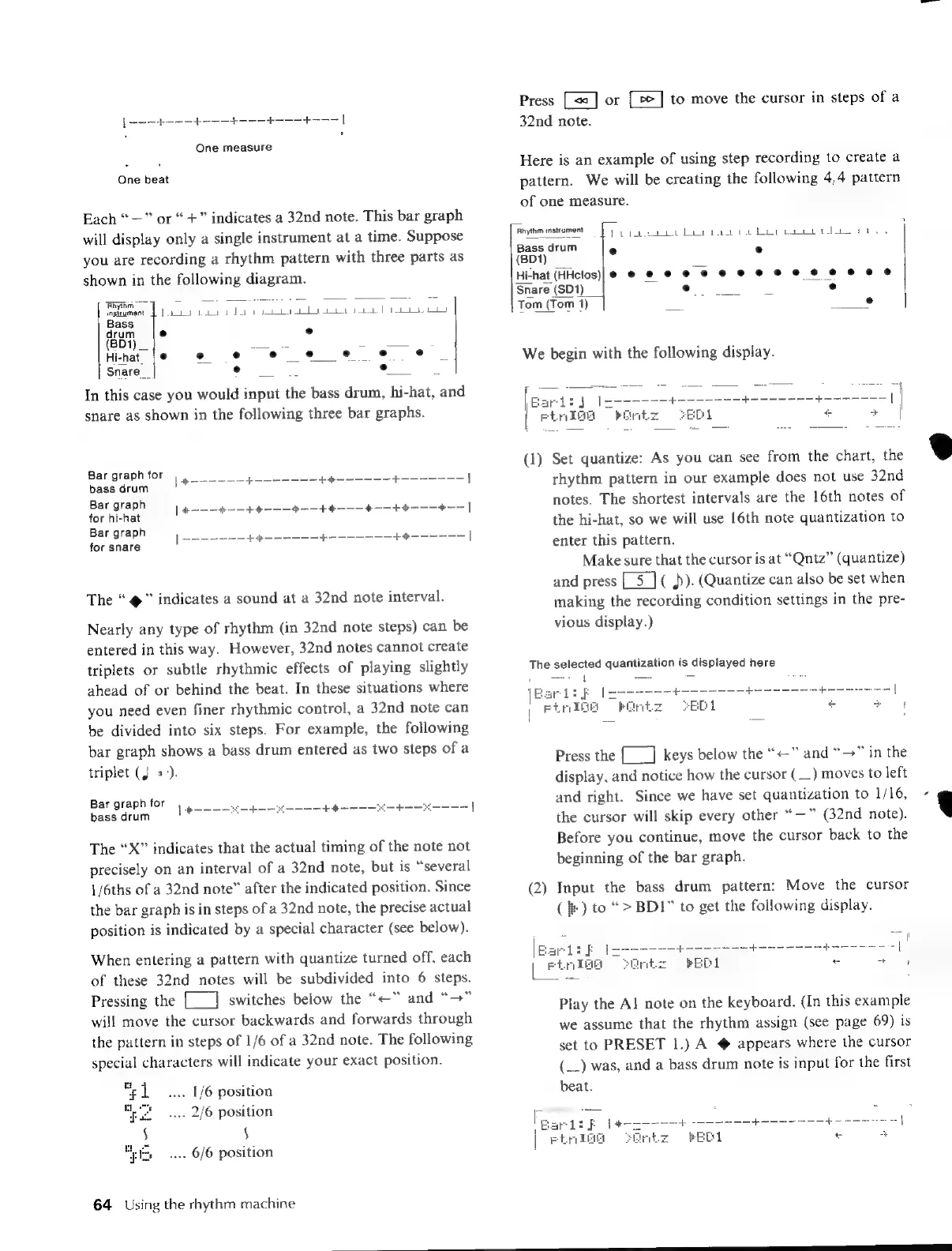
Each
“—”
or
“+”
indicates
a
32nd
note.
This
bar
graph
will
display
only
a
single
instrument
at
a
time.
Suppose
you
are
recording
a
rhythm
pattern
with
three
parts
as
shown
in
the
following
diagram.
Rhythm
=.
baa
i
sR
B
or
mnpicument
[a0
kaa
wd)
ebb
a
Pa
Bass
drum
e
e
(BD1)
ne
3
=
Hi-hat
e
e
e
e e e e
e
Snare
__
e
In
this
case
you
would
input
the
bass
drum,
hi-hat,
and
snare
as
shown
in
the
following
three
bar
graphs.
Bar
graph
for
Base
dears
|
pee
nee
arom
a
pe
eee
nen
|
Bar
graph
E
EEEE
N
E
EE
CEEE
E
PES
PEENE
FEE
VE
for
hi-hat
|
a
af
Hi
ape
+-
+t
+
]
Bar
graph
|
eee
tnt
ip
pa
|
for
snare
The
“
@”
indicates
a
sound
at
a
32nd
note
interval.
Nearly
any
type
of
rhythm
(in
32nd
note
steps)
can
be
entered
in
this
way.
However,
32nd
notes
cannot
create
triplets
or
subtle
rhythmic
effects
of
playing
slightly
ahead
of
or
behind
the
beat.
In
these
situations
where
you
need
even
finer
rhythmic
control,
a
32nd
note
can
be
divided
into
six
steps.
For
example,
the
following
bar
graph
shows
a
bass
drum
entered
as
two
steps
ofa
triplet
(J
=).
Bar
graph
for
bass
drum
[tha
pee
he
oe
|
The
“X”
indicates
that
the
actual
timing
of
the
note
not
precisely
on
an
interval
of
a
32nd
note,
but
is
“several
1/6ths
of
a
32nd
note”
after
the
indicated
position.
Since
the
bar
graph
is
in
steps
of
a
32nd
note,
the
precise
actual
position
is
indicated
by
a
special
character
(see
below).
When
entering
a
pattern
with
quantize
turned
off,
each
of
these
32nd
notes
will
be
subdivided
into
6
steps.
Pressing
the
[___]
switches
below
the
“=”
and
“>”
will
move
the
cursor
backwards
and
forwards
through
the
pattern
in
steps
of
1/6
of
a
32nd
note.
The
following
special
characters
will
indicate
your
exact
position.
"1
....
1/6
position
uo
..
2/6
position
$
$
hie...
6/6
position
64
Using
the
rhythm
machine
Press
or
to
move
the
cursor
in
steps
of
a
32nd
note.
Here
is
an
example
of
using
step
recording
to
create
a
pattern.
We
will
be
creating
the
following
4/4
pattern
of
one
measure.
piyik
instrum.
[et
ape
ay
baci
ee
a
e
drum
(01)
s
s
Hi-hat
(HHcios
e
e
e
e
e
e
oe
eee
eo
eo
ee
Snare
(SD1)
—
e
_
Te
Tom
(Tom
1)
°
We
begin
with
the
following
display.
(1)
Set
quantize:
As
you
can
see
from
the
chart,
the
rhythm
pattern
in
our
example
does
not
use
32nd
notes.
The
shortest
intervals
are
the
16th
notes
of
the
hi-hat,
so
we
will
use
16th
note
quantization
to
enter
this
pattern.
Make
sure
that
the
cursor
is
at
“Qntz”
(quantize)
and
press
(
A).
(Quantize
can
also
be
set
when
making
the
recording
condition
settings
in
the
pre-
vious
display.)
The
selected
quantization
is
displayed
here
Press
the
{__]
keys
below
the
“<”
and
“>”
in
the
display,
and
notice
how
the
cursor
(_.)
moves
to
left
and
right.
Since
we
have
set
quantization
to
1/16,
the
cursor
will
skip
every
other
“—”
(32nd
note).
Before
you
continue,
move
the
cursor
back
to
the
beginning
of
the
bar
graph.
(2)
Input
the
bass
drum
pattern:
Move
the
cursor
(fe)
to
“>
BDI”
to
get
the
following
display.
|part:
E
tr
Play
the
AJ
note
on
the
keyboard.
(In
this
example
we
assume
that
the
rhythm
assign
(see
page
69)
is
set
to
PRESET
|.)
A
@
appears
where
the
cursor
(__)
was,
and
a
bass
drum
note
is
input
for
the
first
beat.
eee

Table of Contents