EasyManua.ls Logo

Yamaha V50 - Page 67

Yamaha V50
81 pages
Print Icon
To Next Page IconTo Next Page
To Previous Page IconTo Previous Page
Loading...
r
2
Cer
explained
in
detail
in
the
next
section.)
Repeat
this
procedure
to
record
each
sound.
(6)
Press
|
9
|
to
end
step
recording.
You
will
return
to
pattern
play
mode
for
the
pattern
you
just
re-
corded.
When
you
press
[
>
],
the
pattern
you
just
recorded
will
play.
If
you
decide
to
modify
or
correct
the
pattern,
repeat
steps
(2)~
(6).
If
you
have
been
recording
using
a
preset
pat-
tern,
you
will
get
the
following
display.
Select
a
pattern
number
to
write
your
newly
recorded
pattern
into,
and
press
the
[___]
below
“>
GO”.
You
will
get
a
message
of
“Are
you
sure?”,
so
press
[+1].
This
completes
step
recording.
USING
THE
BAR
GRAPH
Q
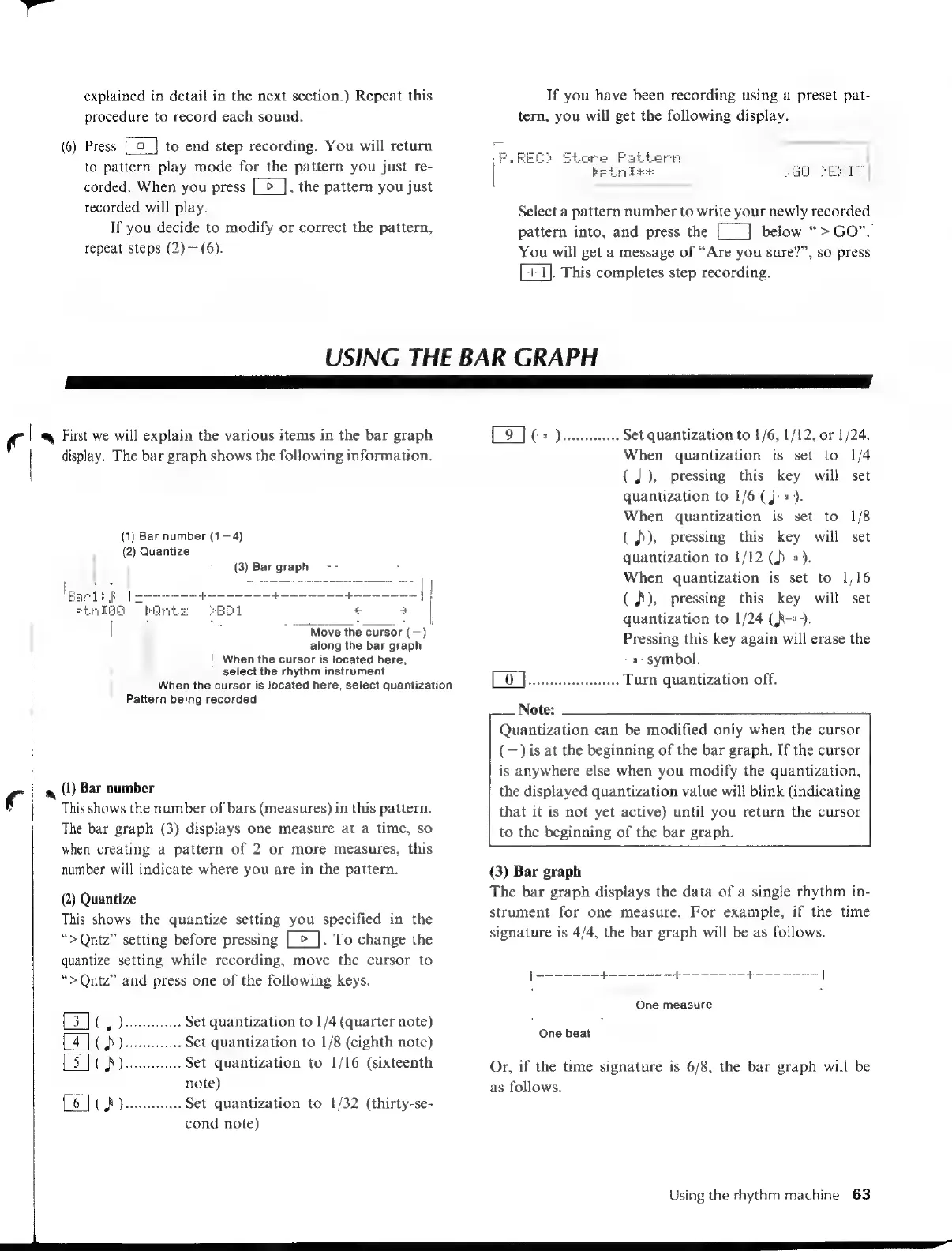
First
we
will
explain
the
various
items
in
the
bar
graph
display.
The
bar
graph
shows
the
following
information.
(1)
Bar
number
(1—4)
(2)
Quantize
(3)
Bar
graph
|
Move
the
cursor
(—)
along
the
bar
graph
|
When
the
cursor
is
located
here,
select
the
rhythm
instrument
Pattern
being
recorded
|a
(1)
Bar
number
This
shows
the
number
of
bars
(measures)
in
this
pattern.
The
bar
graph
(3)
displays
one
measure
at
a
time,
so
when
creating
a
pattern
of
2
or
more
measures,
this
number
will
indicate
where
you
are
in
the
pattern.
(2)
Quantize
This
shows
the
quantize
setting
you
specified
in
the
“>Qntz”
setting
before
pressing
[
>
].
To
change
the
quantize
setting
while
recording,
move
the
cursor
to
“>Qntz”
and
press
one
of
the
following
keys.
..
Set
quantization
to
1/4
(quarter
note)
..
Set
quantization
to
1/8
(eighth
note)
Set
quantization
to
1/16
(sixteenth
note)
ENCA
Jenin
Set
quantization
to
1/32
(thirty-se-
cond
note)
When
the
cursor
is
located
here,
select
quantization
>
pee
Set
quantization
to
1/6,
1/12,
or
1/24.
When
quantization
is
set
to
1/4
(J),
pressing
this
key
will
set
quantization
to
1/6
(J:s).
When
quantization
is
set
to
1/8
(À),
pressing
this
key
will
set
quantization
to
1/12
()
+),
When
quantization
is
set
to
1/16
(
A),
pressing
this
key
will
set
quantization
to
1/24
(A-+).
Pressing
this
key
again
will
erase
the
s-
symbol.
EO
ese,
Beata
Turn
quantization
off.
Note:
Quantization
can
be
modified
only
when
the
cursor
(—)
is
at
the
beginning
of
the
bar
graph.
If
the
cursor
is
anywhere
else
when
you
modify
the
quantization,
the
displayed
quantization
value
will
blink
(indicating
that
it
is
not
yet
active)
until
you
return
the
cursor
to
the
beginning
of
the
bar
graph.
(3)
Bar
graph
The
bar
graph
displays
the
data
of
a
single
rhythm
in-
strument
for
one
measure.
For
example,
if
the
time
signature
is
4/4,
the
bar
graph
will
be
as
follows.
|
----------+---
a
One
measure
One
beat
Or,
if
the
time
signature
is
6/8,
the
bar
graph
will
be
as
follows.
Using
the
rhythm
machine
63

Table of Contents