EasyManua.ls Logo

Yamaha V50 - Step Recording and Bar Graph Usage

Yamaha V50
81 pages
Print Icon
To Next Page IconTo Next Page
To Previous Page IconTo Previous Page
Loading...
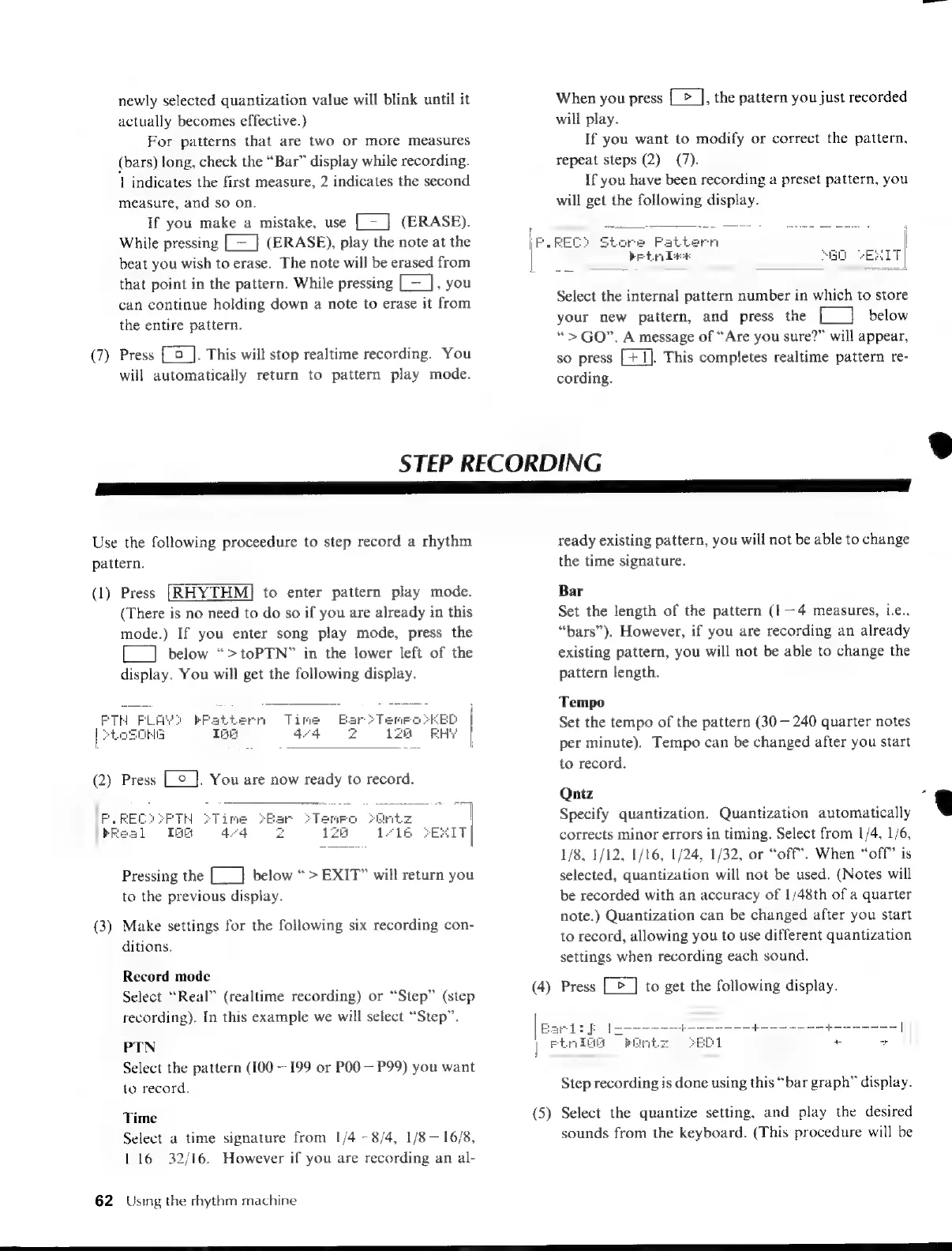
newly
selected
quantization
value
will
blink
until
it
actually
becomes
effective.)
For
patterns
that
are
two
or
more
measures
(bars)
long,
check
the
“Bar”
display
while
recording.
1
indicates
the
first
measure,
2
indicates
the
second
measure,
and
so
on.
If
you
make
a
mistake,
use
[—
]
(ERASE).
While
pressing
[—
_}
(ERASE),
play
the
note
at
the
beat
you
wish
to
erase.
The
note
will
be
erased
from
that
point
in
the
pattern.
While
pressing
[=],
you
can
continue
holding
down
a
note
to
erase
it
from
the
entire
pattern.
(7)
Press
[©
].
This
will
stop
realtime
recording.
You
will
automatically
return
to
pattern
play
mode.
When
you
press
{>
],
the
pattern
you
just
recorded
will
play.
If
you
want
to
modify
or
correct
the
pattern,
repeat
steps
(2)—(7).
If
you
have
been
recording
a
preset
pattern,
you
will
get
the
following
display.
aA
P
mes
EE
EET
4
REC?
Store
Pattern
|
Select
the
internal
pattern
number
in
which
to
store
your
new
pattern,
and
press
the
£]
below
“>
GO”.
A
message
of
“Are
you
sure?”
will
appear,
so
press
[+1].
This
completes
realtime
pattern
re-
cording.
STEP
RECORDING
ee
aE
Use
the
following
proceedure
to
step
record
a
rhythm
pattern.
(1)
Press
to
enter
pattern
play
mode.
(There
is
no
need
to
do
so
if
you
are
already
in
this
mode.)
If
you
enter
song
play
mode,
press
the
[__]
below
“>toPTN”
in
the
lower
left
of
the
display.
You
will
get
the
following
display.
JET
Jed
Pressing
the
[___]
below
“>
EXIT”
will
return
you
to
the
previous
display.
(3)
Make
settings
for
the
following
six
recording
con-
ditions.
Record
mode
Select
“Real”
(realtime
recording)
or
“Step”
(step
recording).
In
this
example
we
will
select
“Step”.
PTN
Select
the
pattern
(100—199
or
P00
—
P99)
you
want
to
record.
Time
Select
a
time
signature
from
1/4—8/4,
1/8—
16/8,
1/16—32/16.
However
if
you
are
recording
an
al-
62
Using
the
rhythm
machine
ready
existing
pattern,
you
will
not
be
able
to
change
the
time
signature.
Bar
Set
the
length
of
the
pattern
(1—4
measures,
i.e.,
“bars”).
However,
if
you
are
recording
an
already
existing
pattern,
you
will
not
be
able
to
change
the
pattern
length.
Tempo
Set
the
tempo
of
the
pattern
(30
—
240
quarter
notes
per
minute).
Tempo
can
be
changed
after
you
start
to
record.
Qntz
Specify
quantization.
Quantization
automatically
corrects
minor
errors
in
timing.
Select
from
1/4,
1/6,
1/8,
1/12,
1/16,
1/24,
1/32,
or
“off.
When
“off”
is
selected,
quantization
will
not
be
used.
(Notes
will
be
recorded
with
an
accuracy
of
1/48th
of
a
quarter
note.)
Quantization
can
be
changed
after
you
start
to
record,
allowing
you
to
use
different
quantization
settings
when
recording
each
sound.
(4)
Press
[>]
to
get
the
following
display.
|
Meia
oP
Ss
ass
Step
recording
is
done
using
this
“bar
graph”
display.
(5)
Select
the
quantize
setting,
and
play
the
desired
sounds
from
the
keyboard.
(This
procedure
will
be

Table of Contents