1
32
Electronics and wiring
5.1 Cab Command
PROG Programming Menu
(ggg)
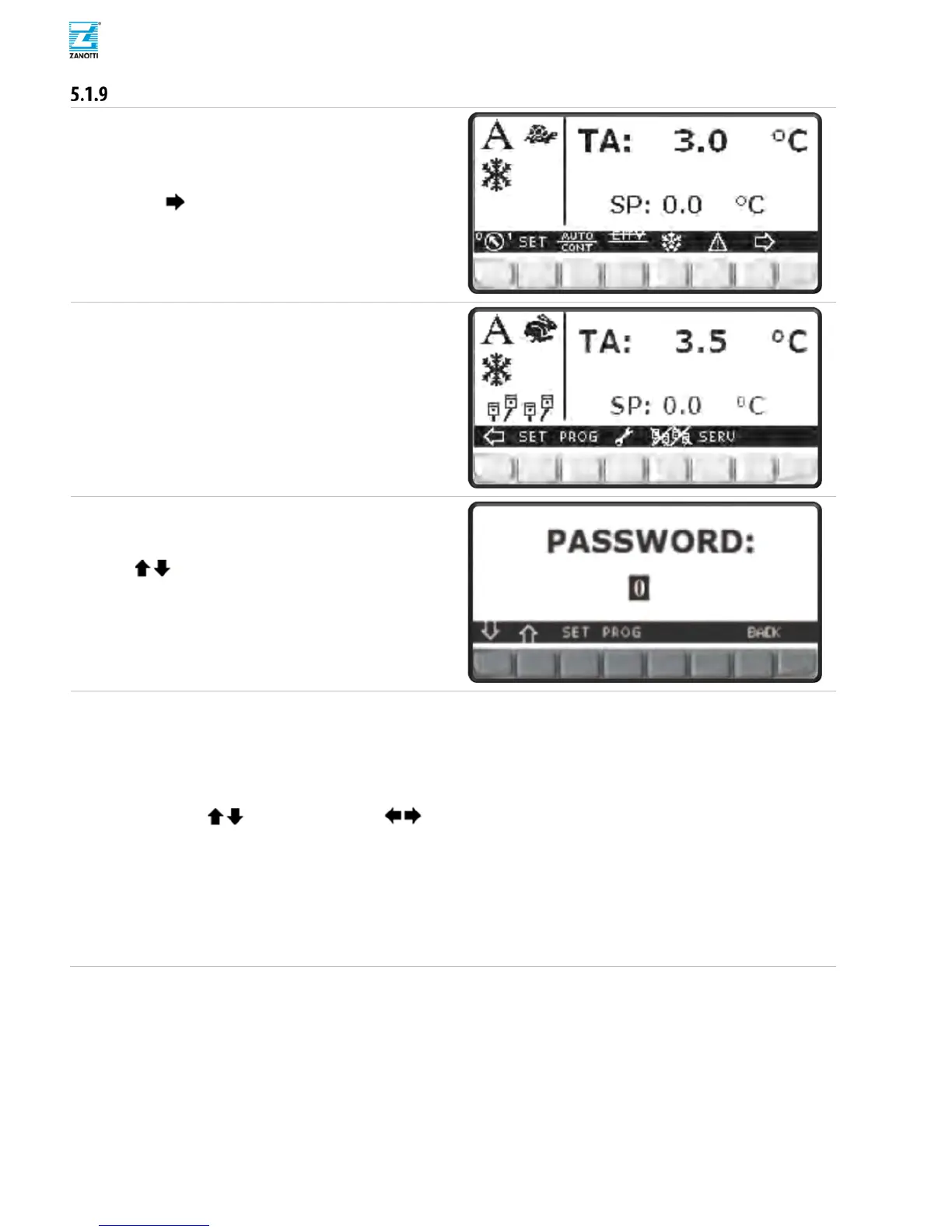
Press button to slide Menu
(hhh)
Press PROG for Programming Menu.
(iii)
Press SET button to enable password input.
(jjj)
Use buttons to select 11(Programming
Password).
(kkk)
Press SET button to confirm.
(lll)
Press PROG accessing programming Menu.
(mmm)
Use to move into sections, to
skip menu page and SET to access submenu.
Parameters Programming Submenus:
- Regulation Parameters Table 7.1.1/7.2.1
- Defrost Parameters Table 7.1.2/7.2.
2
- Alarm Parameters Table 7.
1.3/7.2.3
- Starting Parameters Table 7.2.5/7.2.
4
- Digital Input Management Table 7.1.7/7.2.7
- Digital output Management Table 7.1.8/7.2.8
- Sensors Configuration Table 7.1.6/7.2.
6
- Clock Configu
r
ation
- Maintenance Parameters
- Configur
ation



 To Next Page