OPERATION
Axiovert 200 Documentation Carl Zeiss
B 40-080 e 03/01 3-45
Order No. / Viewed with / Intermediate / Direction of Viewing direction,
Description Switch position image / Monitor motion of object schematic
000000-1005-824 100% doc
Baseport
Camera adapters working without intermediate imaging do not change the orientation of the image.
This also applies to the Frontport with adapters V200 T2 2.5x for SLR used on Frontport 000000-1005-
869 and video adapter V200 C 2/3” 0.63x used on Frontport 000000-1071-171.
The use of Optovars 000000-1005 and 000000-1005-856, too, does not change image orientation.
The above description also applies to any other specimen.
3.4.2 Photomicrography with SLR camera
The Axiovert 200 (manual) and Axiovert 200 M microscopes permit the beam path to be switched to
100% vis (visual observation through eyepieces and an open position for activation of the Sideport to
the right or left), 100% Frontport (port pointing to the front for photomicrography) or 100% Baseport
(port pointing downwards).
Since this is a 100% switching position,
simultaneous visual observation during
photography is not possible.
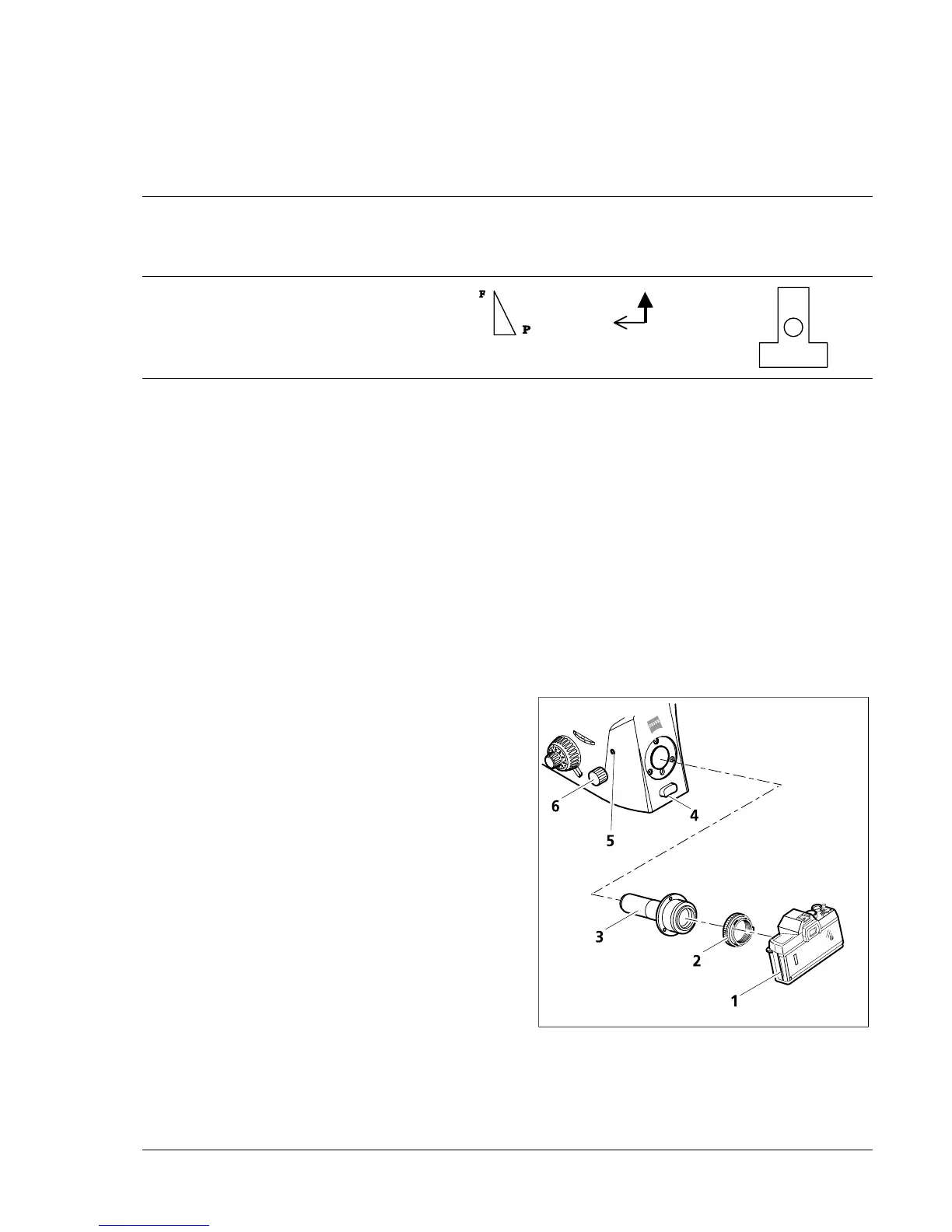
The 2.5x camera adapter and the camera-specific
T2 adapter permit commercially available 35 mm
SLR cameras to be connected to the microscope.
• Remove dust cover or camera lens from the
camera housing (3-25 /1).
• Attach appropriate T2 adapter (3-25/2) to the
camera housing.
• Remove dust cover from the 2.5x camera
adapter (3-25/3).
• Screw 2.5x camera adapter into the T2 adapter
via the thread.
• Remove dust cover from the camera port.
Fig. 3-25 Connection of a SLR camera










 To Next Page