OPERATION
Carl Zeiss Axiovert 200 Axiovert 200
3-14 B 40-080 e 03/01
3.1.2 Switching on and basic settings on
the Axiovert 200 (manual)
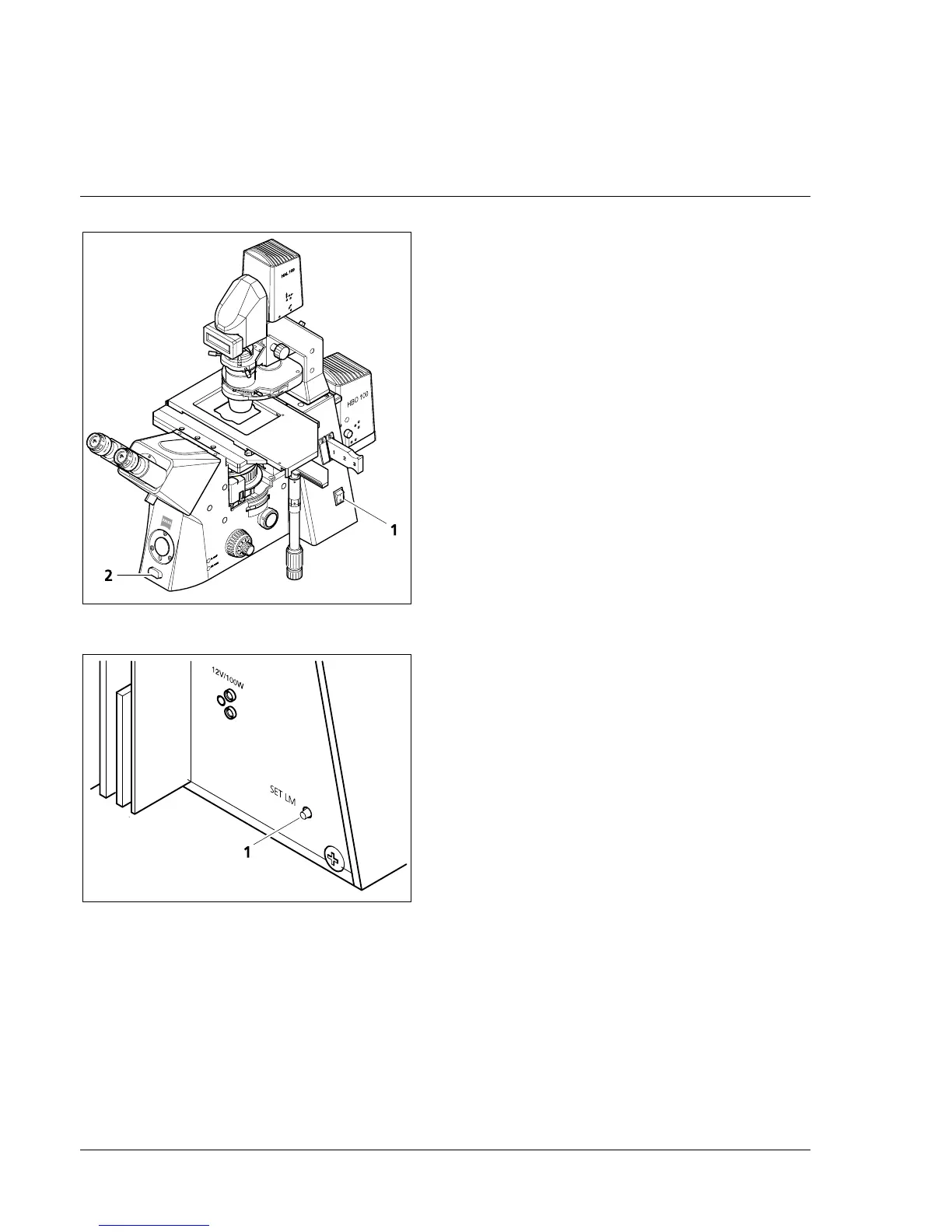
• Switch on the microscope with the on/off
switch on the right side (3-11/1).
The indicator light in the switch lights up. The
microscope is ready for operation after a few
seconds.
3.1.2.1 Configuration (Set mode)
If the microscope is equipped with the LCD
display, the correct objective names must be
assigned to the objective positions first after the
microscope has been switched on or when
objectives have been changed.
The objective positions are entered in the Set
mode. In the case of the first entry, a question
mark (?) appears in the upper line of the LCD
display instead of the objective name.
• To activate the Set mode, keep the Set LM key
(3-12/1) on the instrument rear pressed for
approx. 1 second until a double beep is
emitted. The objective name in the LCD display
starts blinking.
• Now set the magnification and contrasting
technique one after the other for each
nosepiece position by using the toggle switch
(3-11/2) on the instrument front to quickly or
slowly scroll through a list of all possible
combinations in forward or backward
direction.
• To exit the Set mode and return to the standard mode, briefly press the Set LM key on the
instrument rear. The permanent storage of all the settings is confirmed by a beep. LightManager
Settings stored appears in the LCD display.
☞
If no adjustment is performed for more than 60 seconds, the Set mode is exited automatically.
Fig. 3-11 On / Off switch and toggle switch
Fig. 3-12 Key "Set LM"










 To Next Page