Installation
000000-1520-928_GA_EN_021013
Electrical connection
• Connect optional accessories, if available.
• Connect power cable.
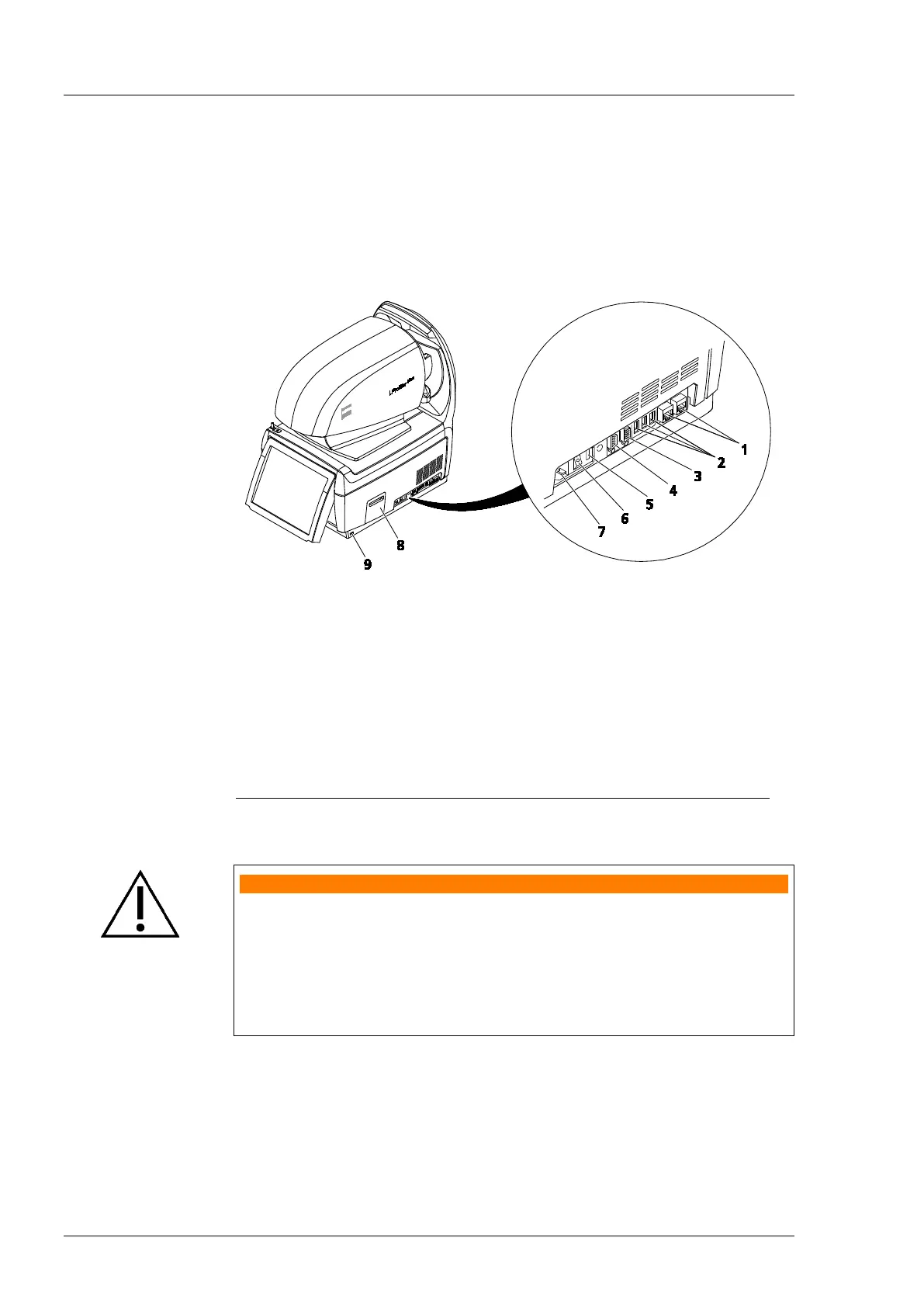
1
LAN connections with disconnection voltage of 4 kV (2)
2
USB ports (3)
3
VGA connector for monitor
5
Fuse compartment
6
Power switch ON (I)/OFF (0)
7
Socket for power cable
In-built printer (paper prints)
9
USB port
Fig. 9 Connection panel on the i.Profiler
® plus
WARNING - RISK OF ELECTRIC SHOCK
If connecting external devices to the interfaces of the i.Profiler
® plus
, the
operator must meet the safety requirements as per IEC 60601-12005
chapter 16 (medical electrical systems)!
A USB isolator (cut-off voltage at least 4 kV) must be used for data
exchanged via external USB devices with separate power supply. The USB
isolator may not be powered by an external power supply.















 To Next Page