Maintenance and care
000000-1520-928_GA_EN_021013
Replacing the fuses
WARNING - RISK OF ELECTRIC SHOCK
Disconnect the power cable from the power supply before replacing the
fuse.
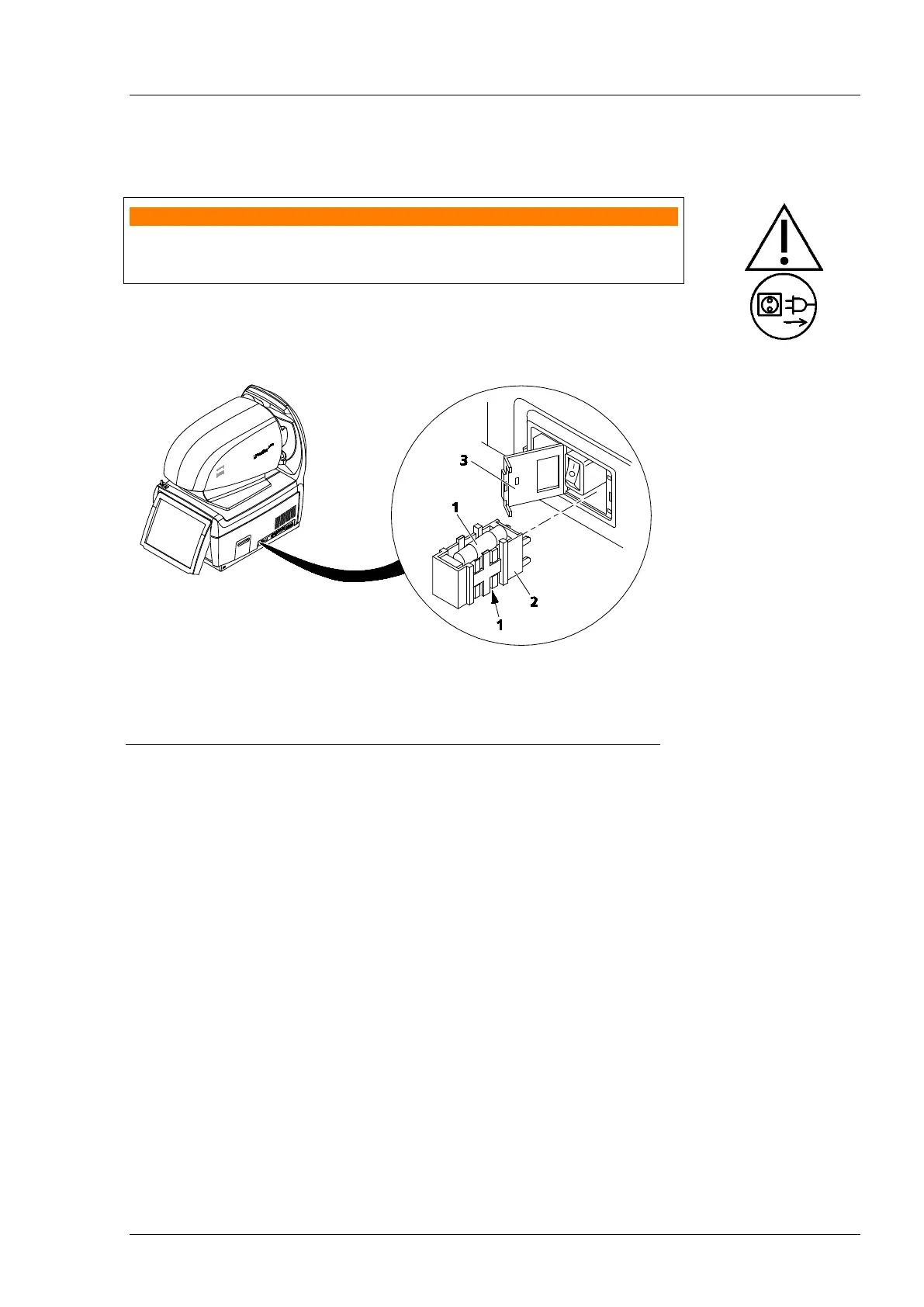
The fuses are located in the fuse box (5, Fig. 9, page 22) to the right of the
power switch of the i.Profiler
® plus
.
1
Fuses
2
Fuse carrier
Lid of fuse box
Fig. 10 Replacing fuses in the i.Profiler
® plus
• Unplug the power cable. The fuse box can only be opened after unplugging
the power cable.
• Open the lid of the fuse box (3, Fig. 10).
• Remove the red fuse carrier (2, Fig. 10) with the two fuses (1, Fig. 10).
• Replace the defective fuse and reinsert the fuse carrier with fuse.
• Close the lid of the fuse box.
Use only fuses listed in chapter Technical data, page 54.















 To Next Page