EasyManua.ls Logo

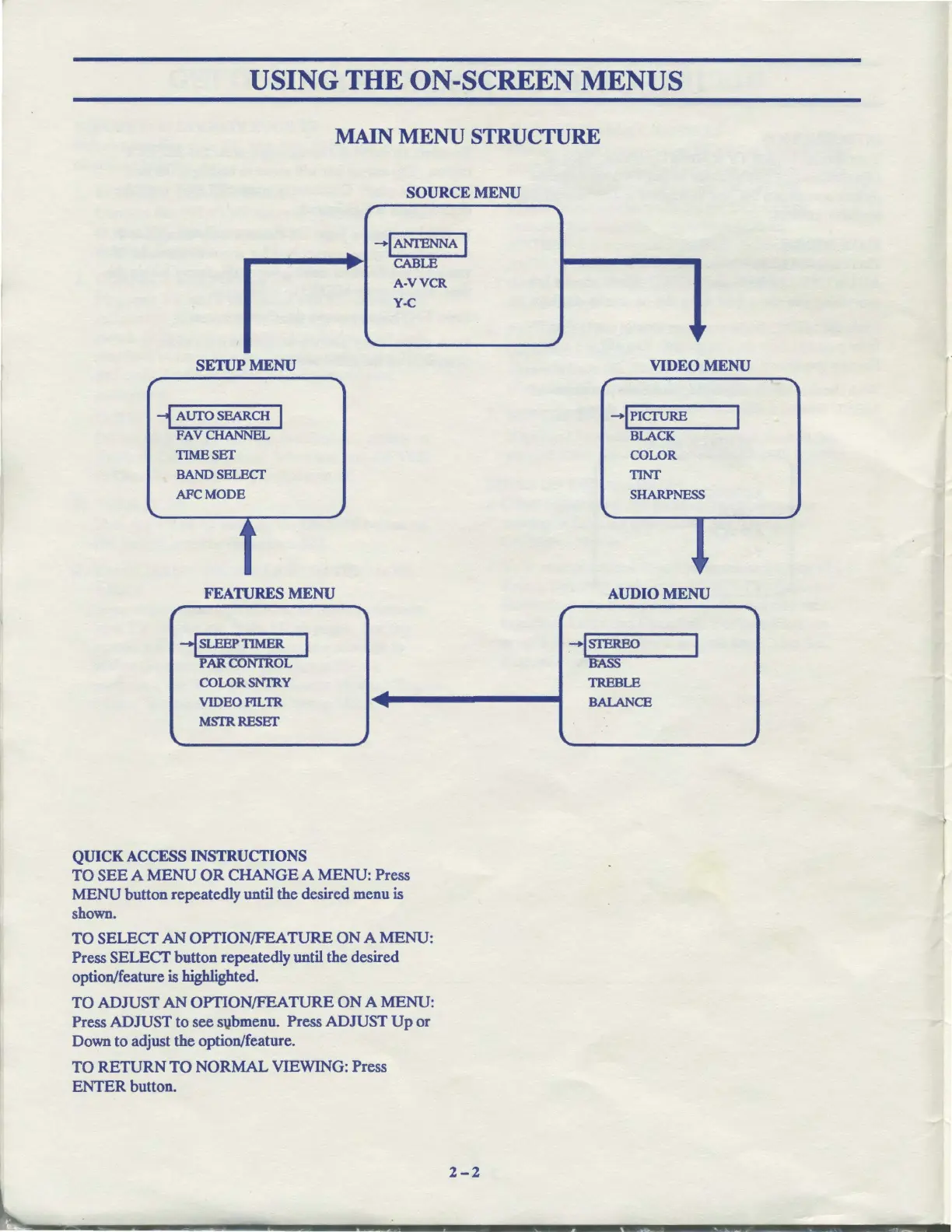
Zenith ADVANCED SYSTEM 3 - Main Menu Structure

Zenith ADVANCED SYSTEM 3
82 pages
Print Icon
To Next Page IconTo Next Page
To Previous Page IconTo Previous Page
Loading...
USING THE ON-SCREEN MENUS
MAIN
MENU
STRUCTURE
SOURCE MENU
r
"'I
.....
-IANI'ENNA
I
....
CABLE
A-VVCR
Y-C
~
,
~
SETUP MENU
VIDEO MENU
r
-i
AUI'O
SEARCH I
FAVCHANNEL
TIMESET
BAND SELECT
AFCMODE
FEATURES MENU
-I
SLEEP
TIMER
I
PAllCONI'ROL
COLORSNI'RY
VIDEOPILTR
MSTRRESET
QUICK
ACCESS
INSTRUCTIONS
-
....
...
TO
SEE
A
MENU
OR
CHANGE
A
MENU:
Press
MENU
button repeatedly until the desired menu is
shown.
TO
SELECT
AN
OPTION/FEATURE
ON
A
MENU:
Press
SELECT
button repeatedly until the desired
option/feature is highlighted.
TO
ADJUST
AN
OPTION/FEATURE
ON
A
MENU:
Press
ADJUST
to
see svbmenu. Press
ADJUST
Up
or
Down to adjust
the
option/feature.
TO
RETURN
TO
NORMAL
VIEWING: Press
ENTER
button.
,
r
-!PICTURE
BLACK
COLOR
TINT
SHARPNESS
....
, ,
AUDIO MENU
-ISTEREO
I
ltASS
TREBLE
BALANCE
....
~

Related product manuals