GETTING
TO
KNOW
YOUR
TV
El
r
.
.
El
T
AOb
AbJ
◄
►
'-
FRONT
PANEL
CONTROLS
a
Enter
Button
I
I
II
S
..
L
HEU
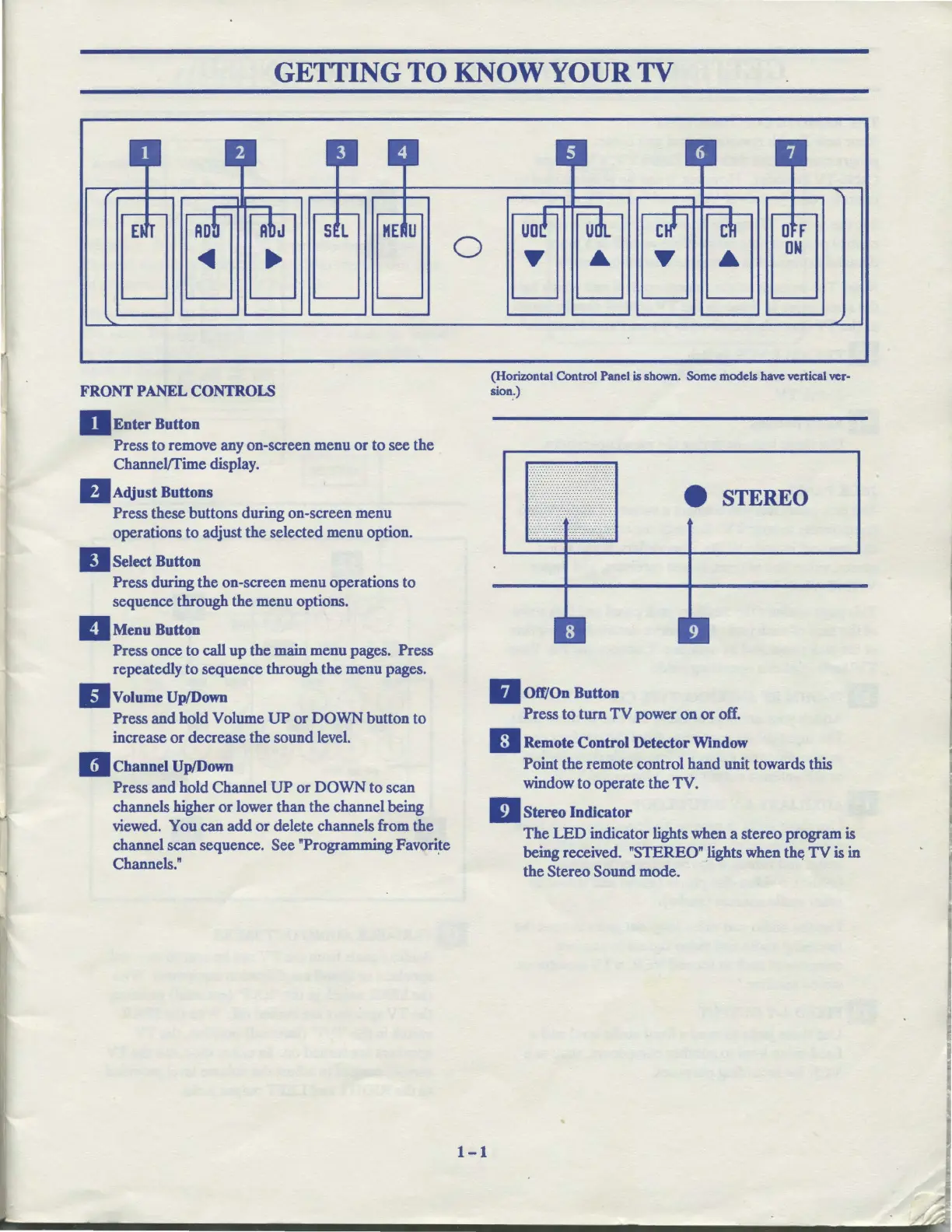
Press to remove any on-screen menu
or
to see the
Channel/fime display.
BAdjust
Buttons
Press these buttons during on-screen menu
operations to adjust the selected menu option.
II
Select
Button
Press during the on-screen menu operations to
sequence through the menu options.
II
Menu
Button
Press once to call
up
the main menu pages. Press
repeatedly to sequence through the menu pages.
II
Volume
Up/Down
Press and hold Volume
UP
or
DOWN
button to
increase
or
decrease the sound level.
II
Channel
Up/Down
Press and hold Channel
UP
or
DOWN
to
scan
channels higher
or
lower than the channel being
viewed. You can
add
or delete channels from the
channel scan sequence. See "Programming Favori~e
Channels."
0
1-1
II
....
__.___
. . .
uot
udt.
ctf
c~
D f
y
•
y
•
ON
~
(Horizontal Control Panel
is
shown. Some models have vertical ver-
sion_.)
• STEREO
II
Off/On
Button
Press
to
turn
TV
power on
or
off.
IJ
Remote
Control Detector
Window
Point the remote control hand unit towards this
window
to
operate the
TV
.
IJ
Stereo Indicator
The
LED
indicator lights when a stereo program is
being received. "STEREO" lights when th~
TV
is in
the Stereo Sound mode.



 To Next Page