EasyManua.ls Logo

Zenith ADVANCED SYSTEM 3 - Operating Your Zenith VCR

Zenith ADVANCED SYSTEM 3
82 pages
Print Icon
To Next Page IconTo Next Page
To Previous Page IconTo Previous Page
Loading...
USING THE REMOTE CONTROL (CONTINUED)
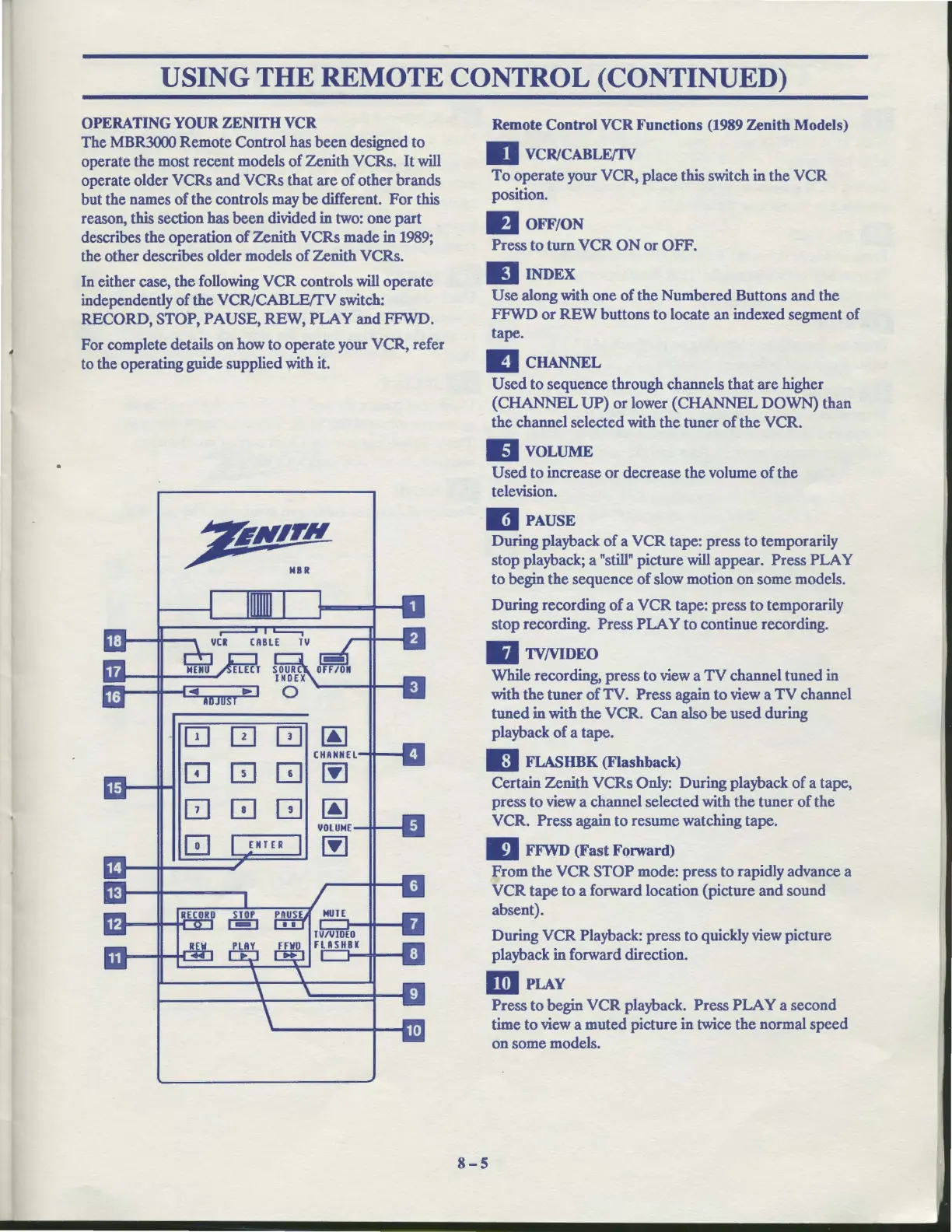
OPERATING
YOUR
ZENITH
VCR
The
MBR3000
Remote
Control
has
been
designed
to
operate the most
recent
models
of
Zenith
VCRs. It will
operate
older
VCRs
and
VCRs
that
are
of
other
brands
but the names
of
the
controls may
be
different.
For
this
reason, this section
has
been
divided
in
two:
one
part
describes
the
operation
of
Zenith
VCRs
made
in
1989;
the other describes
older
models
of
Zenith
VCRs.
In
either case,
the
following
VCR
controls will
operate
independently
of
the
VCR/CABLE/TV
switch:
RECORD,
STOP,
PAUSE,
REW,
PLAY
and
FFWD.
For
complete details
on
how
to
operate
your
VCR,
refer
to the operating guide supplied with it.
0 0
0
~
CHANNEL
~
IT]
GJ
[!]
0
0
GJ
~
VOLUME
0
ENTER
[!]
Remote Control
VCR
Functions
(1989
Zenith Models)
..
VCR/CABLE/IV
To
operate
your
VCR,
place
this switch
in
the
VCR
position.
IEJ
OFF/ON
Press
to
turn
VCR
ON
or
OFF.
IIJ
INDEX
Use
along with
one
of
the
Numbered
Buttons
and
the
FFWD
or
REW
buttons
to
locate
an
indexed segment
of
tape.
Ill
CHANNEL
Used
to
sequence
through
channels
that
are
higher
(CHANNEL
UP)
or
lower
(CHANNEL
DOWN)
than
the
channel selected with
the
tuner
of
the
VCR.
IIJvoLUME
Used
to
increase
or
decrease
the
volume
of
the
television.
Ill
PAUSE
During
playback
of
a
VCR
tape:
press
to
temporarily
stop
playback; a "still"
picture
will
appear.
Press
PLAY
to
begin
the
sequence
of
slow motion
on
some models.
During
recording
of
a
VCR
tape:
press
to
temporarily
stop
recording.
Press
PLAY
to
continue recording.
IIJ
1VIVIDEO
While recording,
press
to
view a
TV
channel
tuned
in
with
the
tuner
of
TV.
Press
again
to
view a
TV
channel
tuned
in
with
the
VCR.
Can
also
be
used
during
playback
of
a tape.
l3
FLASHBK
(Flashback)
Certain
Zenith
VCRs
Only:
During
playback
of
a tape,
press
to
view a channel selected with
the
tuner
of
the
VCR.
Press
again
to
resume
watching tape.
m
FFWD
(Fast
Forward)
From
the
VCR
STOP
mode:
press
to
rapidly advance a
VCR
tape
to
a forward location
(picture
and
sound
absent).
During
VCR
Playback:
press
to
quickly view
picture
playback
in
forward direction.
[[ii
PLAY
8-5
Press
to
begin
VCR
playback.
Press
PLAY
a second
time
to
view a
muted
picture
in
twice
the
normal
speed
on
some models.

Related product manuals