USING THE REMOTE CONTROL (CONTINUED)
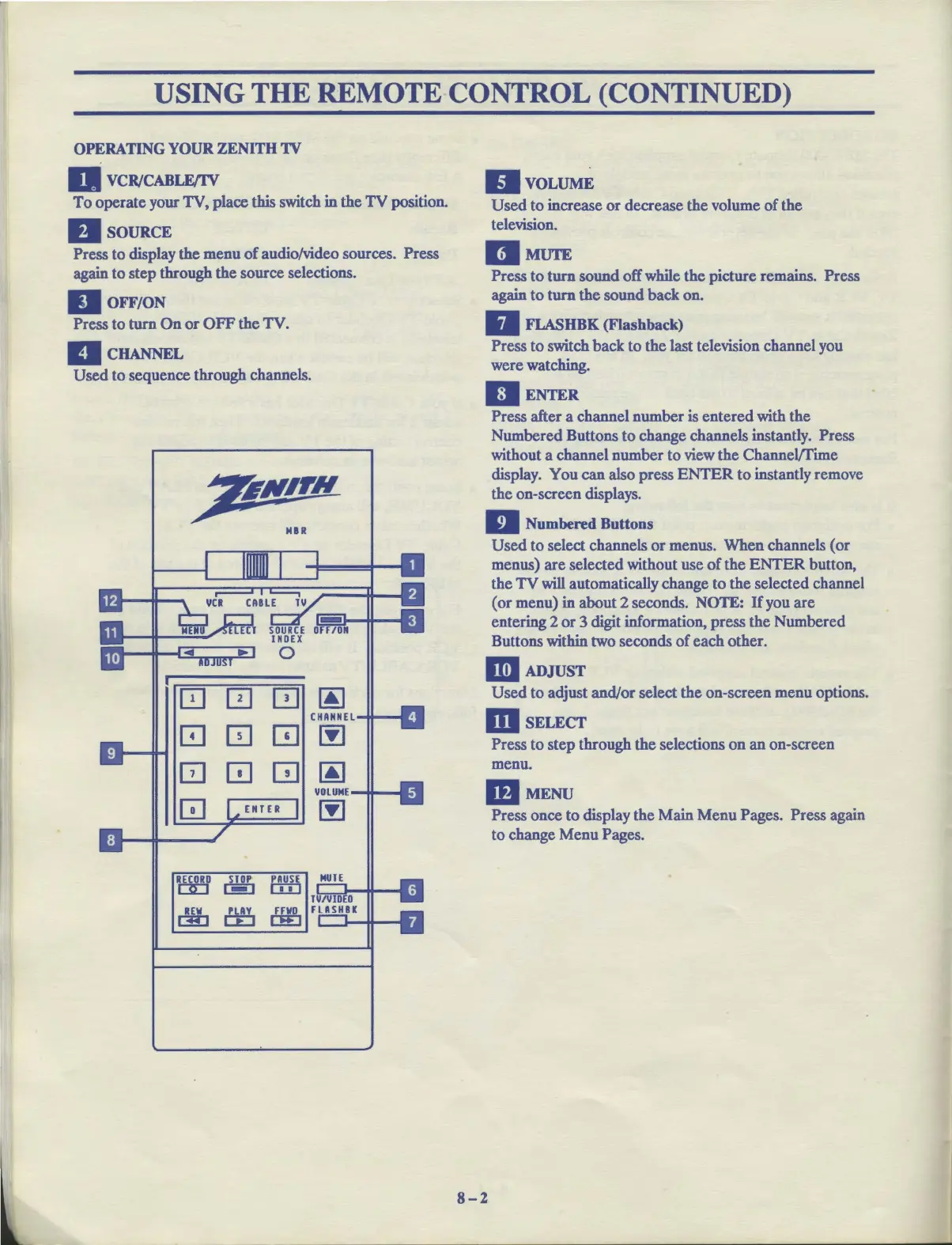
OPERATING YOUR ZENITH
1V
a VCR/CABLE/IV
To
operate your TV, place this switch in the
TV
position.
DsouRcE
Press to display the menu
of
audio/video sources. Press
again
to
step through the source selections.
II
OFF/ON
Press to
turn
On
or
OFF
the TV.
llcHANNEL
Used to sequence through channels.
,7tNPN
MIR
0 0
0
~
CHANNEL
GJ
0
m
~
0
[!]
[!l
~
VOLUME
[!]
~
RODECORD
STOP
PAUSE
,_,
o::D
c:WJ
ffi
~
BvoLUME
Used
to
increase
or
decrease the volume
of
the
television.
IIMUTE
Press
to
turn
sound off while the picture remains. Press
again
to
turn
the
sound back on.
II
FLASHBK
(Flashback)
Press
to
switch back to the last television channel you
were watching.
II
ENTER
Press after a channel number is entered with the
Numbered Buttons
to
change channels instantly. Press
without a channel number to view the Channel/Time
display. You can also press
ENTER
to
instantly remove
the on-screen displays.
II
Numbered Buttons
Used
to
select channels
or
menus. When channels (or
menus) are selected without use
of
the
ENTER
button,
the
TV
will automatically change to the selected channel
(or menu) in about 2 seconds. NOTE: If you are
entering 2
or
3 digit information, press the Numbered
Buttons within two seconds
of
each other.
IIil
ADJUST
Used
to
adjust and/or select the on-screen menu options.
msELECT
Press to step through the selections on an on-screen
menu.
mMENU
8-2
Press once to display the Main Menu Pages. Press again
to change Menu Pages.



 To Next Page