MAINTENANCE AND TROUBLESHOOTING (CONTINUED)
BEFORE
CALLING
FOR
SERVICE
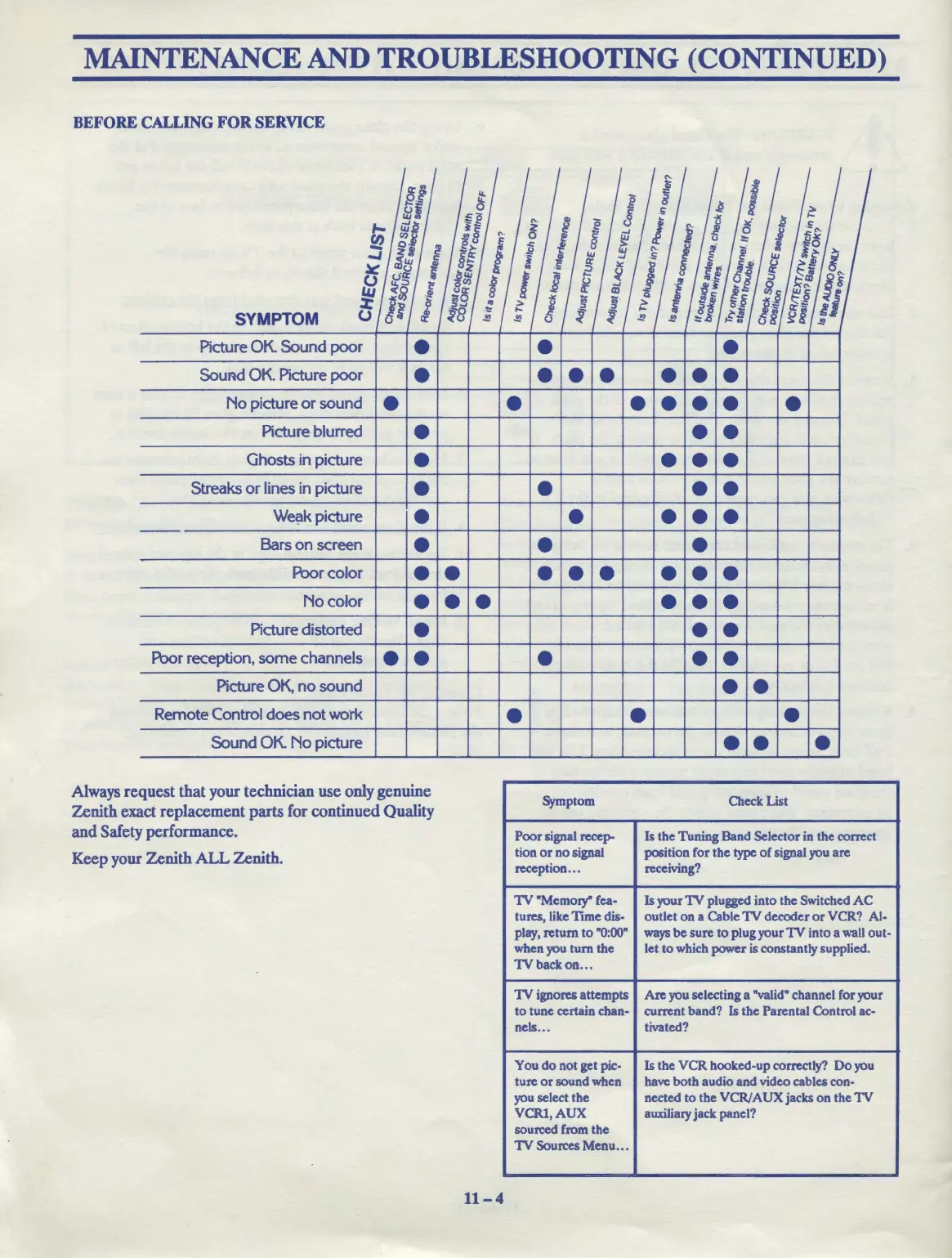
SYMPTOM
Picture OK. Sound poor
• •
•
SouAd OK. Picture
poor
• •
••
• • •
No
picture
or
sound e
•
•
•••
•
Picture blurred •
••
Ghosts in picture
•
• • •
Streaks
or
lines in picture
•
• • •
We~k picture
•
•
•••
Bars
on
screen
•
• •
Poorcolor
• • • • • • • •
Nocolor
• • • • • •
Picture distorted e e e
Poor reception, some channels • • • • •
Picture OK,
no
sound • •
Remote Control does
not
worl<
e • •
Sound OK.
No
picture
Always request that your technician use only genuine
Zenith exact replacement parts for continued Quality
and Safety performance.
Keep your Zenith
ALL
Zenith.
11-4
Symptom
Poor
signal rccep-
tion
or
no
signal
reception
...
1V
"Memory" fea-
tures, like
Tune
dis-
play, return
to
"0:00"
when you turn
the
lVbackon
•.•
1V
ignores attempts
to
tune certain chan-
nels
...
You
do
not get pie-
ture
or
sound when
you select the
VCRl,AUX
sourced from the
1V
Sources Menu
...
••
•
Check List
Is the Tuning Band Selector in the correct
position for the type
of
signal you are
receiving?
Is your
1V
plugged into the Switched
AC
outlet
on
a Cable
1V
decoder
or
VCR? AJ.
ways
be sure
to
plug your
1V
into a wall out-
let
to
which power
is
constantly supplied.
Are you selecting a "valid" channel for your
current band? Is the Parental Control ac-
tivated?
Is the
VCR
hooked-up correctly?
Do
you
have
both
audio
and
video cables con-
nected
to
the
VCR/AUX
jacks
on
the
1V
auxiliary jack panel?



 To Next Page