n
'
CONNECTIONS FOR YOUR TV
PLUGGING
IN
YOUR
1V
Be sure to plug your
TV
into
an
"unswitched" wall outlet
to which power is constantly supplied.
The
"switched"
AC outlets found
on
many cable decoders (and VCRs)
will not continue supplying power to the
TV
once the
decoder is turned off. If the power supply to the
TV
is
interrupted for
an
extended time ( over 1 hour), all
of
the
TVs "memory" features including the Time display,
TV
audio/video adjustments
and
signal source selection will
return
to
their factory settings.
INPUT
SOURCES
FOR
THE
1V
Most TVs have a single
RF
(radio frequency) input,
meaning you can only direct one "signal source"
to
your
TV at a time.
The
"Signal source" refers
to
what is
supplying the picture and/or sound to your TV.
The
most common "signal source" is your outdoor
or
master
antenna
or
cable-TV system. When you watch the tape
play back from your VCR, for example, the
VCR
becomes the "signal source."
Your Zenith
TV
has two
RF
inputs so your
TV
can
be
connected to more than one "signal source"
at
the
same
time.
For
example, you can connect a
VCR
and
a Video
Disc Player to your
TV
and
watch the pro- gram from
either one without reconnecting any cables.
JACK
PANEL
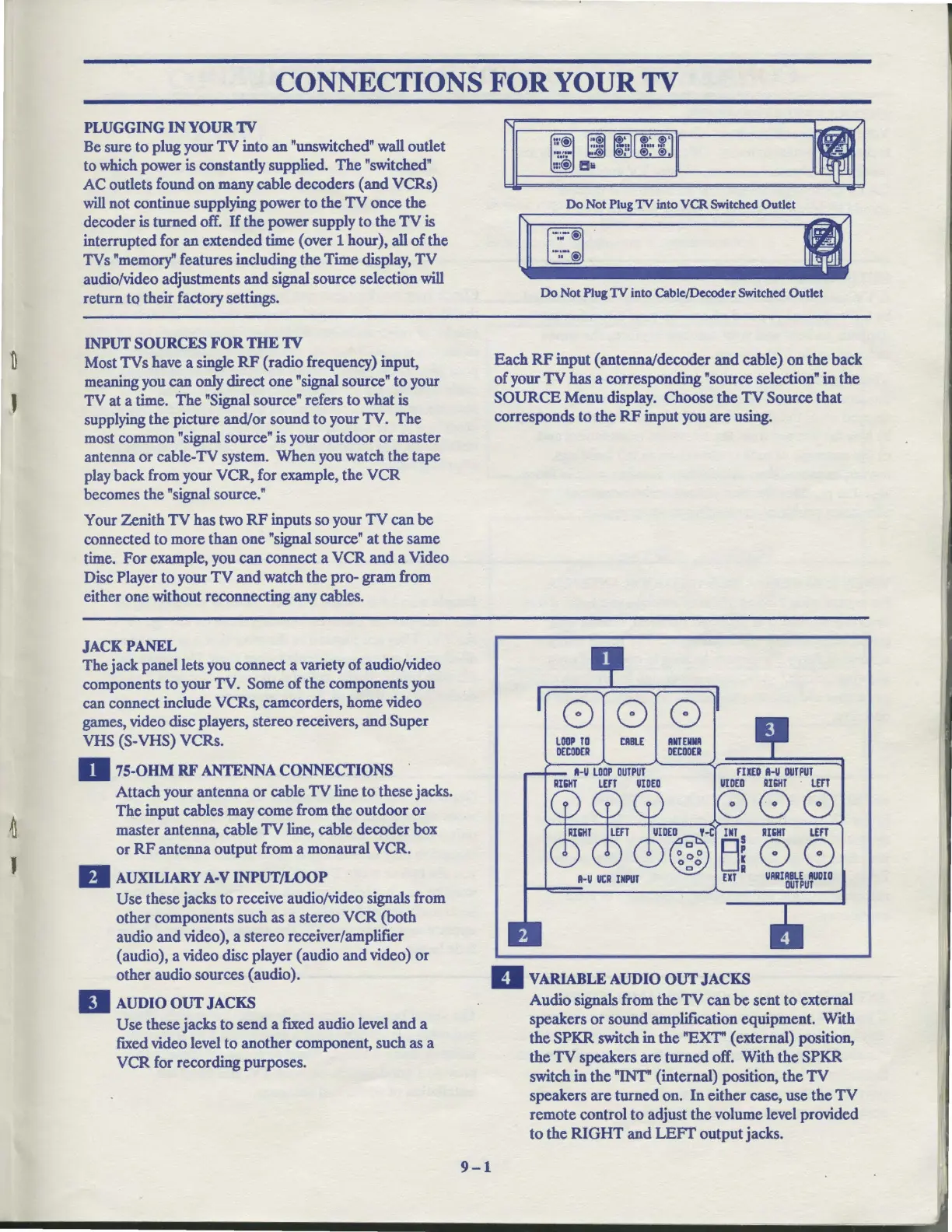
The jack panel lets you connect a variety
of
audio/video
components to your TV. Some
of
the components you
can connect include VCRs, camcorders, home video
games, video disc players, stereo receivers, and Super
VHS (S-VHS) VCRs.
D
75-OHM
RF
ANTENNA
CONNECTIONS
.
Attach your antenna
or
cable
TV
line to these jacks.
The
input cables may come from the outdoor
or
master antenna, cable
TV
line, cable decoder box
or
RF
antenna output from a monaural VCR.
D AUXILIARY A-V INPUT/LOOP
Use
these jacks to receive audio/video signals from
other components such as a stereo VCR (both
audio
and
video), a stereo receiver/amplifier
(audio), a video disc player (audio and video)
or
other audio sources (audio).
II
AUDIO
OUT
JACKS
Use these jacks to
send
a fixed audio level
and
a
fixed video level to another component, such as a
VCR for recording purposes.
9-1
Do
Not
Plug
1V
into
VCR
Switched Outlet
I
Do Not Plug
1V
into Cable/Decoder Switched Outlet
Each
RF
input (antenna/decoder
and
cable)
on
the back
of
your
TV
has a corresponding "source selection" in the
SOURCE
Menu
display. Choose
the
TV
Source that
corresponds to the
RF
input you
are
using.
LOOP
TO
DECODER
CIIIII.E
ANTENNA
DECODER
A-U
LOOP
OUTPUT
AI511T
LEFT
UIDED
FIXED
A-U
OUT
PUT
UIOED
RIGHT
LEFT
000
0
~
0 0~
UIOE@O
,-e
m S
ooo
Ua
11-U
UCR
INPUT
UT
D VARIABLE AUDIO
OUT
JACKS
RIGHT
Lm
00
UARIABLE
AUDIO
OUTPUT
Audio signals from
the
TV
can
be
sent
to
external
speakers
or
sound amplification equipment. With
the
SP.KR
switch in
the
"EXT" ( external) position,
the
TV
speakers
are
turned off. With
the
SP.KR
switch in the "INT" (internal) position, the
TV
speakers are
turned
on.
In
either case, use
the
TV
remote control to adjust the volume level provided
to
the
RIGHT
and
LEFT
output jacks.



 To Next Page