USING THE REMOTE CONTROL (CONTINUED)
OPERATING
YOUR
CABLE-1V
DECODER
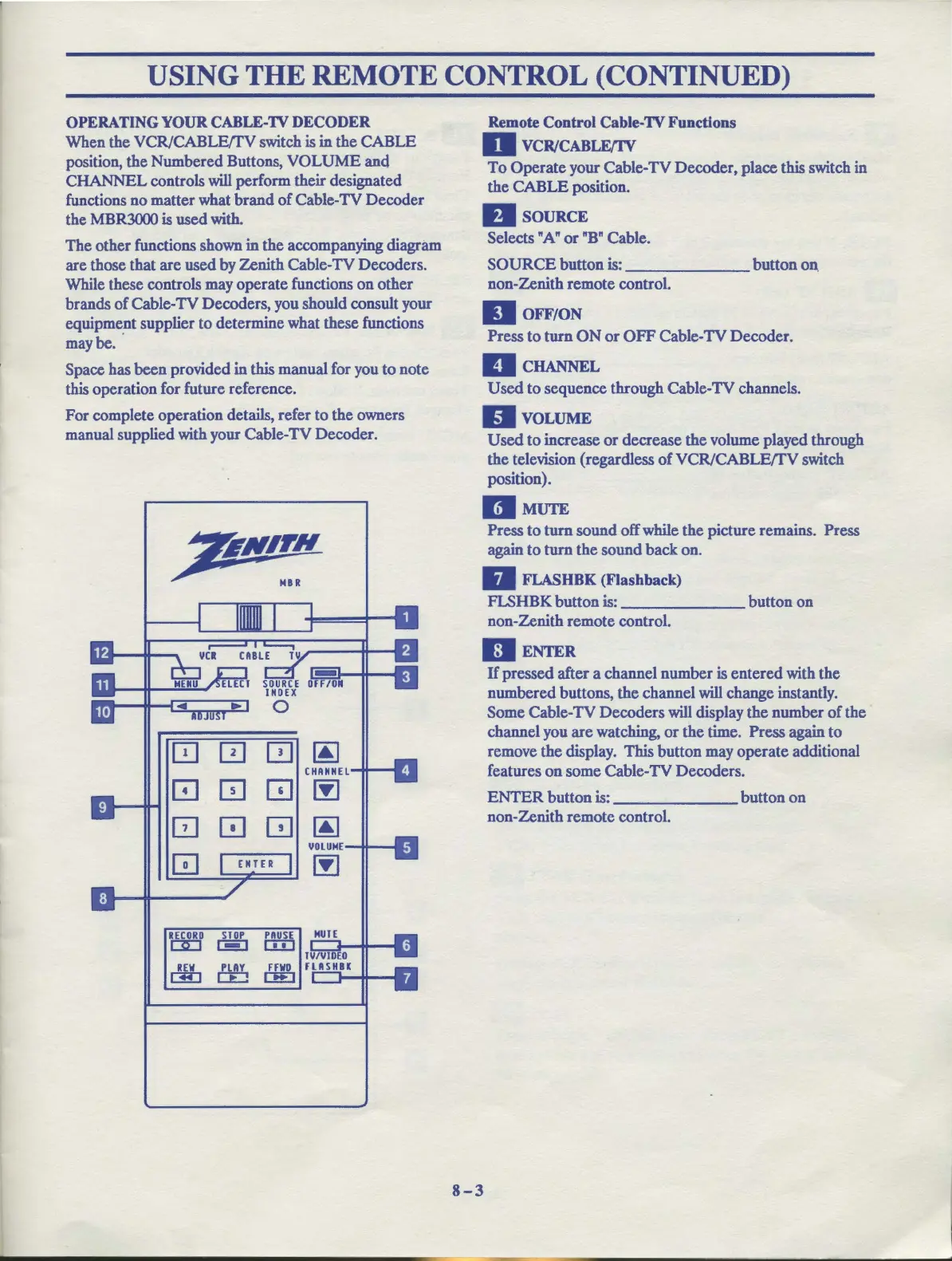
When
the
VCR/CABLE/fV
switch is in
the
CABLE
position,
the
Numbered
Buttons,
VOLUME
and
CHANNEL
controls
will
perform their designated
functions
no
matter
what
brand
of
Cable-TV
Decoder
the MBR3000 is
used
with.
The
other
functions shown
in
the
accompanying diagram
are those that
are
used by
Zenith
Cable-TV Decoders.
While these controls may
operate
functions
on
other
brands
of
Cable-TV Decoders, you should consult your
equipment supplier
to
determine what these functions
maybe.
·
Space has
been
provided in
this
manual for you
to
note
this operation for future reference.
For
complete operation details, refer
to
the
owners
manual supplied with your Cable-TV Decoder.
0 0
[!]
~
CHANNEL
[!]
0
[!]
~
GJ
0
[!]
~
VOLUME
0
00
RECORD
STOP
PAUSE
OD
1-1
CID
~
ffi
~
Remote
Control Cable-1V Functions
D VCR/CABLE/IV
To
Operate
your Cable-TV
Decoder,
place this switch in
the
CABLE
position.
DsouRcE
Selects
"A"
or
"B"
Cable.
SOURCE
button
is:
_______
button
on.
non-Zenith
remote
control.
II
OFF/ON
Press
to
turn
ON
or
OFF
Cable-TV Decoder.
llcHANNEL
Used
to
sequence through Cable-TV channels.
DvoLUME
Used
to
increase
or
decrease
the
volume played through
the
television (regardless
of
VCR/CABLE/fV
switch
position).
DMUTE
Press
to
turn
sound
off while
the
picture remains. Press
again
to
turn
the
sound
back
on.
II
FLASHBK
(Flashback)
FLSHBK
button
is:
_______
button
on
non-Zenith
remote
control.
II
ENTER
8-3
H
pressed
after a channel
number
is
entered
with
the
numbered
buttons,
the
channel
will
change instantly.
Some Cable-TV
Decoders
will
display
the
number
of
the
channel you
are
watching,
or
the
time. Press again
to
remove
the
display. This
button
may
operate
additional
features
on
some Cable-TV
Decoders.
ENTER
button
is:
_______
button
on
non-Zenith
remote
control.



 To Next Page