AUDIO MENU (CONTINUED)
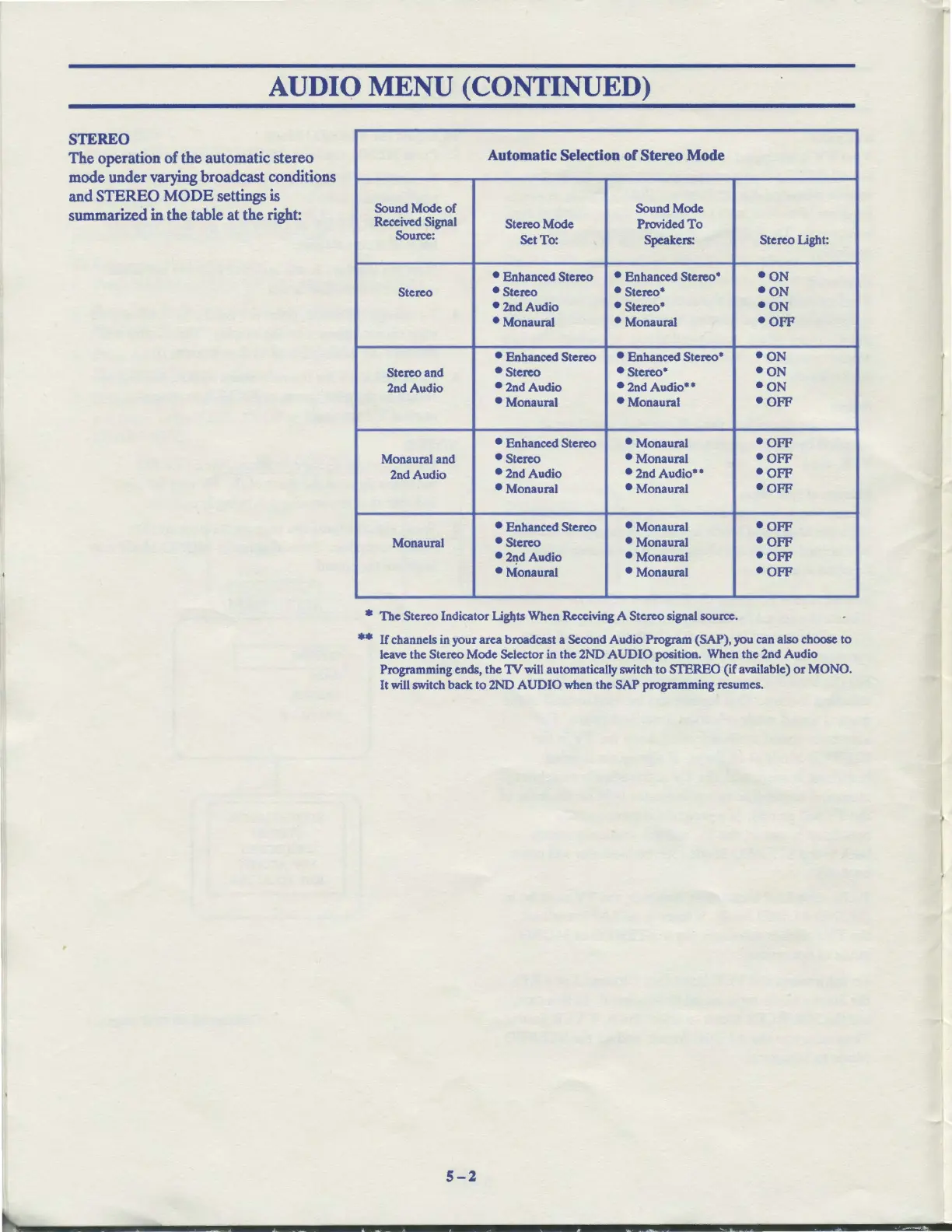
STEREO
The operation
of
the automatic stereo
mode under varying broadcast conditions
and
STEREO
MODE
settings
is
summarized
in
the table
at
the right:
Automatic Selection
of
Stereo Mode
Sound Mode
of
Sound Mode
Received Signal
Stereo Mode
Provided
To
Source:
Set
To
:
Speakers:
Stereo Light:
• Enhanced Stereo • Enhanced Stereo•
•ON
Stereo • Stereo
• Stereo•
•ON
•2nd
Audio • Stereo•
•ON
• Monaural
• Monaural
•opp
• Enhanced Stereo • Enhanced Stereo•
•ON
Stereo and
• Stereo
• Stereo*
•ON
2nd Audio
• 2nd Audio
• 2nd
Audio••
•oN
• Monaural • Monaural
•OFF
• Enhanced Stereo • Monaural
•OFF
Monaural and • Stereo
• Monaural
•OFF
2nd Audio
•2nd
Audio
• 2nd
Audio••
•OFF
• Monaural
• Monaural
•OFF
• Enhanced Stereo • Monaural
•OFF
Monaural
• Stereo
• Monaural
•OFF
•2~dAudio
• Monaural
•OFF
• Monaural • Monaural
•OFF
• The Stereo Indicator Uglits When Receiving A Stereo signal source.
••
If channels
in
your area broadcast a Second Audio Program (SAP), you can also choose to
leave the Stereo Mode Selector in the 2ND
AUDIO
position. When the 2nd Audio
Programming ends, the
1V
will automatically switch to STEREO (if available)
or
MONO.
It
will
switch back
to
2ND AUDIO when the SAP programming resumes.
5-2



 To Next Page