CONNECTIONS FOR YOUR
TV
(CONTINUED)
DIAGRAM
6-CABLE
TV
(WITHOUT DECODER BOX), MONAURAL VCR
AND
ANTENNA
BASIC
ANTENNA
CONNECTION
This is for All-Channel
UHF
/VHF
antenna (including master
TV
antenna*) with a 75 ohm lead-in.
• Master Antenna,
System-
Many apartment
buildings are served by a single all-channel
(VHF/ UHF) antenna system.
The
signal
from this antenna
is
amplified and distributed
to each apartment
and
terminates in a special
wall outlet. Make sure the Master Antenna
system has been turned
on
by your building
services people before connecting your TV.
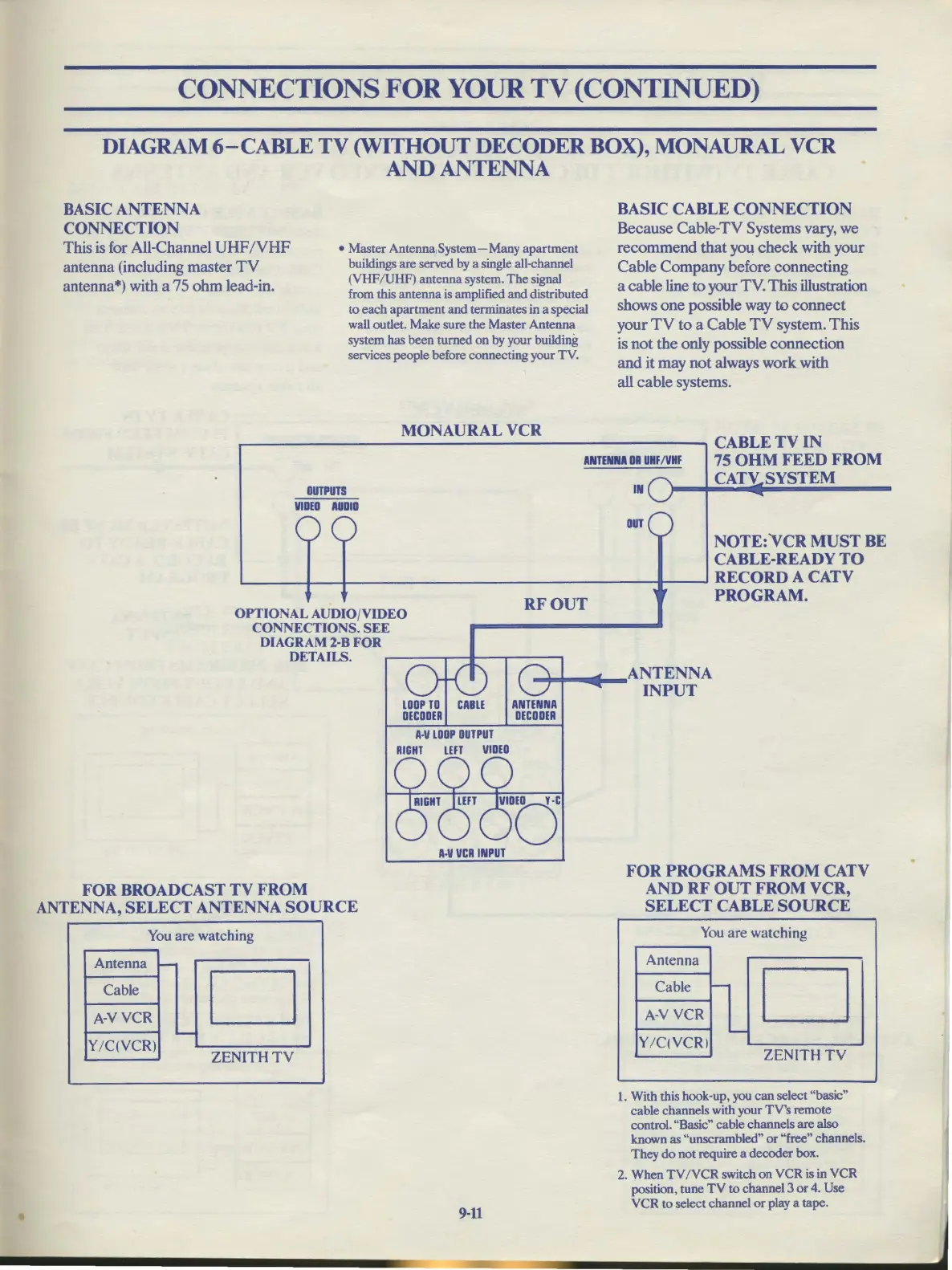
BASIC CABLE
CONNECTION
Because Cable-TV Systems vary, we
recommend
that
you
check
with your
Cable Company before connecting
a cable line
to
your TV. This illustration
shows one possible way
to
connect
your
TV
to
a Cable
TV
system.
This
is
not
the
only possible connection
and
it may not always work with
all cable systems.
MONAURAL
VCR
...------------------------.CABLETVIN
OUTPUTS
VIDEO
AUDIO
ANTENNA
DR
UHF
/VHF
IN
OUT
75
OHM
FEED
FROM
CATV SYSTEM
NOTE:
VCR
MUST
BE
CABLE-READY
TO
'----1---+--------------1--
RECORD
A CATV
OPTIONAL AUDIO/VIDEO
CONNECTIONS.
SEE
DIAGRAM
2-B
FOR
DETAILS.
DEC
FOR
BROADCAST
TV
FROM
ANTENNA,
SELECT
ANTENNA
SOURCE
You
are watching
Antenna
-
Cable
D
A-VVCR
-
Y/C(VCR)
ZENITH
TV
A•V
LOOP
OUTPUT
RIGHT
LEFT
VIDEO
A•V
VCR
INPUT
9-11
RFOUT
PROGRAM.
FOR PROGRAMS
FROM
CATV
AND
RF
OUT
FROM
VCR,
SELECT CABLE SOURCE
You
are watching
Antenna
Cable
-
D
A-V
VCR
......
Y/C(VCRI
ZENITH
TV
1.
With this hook-up, you
can
select "basic"
cable channels with your
TV's
remote
control. "Basic" cable channels are also
known as "unscrambled"
or
"free" channels.
They
do
not require a decoder box.
2. When
TV
/VCR
switch
on
VCR is in
VCR
position, tune
TV
to
channel 3
or
4. Use
VCR
to select channel
or
play a tape.



 To Next Page