CONNECTIONS
FOR
YOUR
TV
(CONTINUED)
DIAGRAM17
HOW
TO
USE
THE
VARIABLE AUDIO
OUTPUT
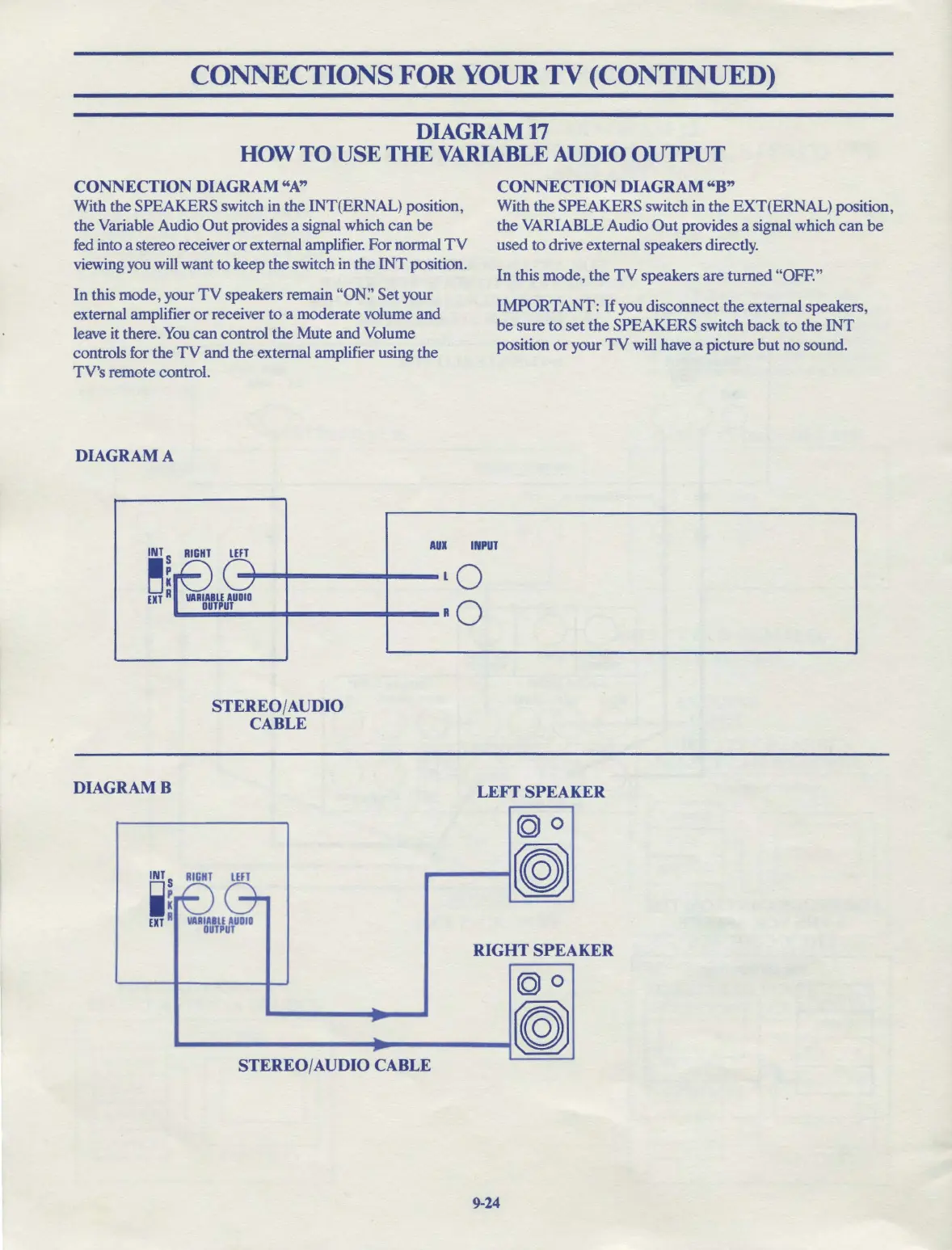
CONNECTION DIAGRAM
"A"
With the SPEAKERS switch in the INT(ERNAL) position,
the Variable Audio
Out
provides a signal which
can
be
fed into a stereo receiver
or
external amplifier. For normal
TV
viewing you will want
to
keep the switch in the
INT
position.
In
this mode, your
TV
speakers remain "ON:' Set your
external amplifier
or
receiver
to
a moderate volume
and
leave it there.
You
can
control the Mute and Volume
controls for the
TV
and the external amplifier using the
TV's remote control.
DIAGRAM A
CONNECTION DIAGRAM
"B"
With the SPEAKERS switch in the EXT(ERNAL) position,
the VARIABLE Audio
Out
provides a signal which
can
be
used
to
drive external speakers directly.
In this mode, the
TV
speakers are turned "OFF."
IMPORTANT: If you disconnect the external speakers,
be
sure
to
set the SPEAKERS switch
back
to
the
INT
position
or
your
TV
will have a picture
but
no sound.
INT
RIGHT
LEFT
AUX
INPUT
~!
-;--
◄
-----+---Lo
UTA
..,____,
_
__,..
___
..,.__Ro
DIAGRAMB
STEREO/AUDIO
CABLE
;:
00-
EXT
A
VARIABLE
AUDIO
OUTPUT
~
...
~
.
STEREO/AUDIO CABLE
LEFf
SPEAKER
(QI
0
~
RIGHTSPEA
KER
(QI
0
~
9-24



 To Next Page