27
Configuring Dual Channel Cards
The Dual Channel Card has several jumper and switch selectable options. The
configuration switches of the Dual Channel Cards are located at the bottom rear edge of
the dual channel card and labelled on the back panel. There are eight switches in two
halves. The top four are labeled for an odd channel (or channel A on the card) and the
bottom four are labeled for an even channel (or channel B on the card). See Table 4.
To make jumper verification easier, the console may be powered down and the Dual
Channel Card taken from its card slot by removing the one mounting screw from the back
panel and pulling the card up and towards the front of the unit. This will allow the LEDs to
clear their rear panel openings. To install the card, insert the front edge of the connector
first and push down and towards the rear panel. Verify that the LEDs line up properly
while positioning. Reinstall the screw through the back panel to the bracket on the card.
The subsections following Table 4 describe the jumper/switch option settings.
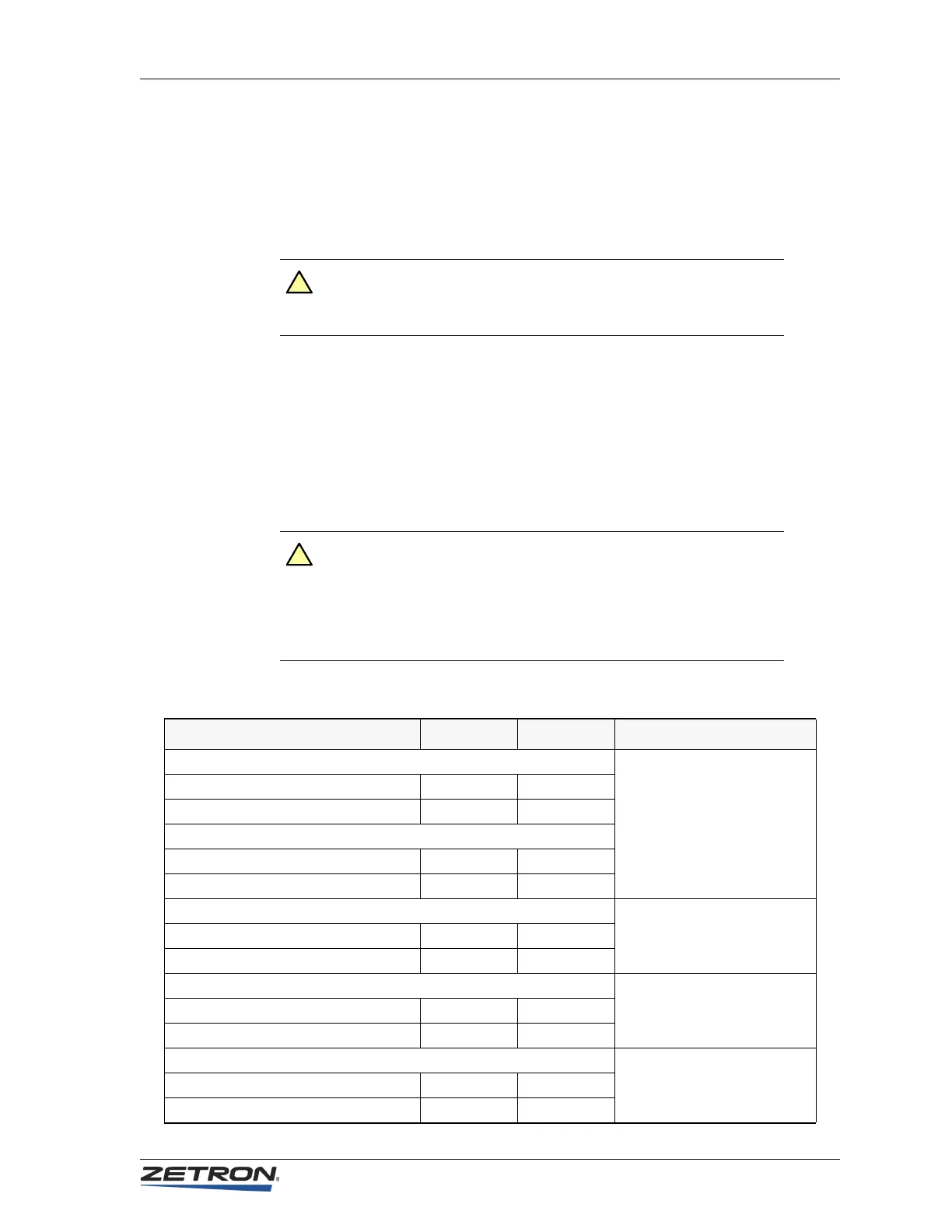
Table 4: Dual Channel Card Jumpers and Switches
Caution! The cards in a Model 4010 are not hot swappable in the unit.
You must power the unit off before any cards can be safely
removed or added to the system.
Caution! When comparing the DIP switch’s ON/OFF labelling with the
Model 4010’s ON/OFF labelling, the installer might notice that
the direction of ON and OFF disagree.
The ON and OFF directions provided in Tabl e 4 are intended to
be used with the Model 4010 silkscreen labelling.
!
!
Option Name Channel A Channel B Notes
2W Line Termination
See Line Termination on
page 28.
Low Impedance (600Ω) JP1-A JP7-A
High Impedance (3.5 KΩ)JP1-BJP7-B
4W Line Termination
Low Impedance (600Ω) JP2-A JP3-A
High Impedance (10 KΩ)JP2-BJP3-B
Guard Tone Enable
Disable for local control or
DC channels. Enable for tone
control channels.
Guard Tone disabled JP4-A JP6-A
Guard Tone enabled JP4-B JP6-B
Busy Transmit Inhibit (BTI)
See Busy Transmit Inhibit on
page 28.
BTI enabled SW1-1-ON SW1-5-ON
BTI disabled SW1-1-OFF SW1-5-OFF
Channel Cross Muting (CCM)
See Channel Cross-Mute on
page 29.
CCM disabled SW1-2-OFF SW1-6-OFF
CCM enabled SW1-2-ON SW1-6-ON


 To Next Page