Zmorph Fab - QUICK START GUIDE 26
10. Toolhead change
It is included in the foam insert with accessories.
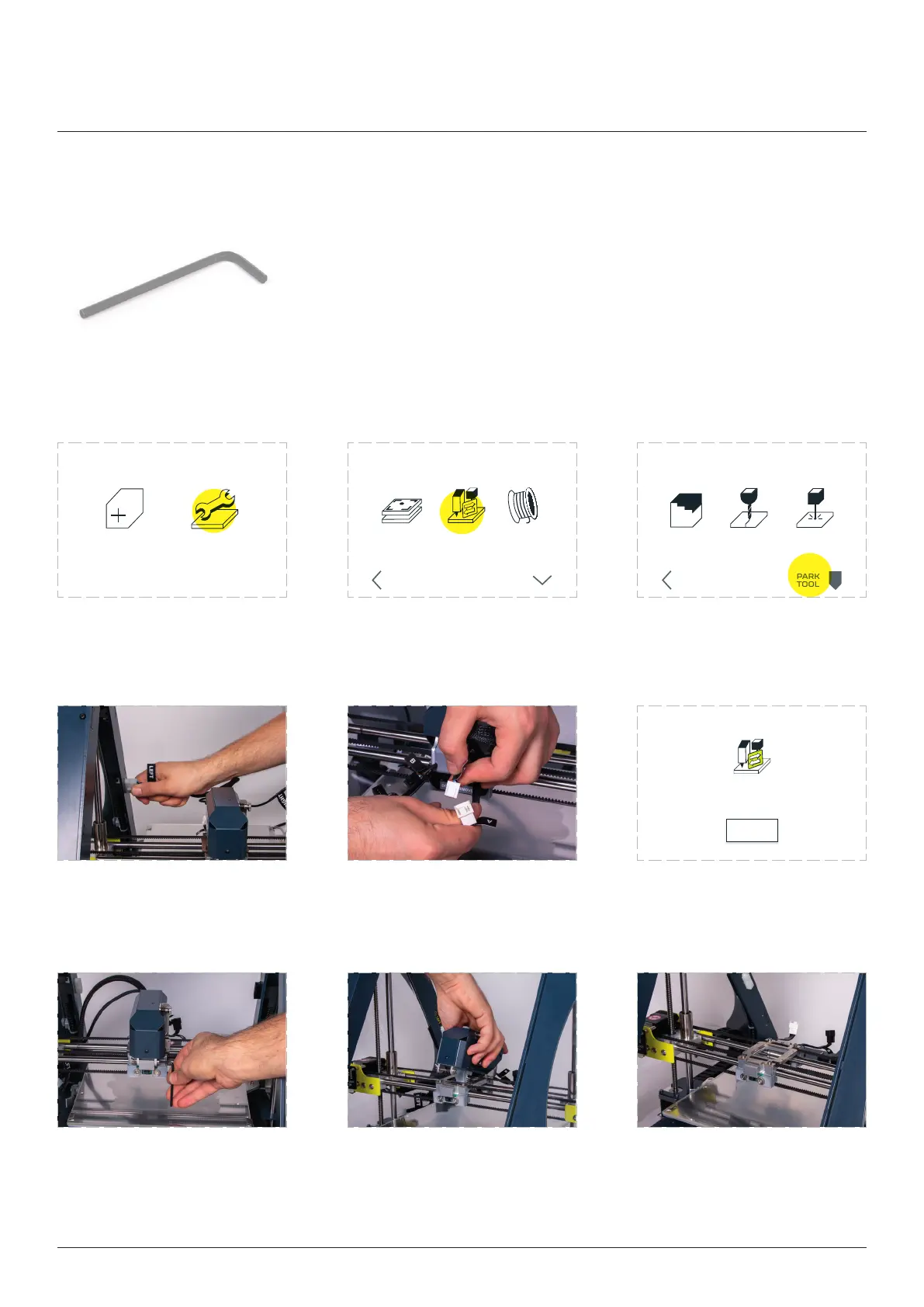
10.1 Dismounting Toolhead
NEW JOB MAINTENANCE
LOAD
FILAMENT
CHANGE
TOOL
CALIBRATE
3D PRINTING
BACK MORE
3D PRINT
CHANGE TOOLHEAD
CNC LASER
PARK
TOOL
BACK
Toolhead change process staed.
When you mount the toolhead press OK
OK
Select ‘MAINTENANCE’. Select ‘CHANGE TOOL’.
positioning process to be
Disconnect the toolhead
cables from the machine
‘LEFT’ and ‘RIGHT’ frame
sockets.
Disconnect the toolhead
from the X carriage.
Zmorph Fab will inform about
toolhead change process.
Use 3 mm Allen key to loose
the screw mounting the
toolhead.
Lift the toolhead from the
front to back from the
X-carriage.
The printer is ready for
mounting another toolhead.
Toolhead change



 To Next Page