zmorph3d.com 19
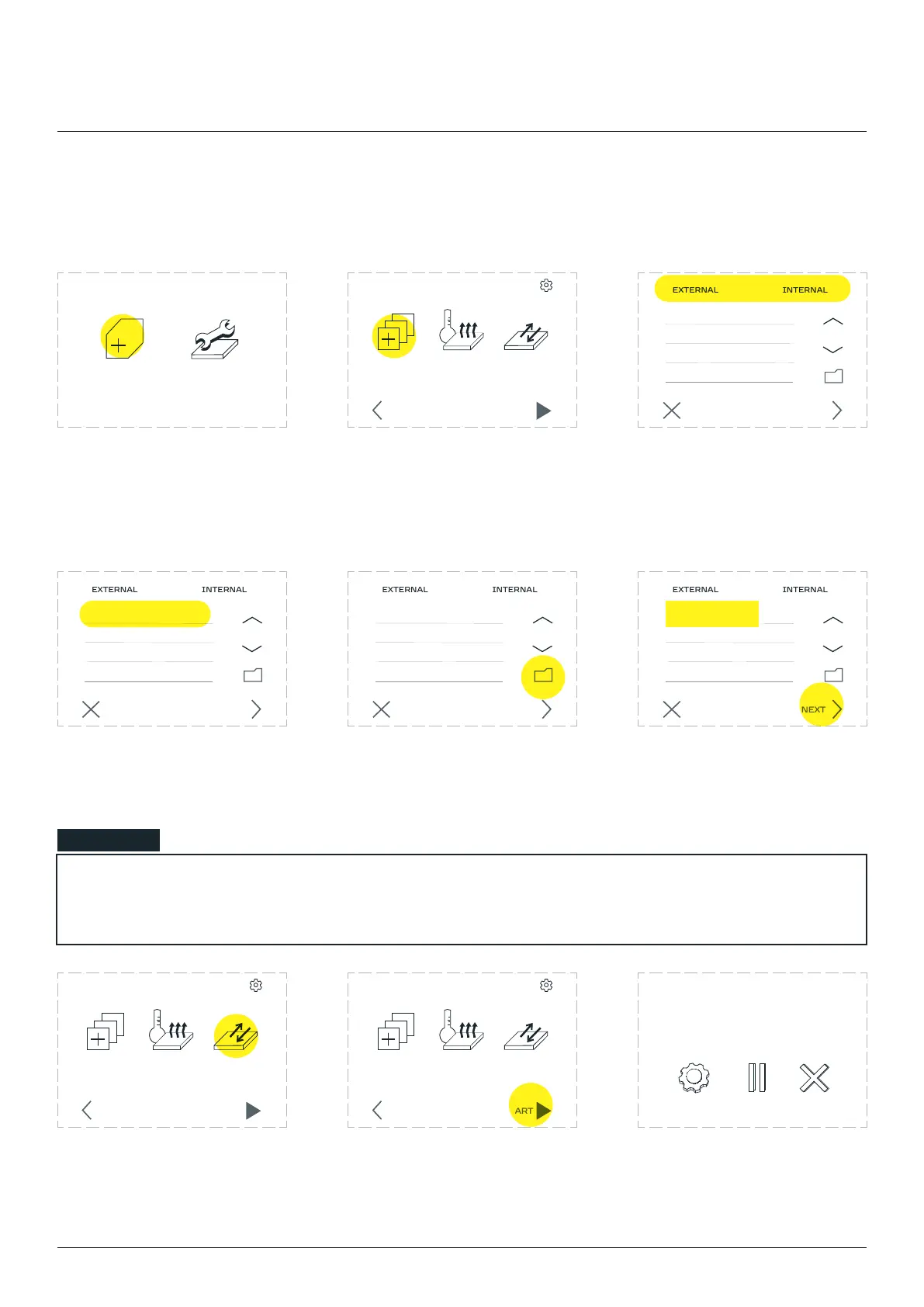
8.3 First Print
Choose ‘’. Choose ‘CHOOSE FILE’. Files uploaded to the internal
card are located in the
to the SD card are located in
the ‘EXTERNAL’ tab.
Select the previously prepared
select its name.
Exiting the folder is done
by selecting the folder icon.
choose ‘NEXT’.
NEW JOB MAINTENANCE
CANCEL NEXT
CHOOSE
FILE
PREHEAT
PRINTER
MOVE
BED
SETTINGS
STARTBACK
CANCEL NEXT
CANCEL NEXT
CANCEL NEXT
NOTE
will automatically start preheating.
The table can be prepared by
selecting ‘’. Apply
an adhesive solution to the
table surface.
Choose ‘START’.
when the extruder and the
table have reached the right
temperature.
CHOOSE
FILE
PREHEAT
PRINTER
MOVE
BED
SETTINGS
STARTBACK
CHOOSE
FILE
PREHEAT
PRINTER
MOVE
BED
SETTINGS
STARTBACK
ABORTSETTINGS
example.gcode
progress 20% 0h34m elapsed
example.gcode
example.gcode example.gcode example.gcode
Single Extruder Toolhead 1.75mm



 To Next Page