zmorph3d.com 39
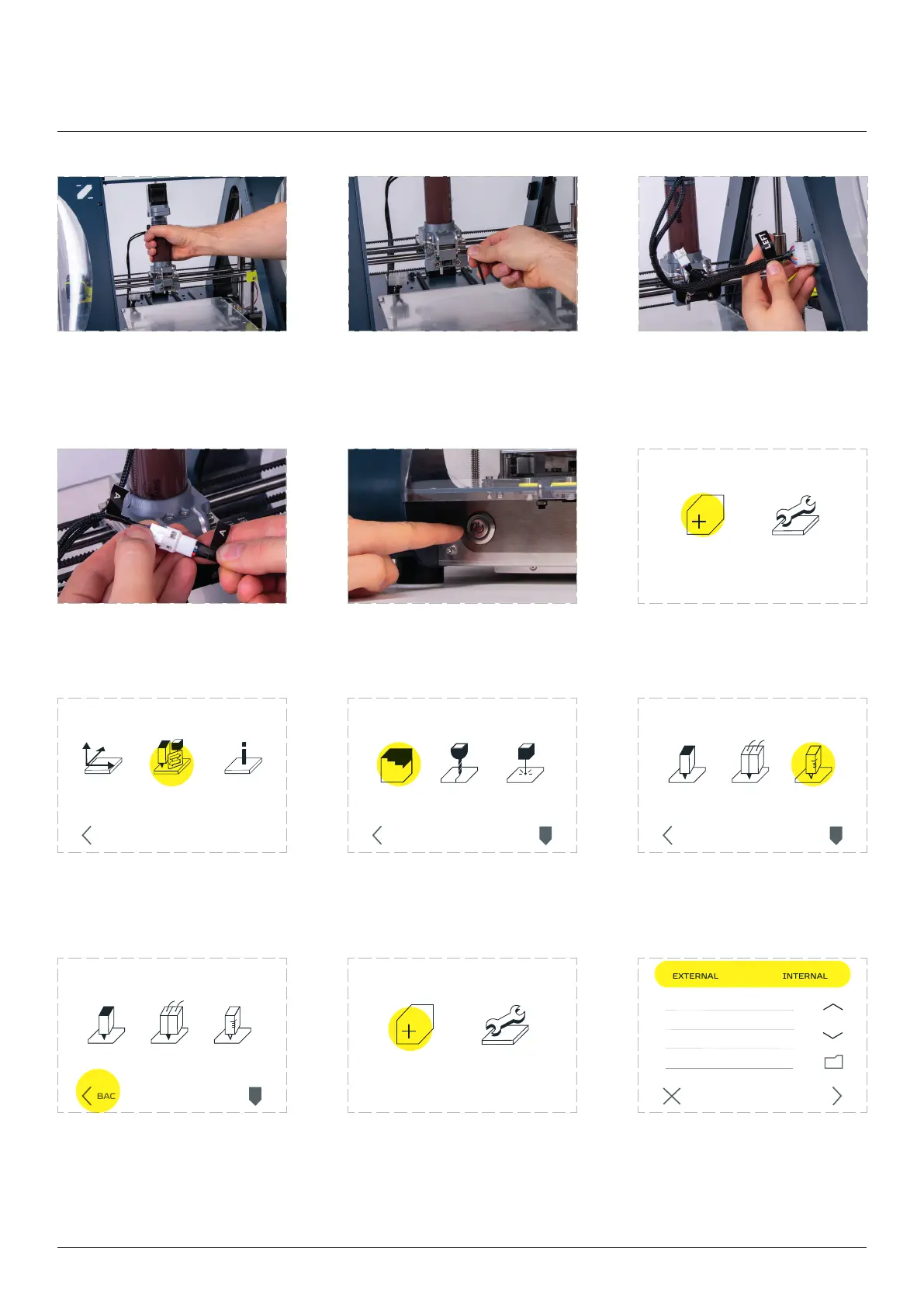
Connect the extruder ‘A’ ca-
ble to the ‘A’ plug.
Turn on the machine. Enter the ‘MAINTENANCE’
menu.
Go to the ‘CHANGE TOOL’
option.
Go to the ‘ Choose ‘
’ option.
Go back to the main
menu screen.
Enter the ‘’. NEXT’ button.
INFOMOVE
AXIS
CHANGE
TOOL
BACK
3D PRINT
CHANGE TOOLHEAD
CNC LASER
PARK
TOOL
BACK
NEW JOB MAINTENANCE
NEW JOB MAINTENANCE
SINGLE
PRINTING
THICK PASTE
PRINTING
3D PRINT
PARK
TOOL
BACK
DUAL
PRINTING
SINGLE
PRINTING
THICK PASTE
PRINTING
3D PRINT
PARK
TOOL
BACK
DUAL
PRINTING
CANCEL NEXT
example.gcode
on the X-cariage mount.
Screw tight the front screw. Connect the ‘LEFT’ connector
to the Left socket on the
machine frame.
Thick Paste Extruder



 To Next Page