Extended Network Management (EXM) Setup
1. Enable Network Extension Mode on all radios required in the extended network radio list including the
radio logged into, the remote radio being used to extend management, the destination base station and
any remote radios off that base station requiring management. See ‘Security > Setup’ on page 227 for
the Network Extension Mode setting.
2. Ensure that the Network ID is the same on all radios in the extended network radio list (see ‘Network
ID’ on page 113).
3. Ensure that the Key Encryption Key Type, Key Encryption Key Size and the Key Encryption Key are the
same on all radios in the extended network radio list (see ‘Security > Setup’ on page 227).
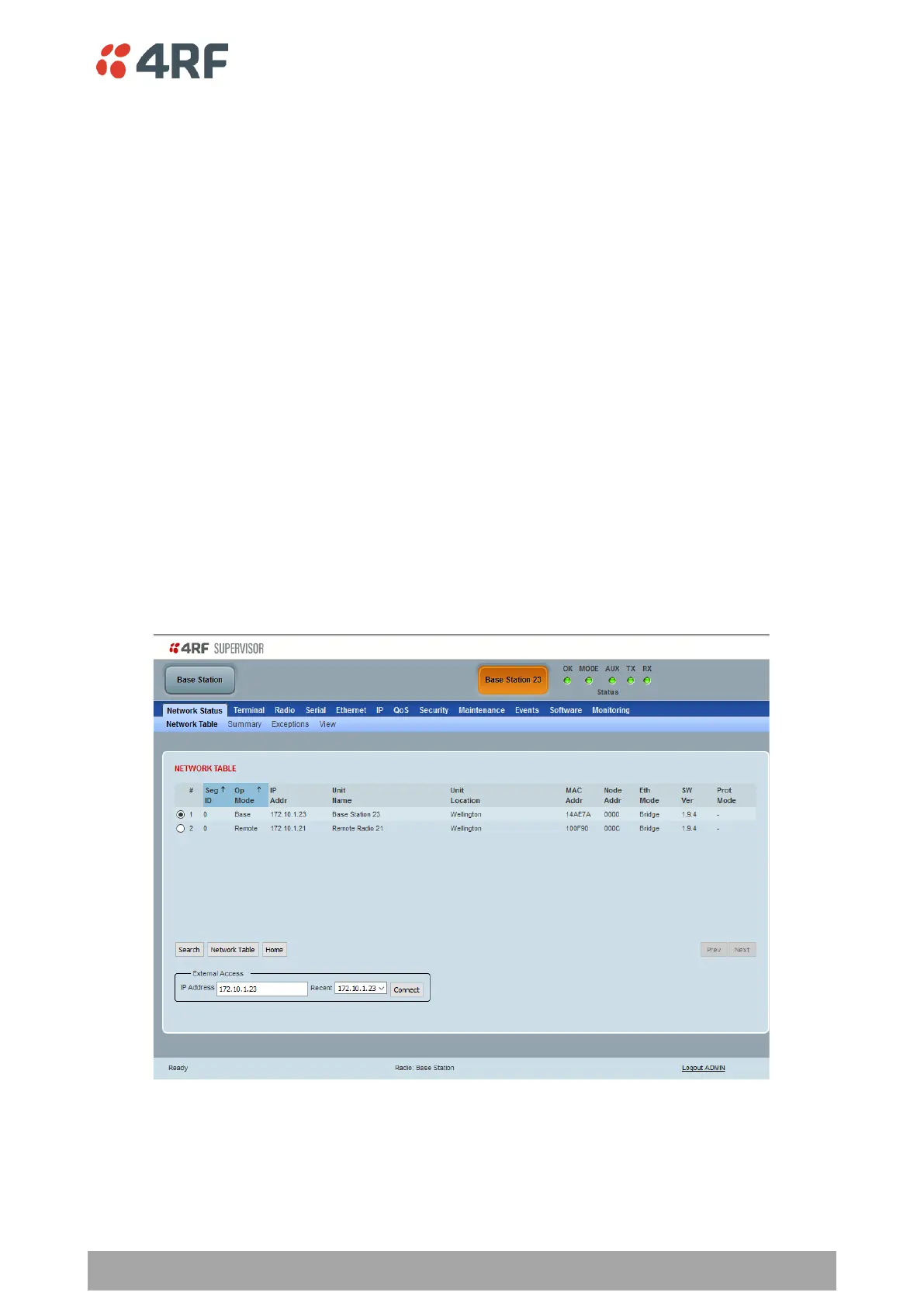
4. Click on the Network button on SuperVisor Alarm Bar (see ‘Network Status > Network Table’ on page
331).
5. In the External Access box, enter the IP address of the external radio and click the Connect button.
If this connection is successful:
• The Network Button will show the name of the radio connected to
• The LEDs next to the Network button will display the status of the radio connected to
• Clicking any top level menu after the connection is established will open the page for the radio
connected to
The Network Table shows the radio connected to. To see the complete Network Table of the radio connected
to, click the Network Table button.



 To Next Page