ABB EQmatic
Commissioning
86 2CDC512090D0202 | QA/S x.yy.1
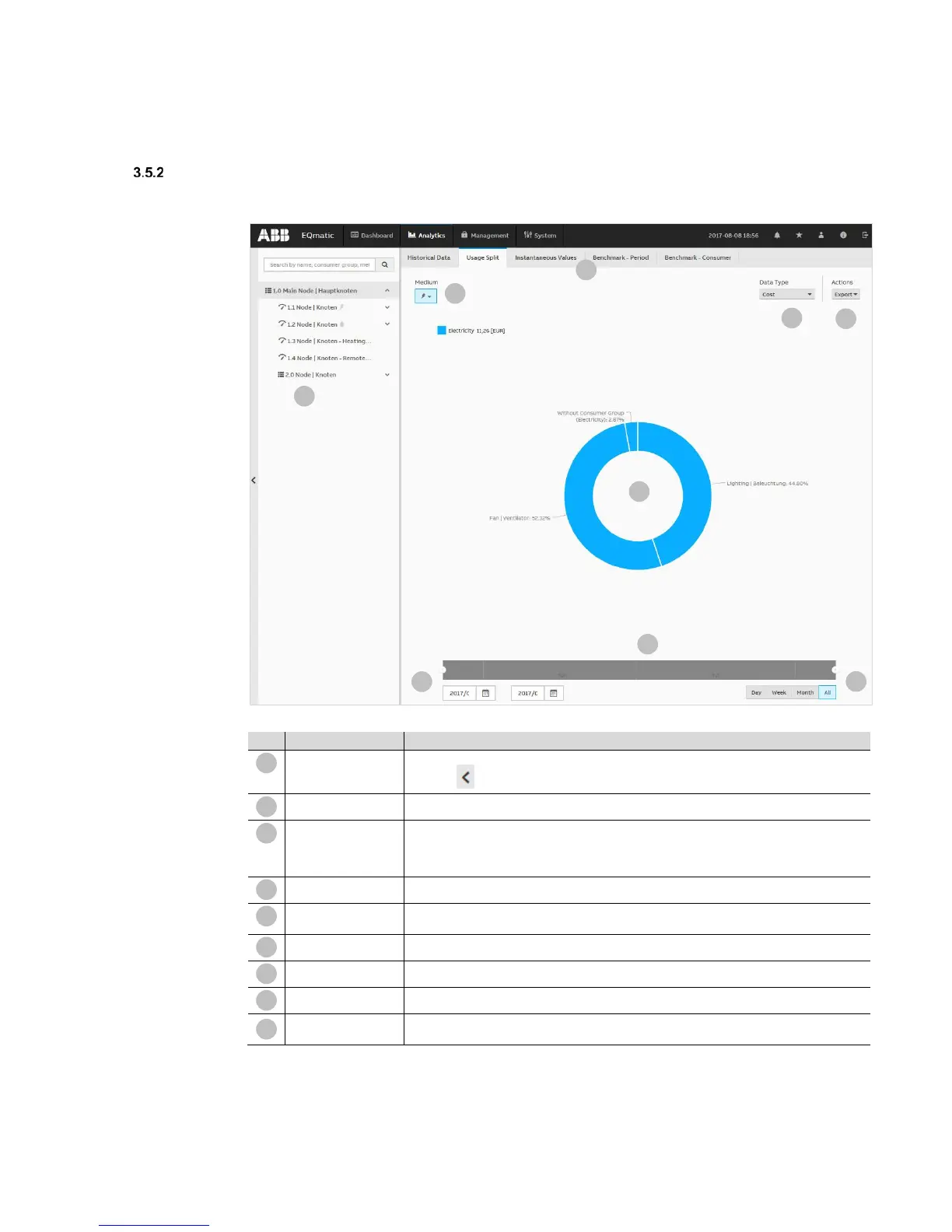
Usage split
Used to analyze and display costs and consumption, etc., per medium or consumer group.
Metering structure
Used to navigate and select a consumer or node.
Click the icon to show or hide the metering structure.
Analysis functions
Menu for selecting the required analysis function
Media
Displays the media available in the system. Depending on the M-Bus/Modbus devices
connected, the media electricity, water, gas and heat are displayed here. If M-Bus/Modbus
devices have been assigned to consumer groups (e.g. lighting, electrical sockets, air
conditioning, etc.), they can be opened using the sub-menu.
Data type
Used to select the required data type (e.g. Costs, Consumption, etc.)
Used to select further data processing options (e.g. Save as image, Export to .xlsx, csv,
Save as favorite, Print chart)
Chart area
Used to display the data graphically. Click the related consumer group to highlight it.
Slider
Used to limit and move the required period.
Calendar function
Used to enter the required period (from/to)
Used to select and display current day, week, month, year, all. Presets are shown
dynamically, depending on the measuring period.











 To Next Page