ABB EQmatic
Commissioning
88 2CDC512090D0202 | QA/S x.yy.1
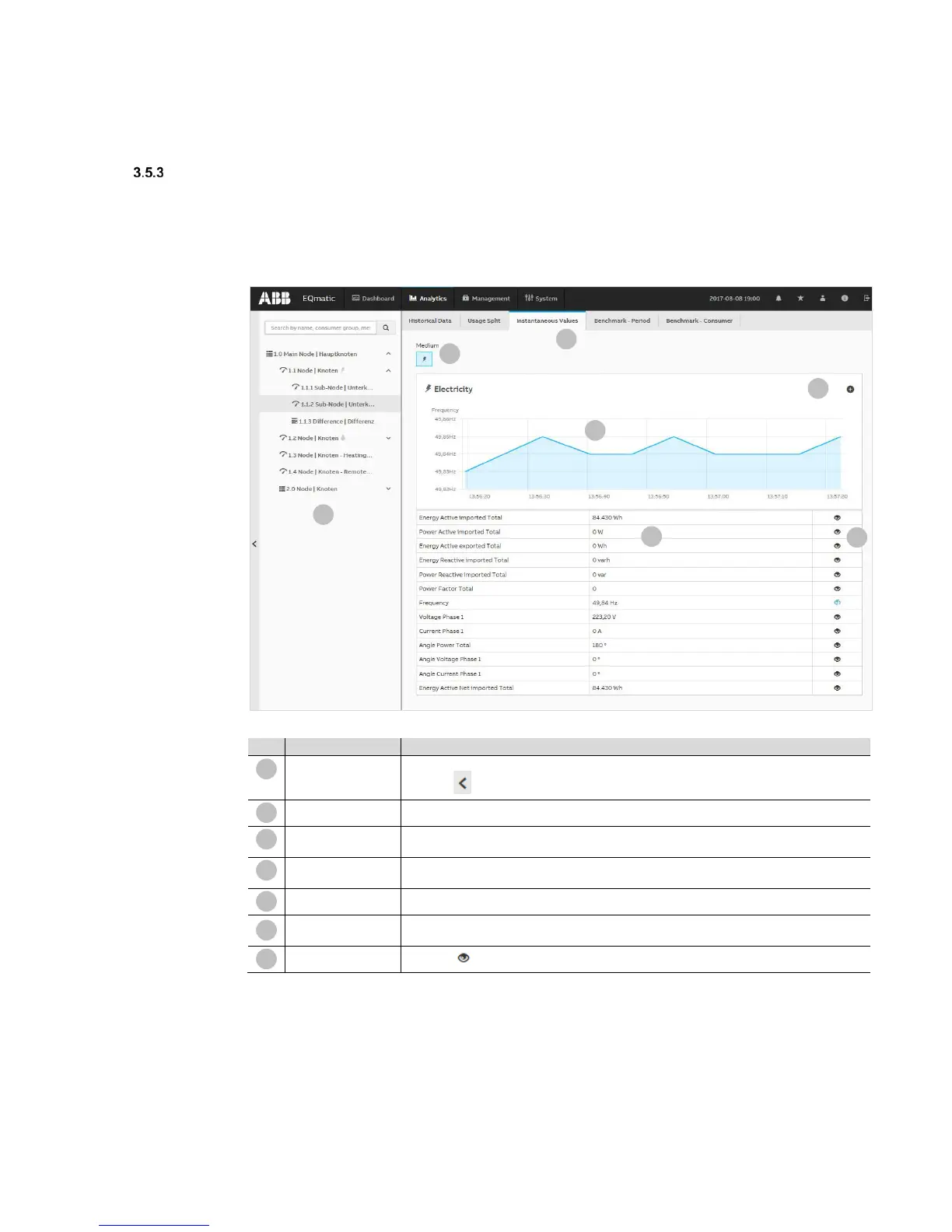
Instantaneous values
This function displays the instantaneous value for a single data point in real time. The value is
displayed on a serial chart.
You must first select the required metering point or meter in the metering structure.
Depending on the meter’s functionality, various data points are available for display.
Used to navigate and select a consumer or node.
Click the icon to show or hide the metering structure.
Analysis functions
Menu for selecting the required analysis function.
Media
Displays the media available in the system. Depending on the M-Bus/Modbus devices
connected, the media electricity, water, gas and heat are displayed here.
Opens the window for selecting and adding data points to the table for subsequent
Chart area
Used to display graphically the data point selected on a serial chart.
The meter data points are listed in the table depending on the functionality and the available
meter data points selected.
Display
Click the icon to display the data point on the real-time chart.











 To Next Page