ETL600 1KHW001489-EN ABB Switzerland Ltd
4.4.2.3. Logon to the equipment
Point to Equipment / Connect to open the Connect dialog box.
Select Logon, accepting the default value of 0 for the Equipment ID.
Select Local. If parameters have to be downloaded to the equipment,
uncheck Read access only. If a password has been downloaded into
the equipment previously and if Read/write access is desired, enter the
correct Write password. If immediately after logon, configuration
and/or status data are to be uploaded, check the boxes Upload
configuration and/or Upload status. Finally, click OK.
The status of the communication can be deduced from the color of the
circle-button in the toolbar:
Grey:
• Communication inactive (Off line mode)
Red:
• HMI600 waits for an answer from the equipment. By
clicking the red circle, the communication is interrupted.
Green:
• Communication ready (On line mode)
Note:
When an unsupported COM port has been selected in the
previous step (refer to section 4.4.2.2), an error message
will pop up: “Could not open COM port”.
4.4.3. Communication via phone modems
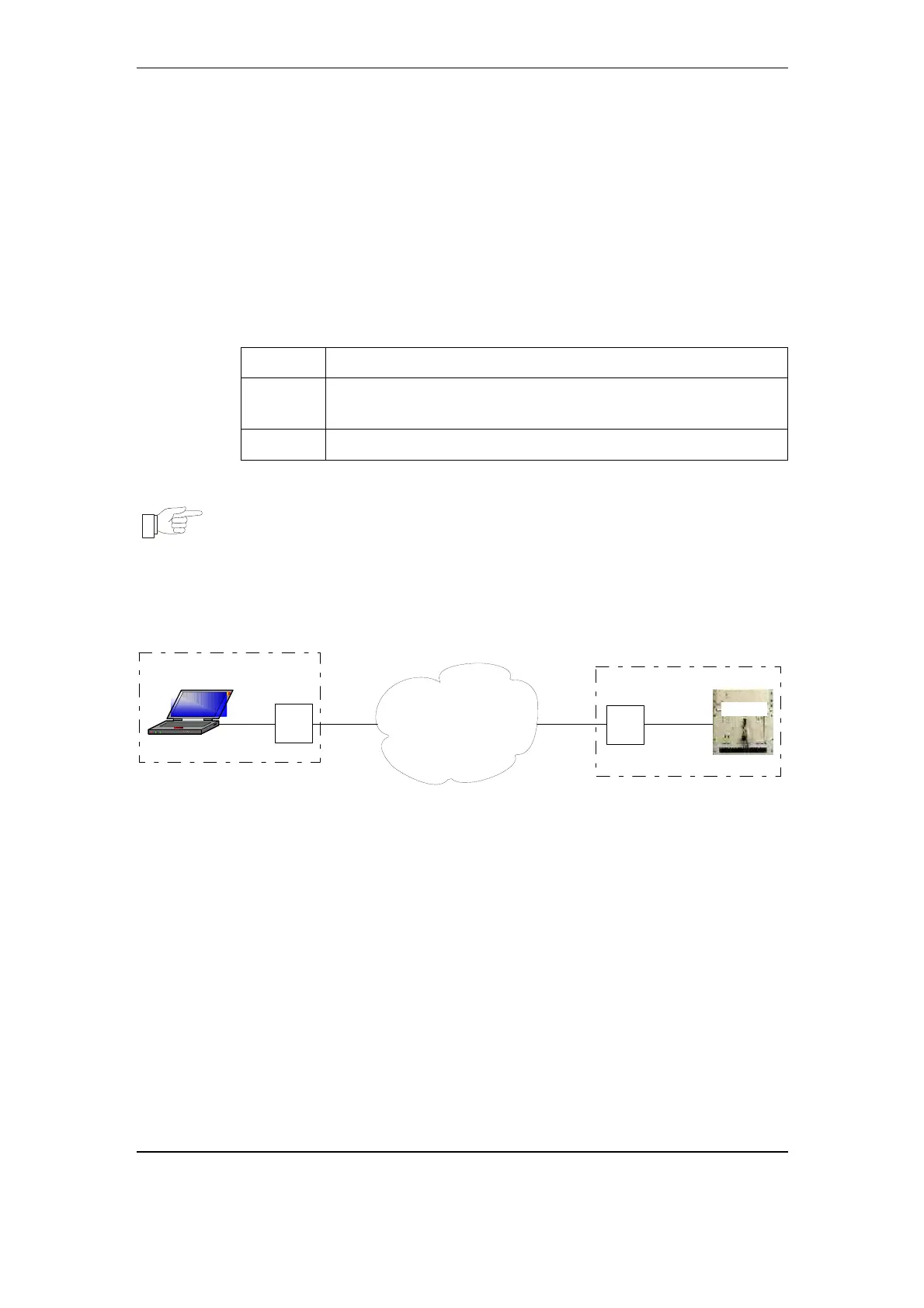
HMI600 can communicate with ETL600 via phone modems.
Control center
Substation
Dial up
modem
Dial up
modem
RS232
cable
PSTN
(Public
Switched
Telephone
Network)
RS23
2
cabl
e
Telephone
line
HMI600
ETL600
Telephone
line
Fig. 4-2 Communication via phone modems
4.4.3.1. Communication media
4.4.3.1.1. Modems
The phone modems should be capable of transmitting at least 9’600
bps. Modems compatible to ITU-T V.32 or higher fulfil this
requirement. The highest data rates are obtained with ITU-T V.90 (or
higher) modems. Also make sure that the modems data format can be
set to 8 data bits, even parity bit, one stop bit.
4.4.3.1.2. Cables
For the connection between modem and ETL600, a 9 pin null modem
cable has to be used:
User Interface Program November 2005 4-5



 To Next Page