System Utilities 2-24
Clearing the Password Check and BIOS Password
Clearing the Password Check
The password check can be removed by shorting the “RTC_RST” point with a metal instrument.
1. Remove the lower cover door and the memory module (refer to System Utilities on page 2-2).
2. Remove the battery (refer to System Utilities on page 2-2).
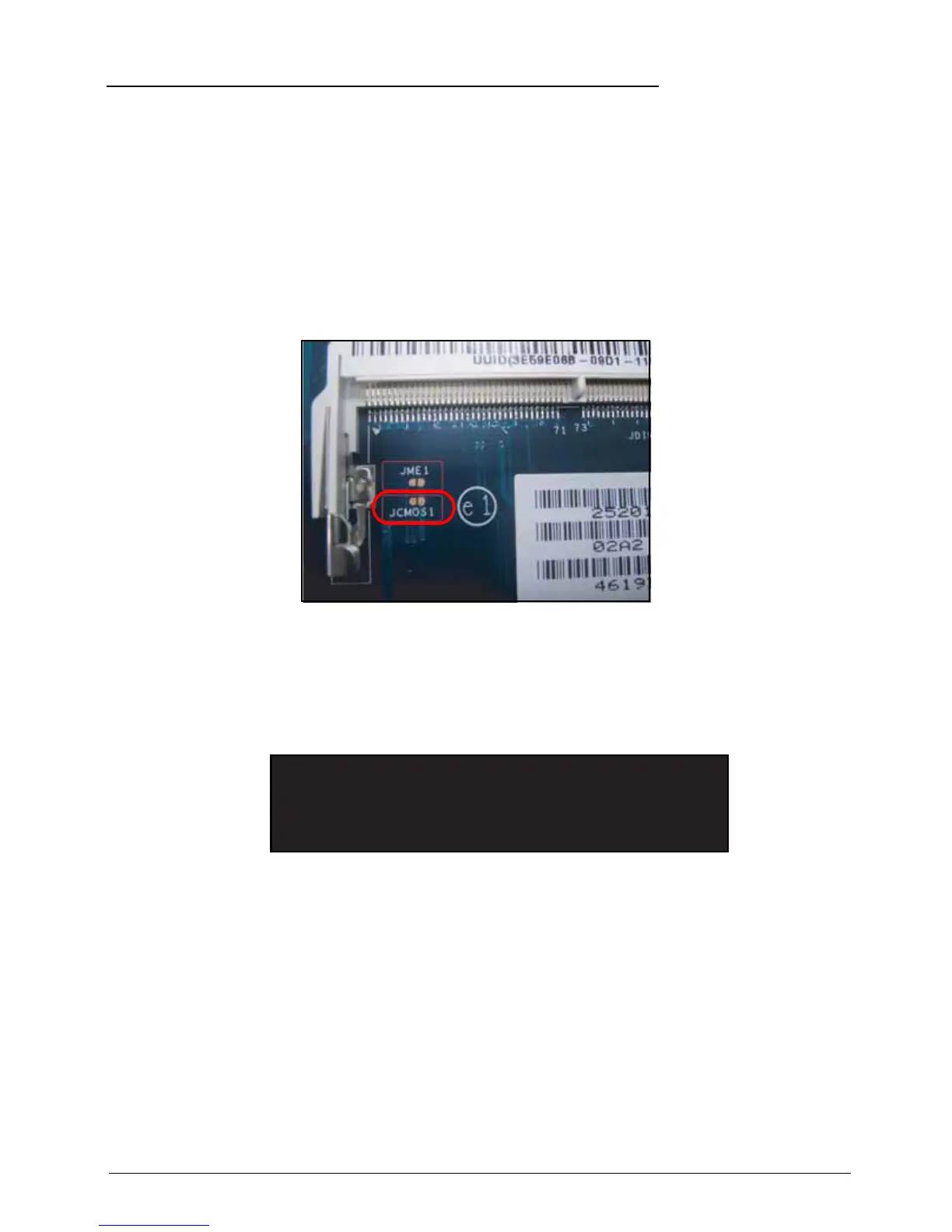
3. Under the memory module slots, locate the JCMOS1 jumper.
4. Use an electronic conductivity tool to bridge the two points of the jumper.
Figure 2:29. CMOS Jumper
Clearing BIOS Passwords
To clear the User or Supervisor password, perform the following:
1. At the command prompt, type CP.exe. The Clean Password Utility is shown.
Figure 2:30. Clean BIOS Password
2. Press 1 or 2 to clear the desired password shown on the screen.
3. The screen displays function success or failure.






 To Next Page