System Overview
ACIST RXi System User’s Guide | 13901700-001,01 2019-09 English
System Hardware
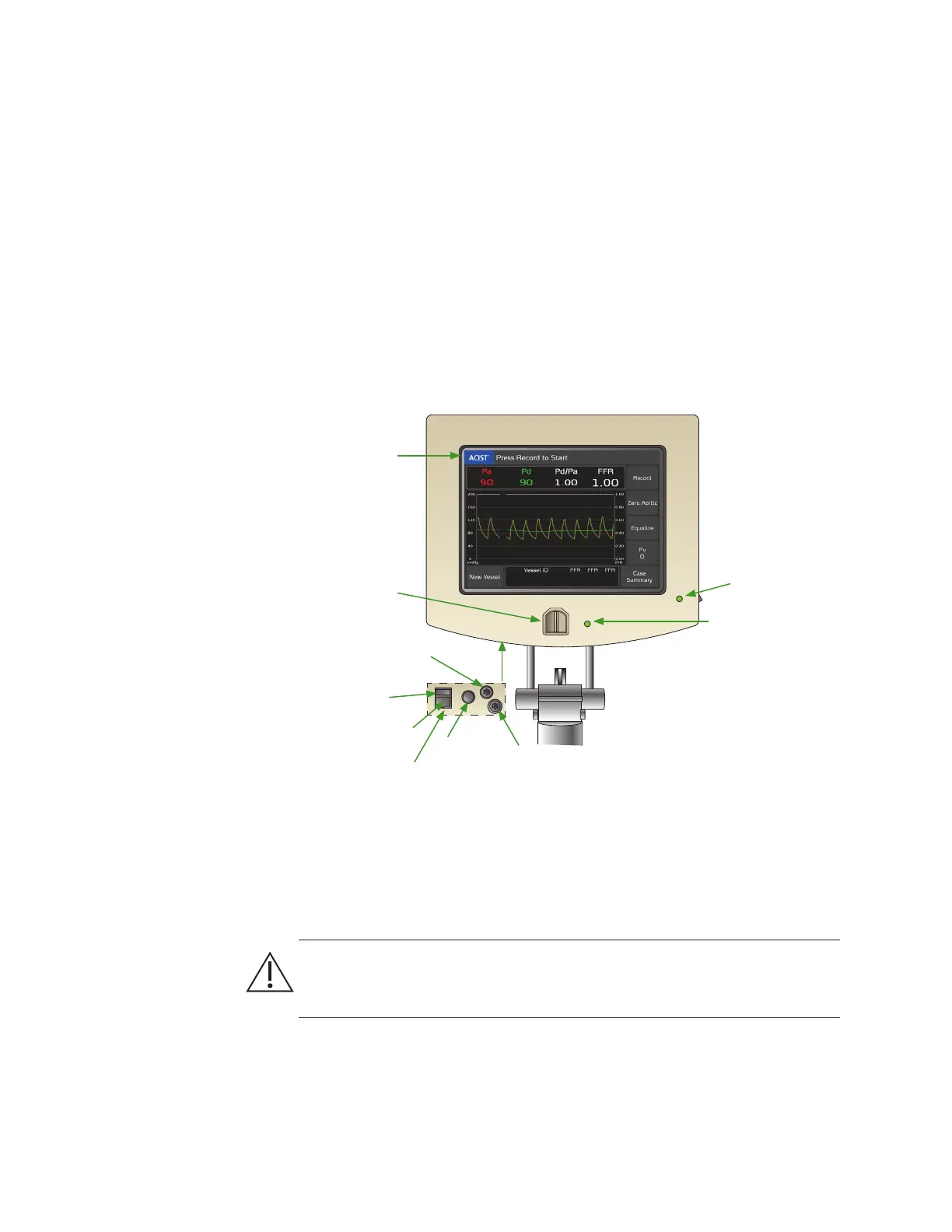
System Console
e system console provides the main user interface for the ACIST RXi
System, and includes the following features:
• color touchscreen display, which provides pop-up message notications
and button touch feedback
• Navvus® MicroCatheter port
• speaker, which provides audible alerts
• USB port used for installing soware updates and exporting
screenshots of FFR results
• hemodynamic cable ports
• power cable
System Power Supply
e power supply, which provides power to the ACIST RXi System, is the only
connection to mains power. A green system status indicator light illuminates
when power to the system is on and ready for use.
CAUTION
Use only the supplied medical grade power converter (Model MENB1030A1249F02) to
ensure safe operation of the RXi System.
Color Touchscreen
Display
Navvus MicroCatheter
Port
Navvus MicroCatheter
Status Indicator LED
System Status
Indicator LED
Power
Cable
Connector
USB Port
Aortic Pressure
(Pa) Cable Port
Distal Pressure
(Pd) Cable Port
(service use only)
NOTE: This panel is
on the underside of
the console.



 To Next Page