Daily Cleaning
78 | ACIST RXi System User’s Guide 901700-001,01 2019-09 English
Maintenance
Optional Fiber Optic Cleaning Process
To perform this procedure, you will need the Senko Smart Cleaner or
equivalent ber optic cleaning tool and the RXi PIM Door Opener. ese can
be obtained by contacting your ACIST representative or contacting ACIST
Customer Service.
Note
For these instructions, the Senko Smart Cleaner is shown, but any equivalent o-the-
shelf dry cleaning tool for use with ber optic LC, MU, and APC connections can be used.
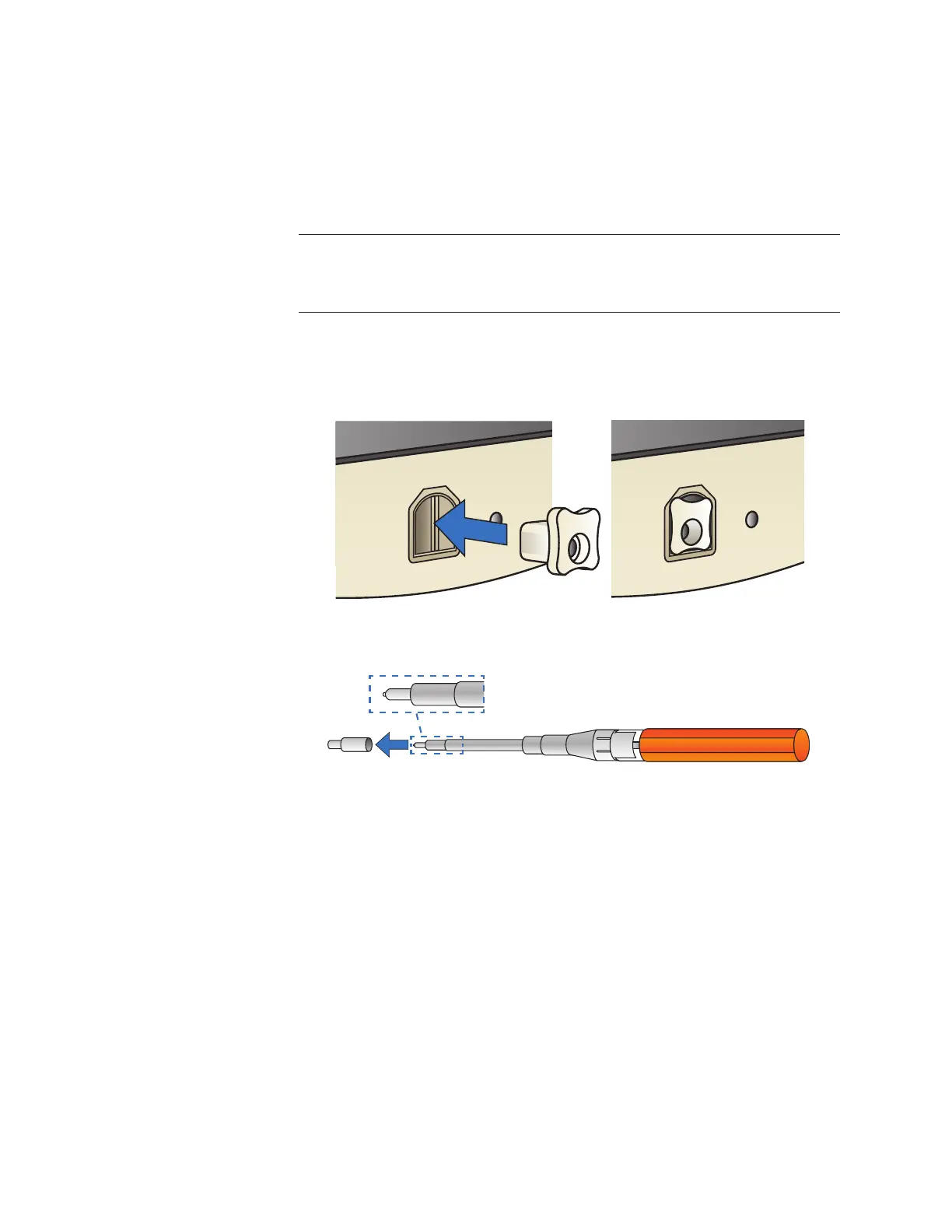
Perform the following steps to clean the Patient Interface Module (PIM).
1. Turn o power to the system.
2. Insert the PIM Door Opener completely into the PIM assembly.
3. Remove the white adapter cap on the Senko Smart Cleaner to expose the
cleaning lament.
4. Insert the exposed lament into the PIM assembly with the door open.
While keeping the cleaner as straight as possible, depress the cleaner fully
until it stops moving. A click may be heard.
5. Rotate the cleaner 90° and depress fully again.



 To Next Page