System Information and Settings
ACIST RXi System User’s Guide | 71901700-001,01 2019-09 English
Additional Settings
Review the FFR Recording (FFR Review)
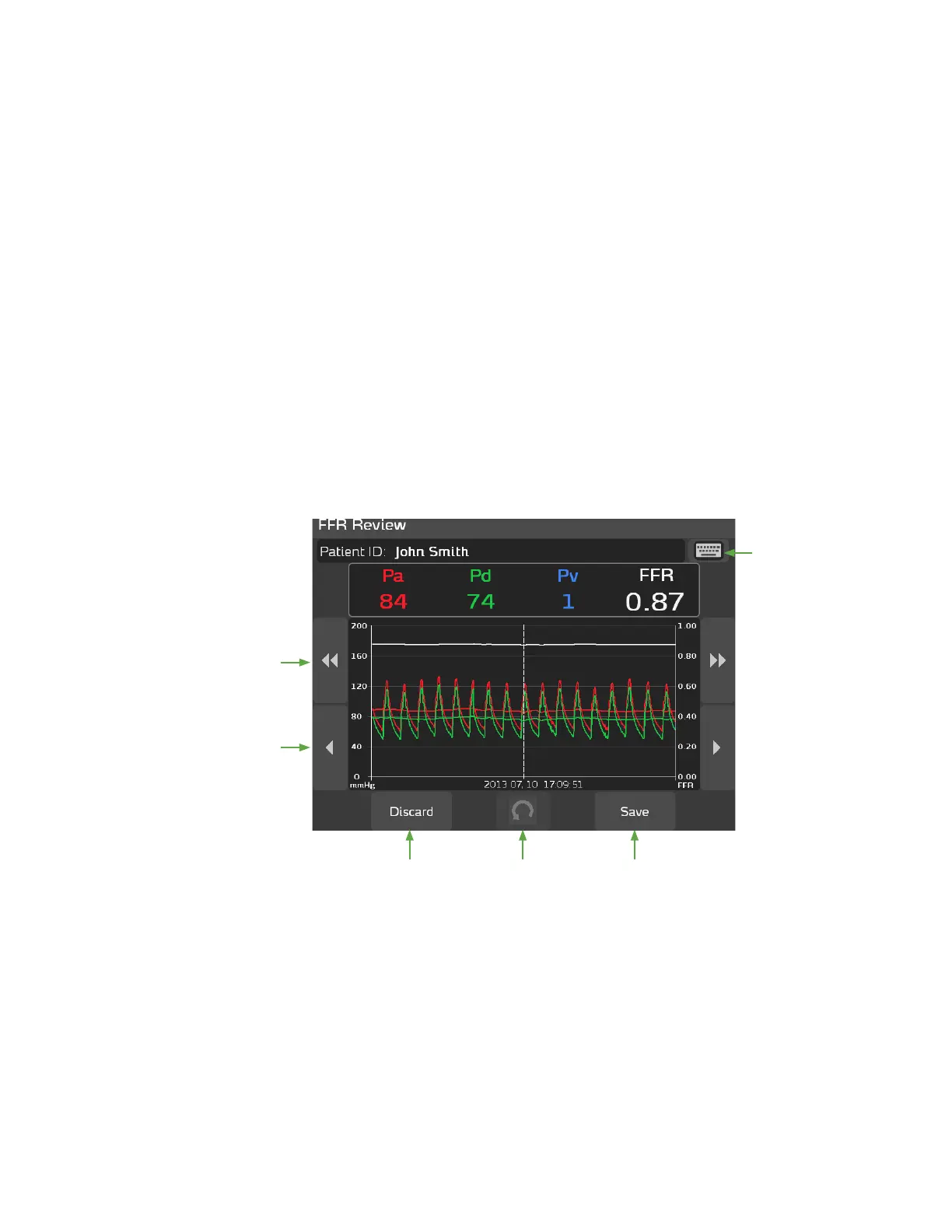
e FFR Review screen displays when you press the Stop button to stop the
recording. e FFR Review screen enables you to view a snapshot of the FFR
data, which includes:
• aortic pressure (Pa)
• distal pressure (Pd)
• venous pressure (Pv)
• FFR
e date and the time of the recording displays at the bottom of the FFR
Review screen. If a patient ID is associated with the recording, the patient’s ID
will also display at the top of the screen. To add a patient ID to the FFR Review
screen, press the keyboard icon in the upper right corner of the FFR Review
screen.
e FFR minimum location is indicated by a white vertical line. Ten seconds
of the recorded waveform (if available) before and aer the FFR minimum
location is displayed, as shown in the example below:
Press the arrow
keys on either
side of the signal
display area to
scroll forward
and backward
through the
recorded
waveform.
Press Discard
to discard the
recording.
Press Save
to save the
recording.
Press the Revert
button to reset
the FFR Marker to
the original FFR
minimum value
chosen by the
system.
Press the
keyboard
icon to enter
the Patient
ID on the
FFR Review
screen.



 To Next Page